ComfyUI HiDream workflow: setup, GGUF, and API (2026)
A ComfyUI HiDream workflow walkthrough: native nodes, the four text encoders, City96 GGUF quants down to 8GB VRAM, the Detail Demon trick, and a hosted API path with no download.

Four text encoders for one image model. A 34GB base file. And a quadruple CLIP loader node that did not exist in ComfyUI a few months ago. That is the ComfyUI HiDream workflow the first time you open it, and the surprising part is how little of it you build by hand.
HiDream is an open-source image model that competes with the big closed text-to-image systems, with one genuine edge: it renders text inside an image cleanly, and it brings back negative prompts that Flux dropped. The catch is weight. The full model is too big for most consumer cards, so the real question is not "can I run HiDream" but "which watered-down version fits my GPU, and what do I give up."
This guide does two things. First it walks the ComfyUI HiDream setup from the Endangered AI demo: the native nodes, the four text encoders, the City96 GGUF quants, and the Detail Demon trick for sharper skin. Then it covers the production path, because a 34GB model answering at 3am for ten users at once is a different machine than the one on your desk.
Why HiDream is worth the file size
HiDream is an open-source text-to-image model that comes close to the leading closed models on quality while adding two things they lack: clean in-image text rendering and working negative prompts.
Start with what you get for the trouble. HiDream competes with the top closed image generators on raw quality, and because it is open it can be fine-tuned and quantized, which is the whole reason it runs on a home GPU at all. The one place it falls short is text it was not asked for: it nails text you prompt, and gets unreliable on text you did not.
The second win matters more day to day. HiDream brings back the negative prompt. With Flux, you could not tell the model what you did not want. You had to phrase the positive prompt carefully and hope the thing you were trying to avoid never showed up. HiDream gives you a negative box again, so "no extra fingers, no watermark" is a thing you can say directly instead of dancing around.
That combination, open weights plus text plus negatives, is why people put up with the download. The rest of this guide is about making the download fit your card.
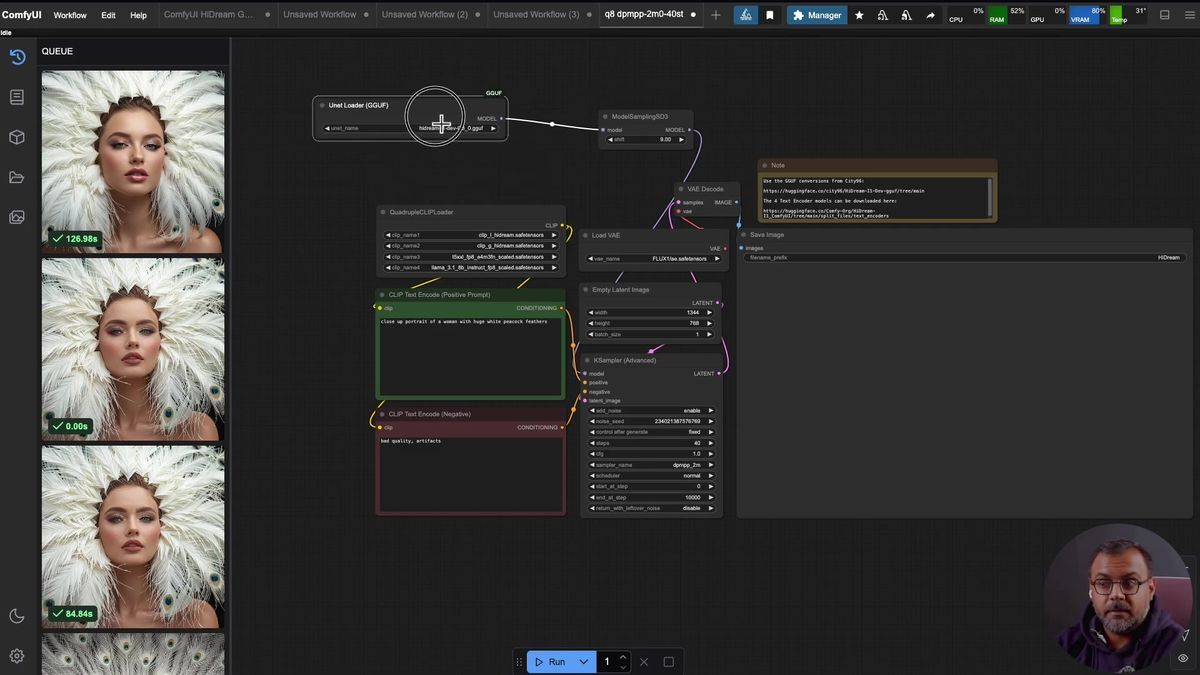
The native HiDream nodes ComfyUI ships
Recent ComfyUI integrates HiDream natively, so the workflow needs few or no custom nodes. You download a handful of model files, drop each in the right folder, and load the provided graph.
This is the good news up front. As of the demo, ComfyUI had HiDream support built in, so you are not hunting down custom node packs to get a basic generation. The work is file placement, not node-building.
The graph itself is plain. A model loader feeds a ModelSamplingSD3 node, which feeds a regular KSampler, an empty latent, a VAE loader, and a VAE decode. If you have run any SDXL or Flux graph in ComfyUI, the spine looks familiar. Two nodes are the HiDream-specific part, and they are worth understanding before you wire anything.
The first is the loader. In the demo it is a GGUF loader, because the model being run is a quantized GGUF build (more on that below). The second, and the one that catches people, is the quadruple CLIP loader. HiDream needs four text encoders, not one, and this node is what loads all four into the graph. That single node is most of why HiDream is so good at text and why the setup feels heavier than a normal model.
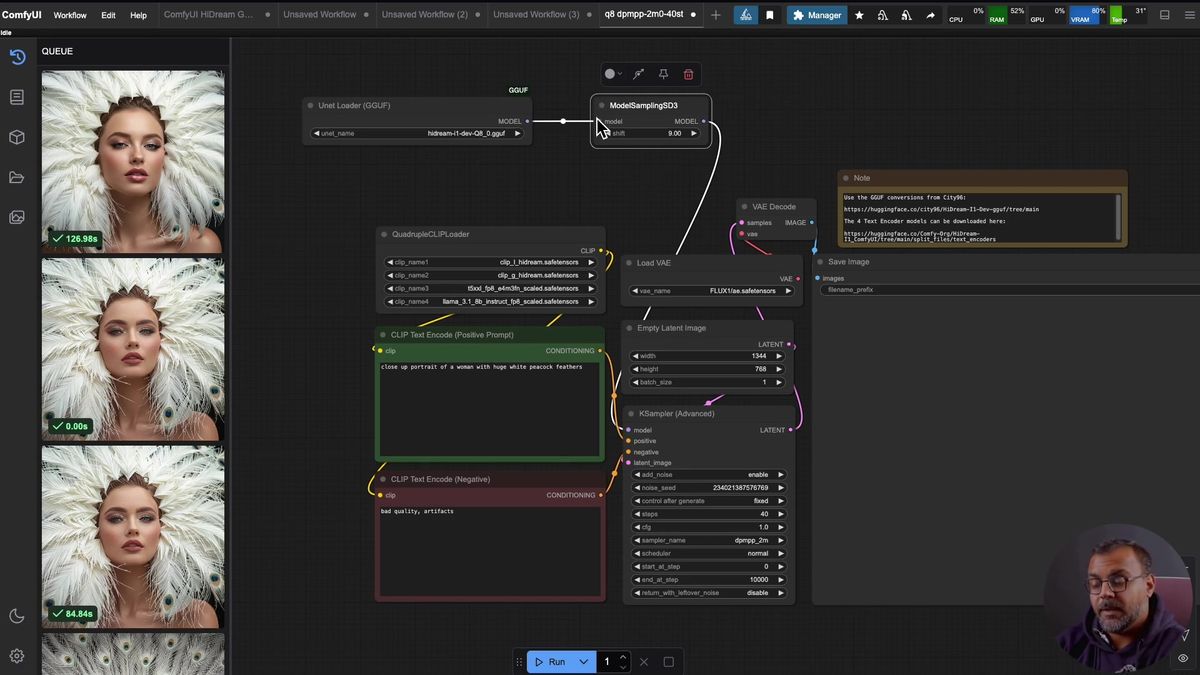
The four text encoders HiDream needs
HiDream loads four text encoders through a quadruple CLIP loader: CLIP-L, CLIP-G, a T5 XXL, and a Llama 3.1 8B Instruct FP8 model, and all four go in the text_encoders folder.
Here is the list, because this is where a setup quietly breaks. The four files the quadruple CLIP loader expects:
| Text encoder | Notes |
|---|---|
| CLIP-L | Unique to HiDream, download it |
| CLIP-G | Unique to HiDream, download it |
| T5 XXL | Same encoder Flux uses, reuse it if you already have it |
| Llama 3.1 8B Instruct FP8 | A real LLM as an encoder, reuse it if you have it from LLM work |
Two of these you may already own. The T5 XXL is the same one Flux uses, so if you have run Flux you do not need to redownload it. The Llama 3.1 8B Instruct FP8 is the same model people pull for general LLM tinkering, so if it is already on disk, just point at it. CLIP-L and CLIP-G are HiDream-specific, so those two are the new downloads.
All four land in ComfyUI/models/text_encoders/. There is also an optional HiDream CLIP text encode node that lets you split your prompt across the different encoders instead of feeding one combined positive and negative. The demo had not tested it deeply, and honestly neither have most people yet, so treat it as an experiment rather than the default path.
One more file: the VAE. HiDream uses the Flux VAE, so if you have messed with Flux that file is already sitting in models/vae. If not, grab it and drop it there.
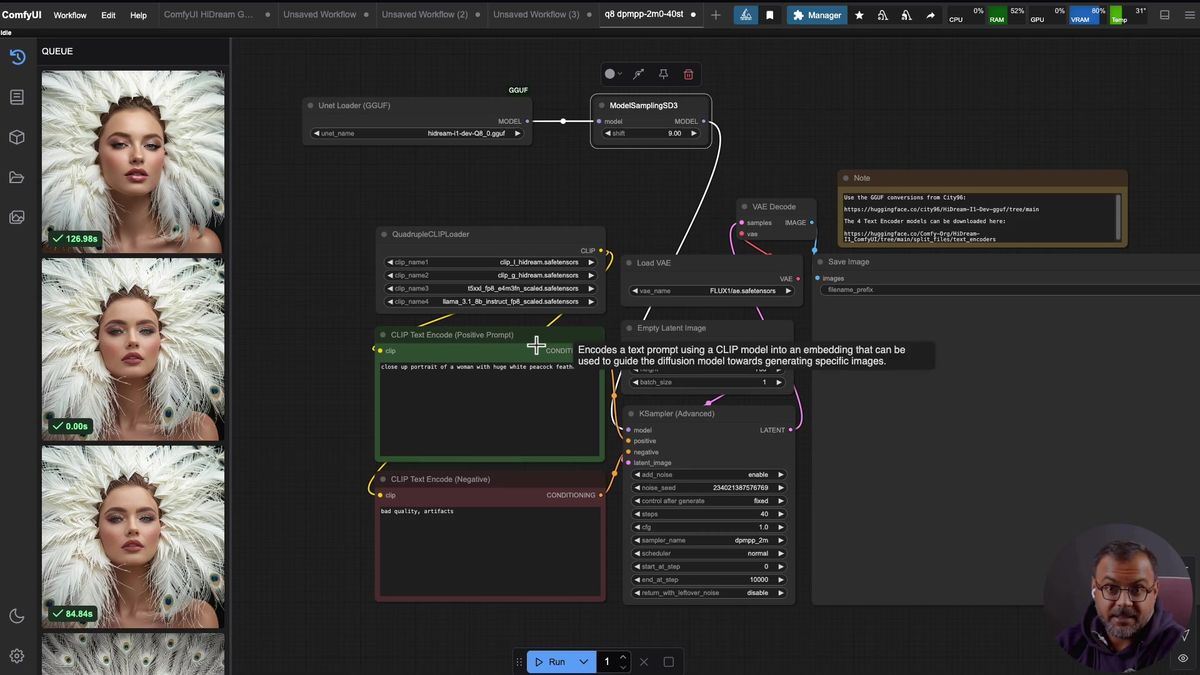
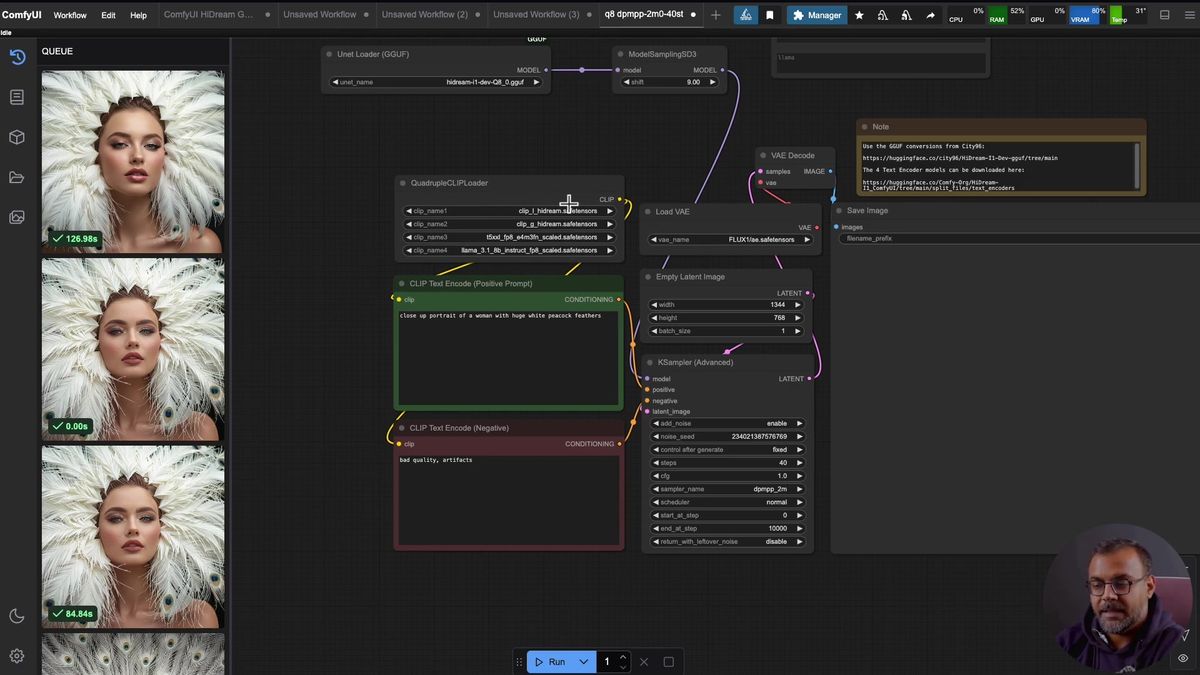
Picking a GGUF quant for your VRAM
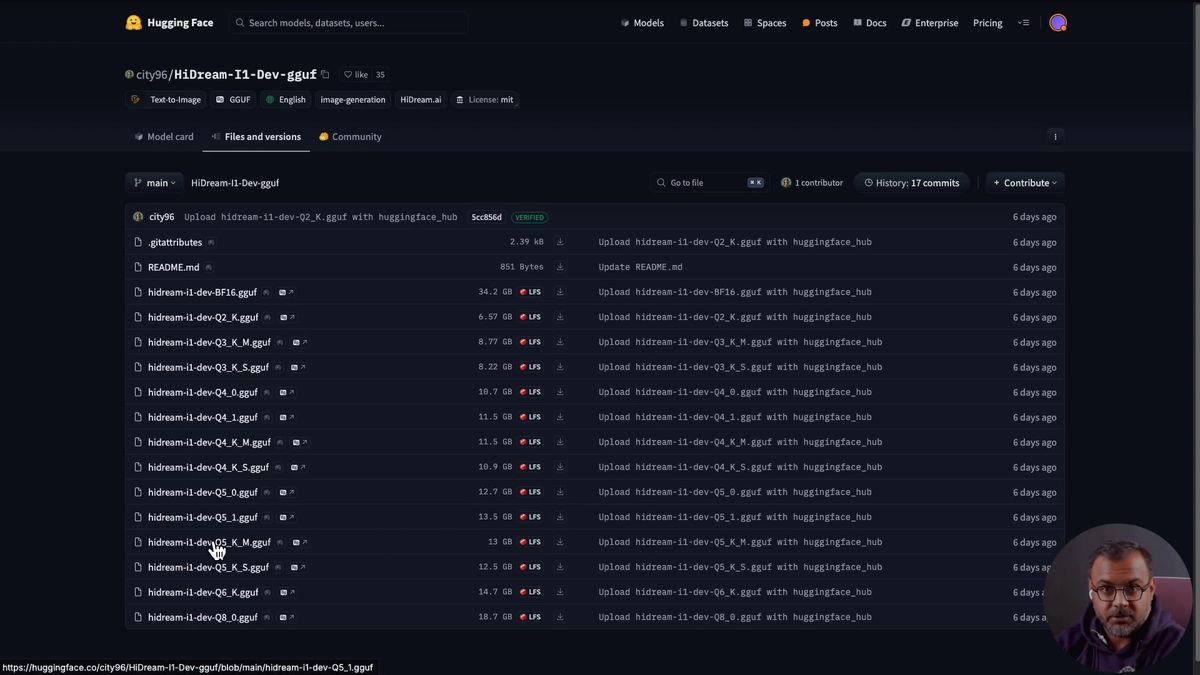
City96's GGUF quants water the HiDream model down from a 34GB BF16 build to small Q-numbers, so a Q8 or Q6 runs on a 24GB card and a Q2 can squeeze onto 8GB, with image quality dropping as the Q-number drops.
This is the decision that determines whether HiDream runs at all on your machine. A quantization is a compressed version of the original weights. City96 published a full ladder of them, and the rule is simple: the smaller the Q-number, the smaller the file and the more quality you give up.
The honest spread from the demo, running on a 24GB RTX 3090:
| Build | Rough size | Fits | Quality |
|---|---|---|---|
| BF16 (full) | ~34GB | High-VRAM only | Best |
| Q8 | Large | 24GB comfortably | Closest to full |
| Q6 | Medium | 16GB range | Strong, slight loss |
| Q4 / lower | Smaller | 12GB range | Noticeable loss |
| Q2 | Smallest | 8GB possible, not advised | Rough |
On the 3090, Q8 was the daily driver and Q6 came out when memory got tight. The recommendation that held up: Q6 or Q8 if your card can take it. You can technically run down to a Q2 on 8GB, but the quality falls off enough that it is more of a "it boots" than a "use this" option.
Whichever you pick, the GGUF file goes in ComfyUI/models/unet/. Refresh the browser, and the loader dropdown shows the quant you downloaded. One observation from the demo worth carrying over: ModelSamplingSD3 wanted a shift of 9 on quantized models and a shift of 3 on the full model. That is community-tuning territory, not a hard spec, so treat it as a starting value and adjust.
The Detail Demon trick for quantized skin
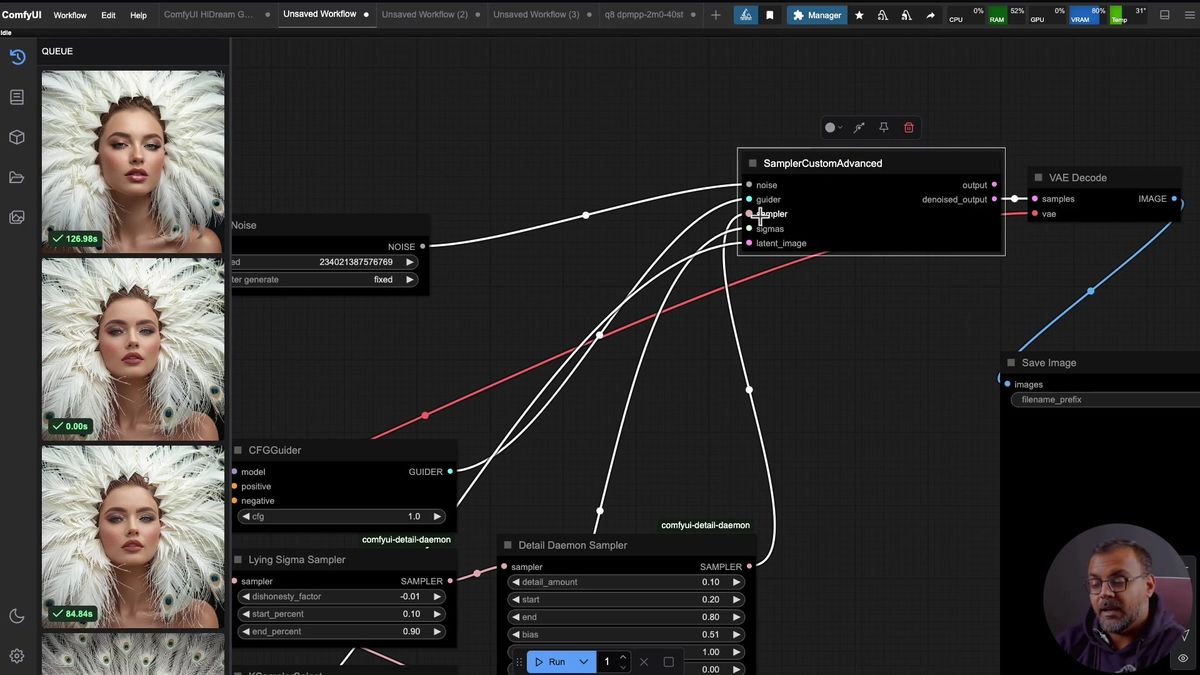
Quantized HiDream tends to give portraits a plasticky, airbrushed skin look, and adding a Detail Demon sampler to the chain pushes detail and skin texture back in on the same prompt and seed.
If you run a Q6 or Q8 portrait, you will probably notice it: skin goes a little plastic, that airbrushed look Flux users know well. It is a quantization side effect, not a HiDream flaw, and there is a fix that costs you one custom node.
The trick is a node called Detail Demon. To use it, you break the standard KSampler into its parts with a SamplerCustomAdvanced node, then insert the Detail Demon sampler into the chain. The pieces look like a normal sampler turned inside out: a noise generator, a CFG guider at 1.0, a sampler selector, an empty latent, and a BasicScheduler holding your steps and denoise. The new part is routing the sampler through a LyingSigmaSampler and then the Detail Demon sampler before it hits the custom advanced node and the VAE decode.
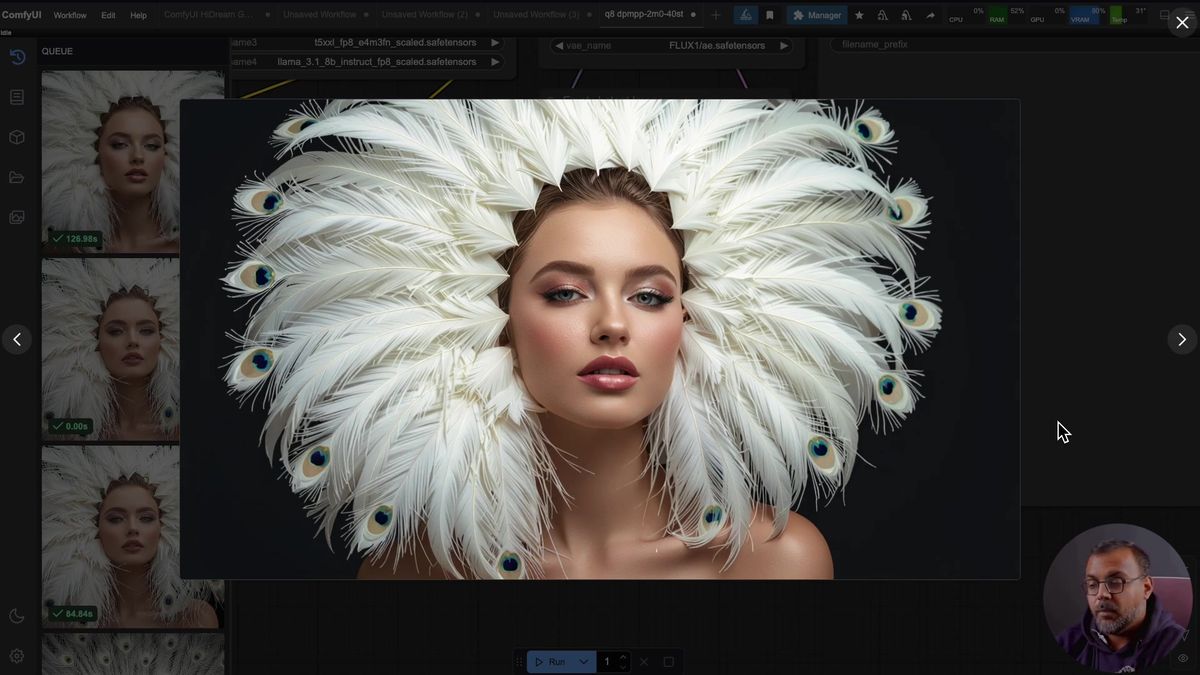
On matched prompt and seed, the Detail Demon versions came out with clearly more detail and better skin in most cases. A few seeds looked better without it, so it is not a free win on every image, but as a default it earns its place.
One cost to flag. Detail Demon is heavy on VRAM. On the 3090, the demo could not run Detail Demon and the Q8 model together without pushing VRAM to 95 to 100%, which caused instability, so the Detail Demon results were made on the Q6 build instead. If you are near the edge of your card, drop a quant level before you add the node.
Where a local HiDream install stops being enough
A desktop HiDream install runs one image at a time on your card and burns most of your VRAM doing it, which is right for testing and wrong as the backend a product calls.
None of this is a reason to skip the local install. It is the right place to learn HiDream, compare samplers, and decide whether Q6 with Detail Demon is your sweet spot. It is the wrong thing to be the endpoint your app hits.
Three things change the moment a hobby workflow becomes a feature.
Concurrency. ComfyUI runs one generation at a time. With HiDream eating most of a 24GB card per image, ten users hitting your graph at once means a long line and no second worker behind it.
VRAM headroom. The demo could not fit Detail Demon and a Q8 model on a 3090 together. Your best-quality config and your highest-quality node may not coexist on one card, which is a hard ceiling, not a tuning problem.
Operations. Keeping a 24GB-class card warm for spiky traffic is wasteful, and the moment you add a second card to handle load you are running a GPU fleet and an on-call rotation instead of building product (we have run that math, and it does not end well for one machine).
Running the HiDream workflow as a hosted API
You can run the exact HiDream graph you tuned as a hosted endpoint: export the workflow JSON, deploy it, then POST a prompt and poll the run ID until it finishes, with no 34GB download and no GPU of your own.
Here is the honest version of the production path. HiDream is not a one-click model row in our catalog today, so the path that fits HiDream specifically is deploying the workflow you built. ComfyUI Deploy takes the exported workflow JSON, the same graph with your quant, your ModelSamplingSD3 shift, and your Detail Demon chain, and runs it as a hosted endpoint. The graph you tuned ships as-is, no rebuild. Disclosure: Runflow is our product, and the local ComfyUI setup above works with or without us.
Once a workflow is deployed, the call shape is the same as every other model on the platform: POST inputs, get a run ID, poll until done.
# Submit a run against your deployed HiDream workflow
curl -X POST https://api.runflow.io/v1/models/your-team/hidream-workflow/runs \
  -H "Authorization: Bearer rf_live_your_key" \
  -H "Content-Type: application/json" \
  -d '{
    "input": {
      "prompt": "close-up portrait of a woman, peacock feathers, soft studio light",
      "negative_prompt": "plastic skin, airbrushed, watermark"
    }
  }'
You get back a run ID. Poll it until the status reads succeeded:
curl https://api.runflow.io/v1/runs/RUN_ID \
  -H "Authorization: Bearer rf_live_your_key"
Wrapped in a loop, that is the whole integration:
import requests, time

BASE = "https://api.runflow.io/v1"
HEAD = {"Authorization": "Bearer rf_live_your_key"}
MODEL = "your-team/hidream-workflow"

run = requests.post(
    f"{BASE}/models/{MODEL}/runs",
    headers=HEAD,
    json={"input": {"prompt": "a neon sign reading open late, rainy street, cinematic"}},
).json()

run_id = run["id"]
while True:
    r = requests.get(f"{BASE}/runs/{run_id}", headers=HEAD).json()
    if r["status"] in ("succeeded", "failed"):
        print(r)
        break
    time.sleep(2)
Concurrency, retries, and failover are handled for you, so the tenth user is not stuck behind nine others. Pricing is simple fixed per call, which keeps cost predictable per image instead of per GPU hour. If you would rather call a ready-made model than deploy a graph, the model catalog has the Flux family, nano-banana, Qwen, and WAN live from day one for HiDream-adjacent work. For an app running this at scale, hosting tends to land around 70% cheaper than building the in-house GPU team to match, and it needs no AI team to keep alive. The ComfyUI API developer guide is the pillar to read next.
Frequently asked questions
How do I run HiDream in ComfyUI?
Recent ComfyUI integrates HiDream natively. Download a GGUF model build into models/unet, the four text encoders into models/text_encoders, and the Flux VAE into models/vae, then load the provided workflow. The model loader feeds ModelSamplingSD3, a KSampler, and a VAE decode.
What are the four HiDream text encoders?
CLIP-L, CLIP-G, a T5 XXL, and a Llama 3.1 8B Instruct FP8 model, all loaded through the quadruple CLIP loader node. The T5 XXL is the same one Flux uses, and the Llama encoder is a standard model, so you may already have two of the four.
How much VRAM does HiDream need?
It depends on the GGUF quant. The full BF16 build is about 34GB. A Q8 or Q6 runs on a 24GB card, a Q6 fits the 16GB range, and a Q2 can squeeze onto 8GB, though quality drops as the Q-number drops.
What is the best HiDream GGUF quantization?
Q8 if your card can hold it, Q6 if memory is tight. City96 publishes the full ladder. Smaller Q-numbers shrink the file and reduce quality, so Q2 is more "it boots" than "use this."
Why does HiDream skin look plasticky?
That airbrushed look is a side effect of quantization, not the model itself. Adding a Detail Demon sampler to the chain pushes detail and skin texture back in on the same prompt and seed, with a clear improvement on most images.
Does HiDream support negative prompts?
Yes. Unlike Flux, HiDream brings back the negative prompt, so you can tell the model what to exclude directly instead of phrasing the positive prompt to avoid it.
What does the ModelSamplingSD3 shift do for HiDream?
It tunes the sampling. Community observation from the demo put the shift around 9 for quantized models and 3 for the full model. Treat those as starting values to adjust, not a fixed spec.
Can I run a HiDream workflow as an API without a GPU?
Yes. Export the workflow JSON and deploy it as a hosted endpoint, then POST a prompt and poll the run ID until it finishes. That skips the 34GB download and the local card entirely, and handles concurrency and uptime a single desktop cannot.
Where to go next
You have both halves now: the ComfyUI HiDream workflow for designing and testing locally, and the deploy path for shipping it. The setup was never the real problem. The real question is whether your one 24GB card, already maxed by a Q8 model and a Detail Demon node, is still the thing answering at 3am when the tenth user shows up.
- Install locally first: GGUF build into
models/unet, four text encoders intomodels/text_encoders, Flux VAE intomodels/vae. - Pick a quant for your card, Q8 or Q6 if it fits, and set the ModelSamplingSD3 shift as a starting value.
- Use the negative prompt box, the thing Flux never gave you, to cut what you do not want.
- If quantized skin goes plastic, add a Detail Demon sampler, and drop a quant level if VRAM gets tight.
- When real traffic shows up, deploy your tuned graph with ComfyUI Deploy so concurrency and failover are handled for you.
- For ready-made models near HiDream, call the model catalog for the Flux family, nano-banana, Qwen, and WAN.
- If you are weighing HiDream against Flux, the ComfyUI Flux install guide and Flux 2 in ComfyUI cover the other side.
Start free at runflow.io.
Want custom benchmarks for your workload?
We'll run our evaluation pipeline against your production data, for free.
Talk to Founders