ComfyUI Flux install: Dev vs Schnell speed guide (2026)
ComfyUI Flux install, end to end: Dev vs Schnell, the license trap, VRAM and speed numbers, then the hosted Flux path with no multi-GB downloads.

3 seconds for one image. On a 4090. After a 23GB download and a folder hunt across checkpoints, clip, unet, and vae. That's a clean ComfyUI Flux install once everything lands in the right place. Get one path wrong and the model silently refuses to load, or your 4090 run quietly becomes a six-minute wait on a 6GB card.
We learned the gap the expensive way. Flux from Black Forest Labs is the best open-weight text-to-image model most teams have run locally, and it is also a model where "install" means five different downloads, two license regimes, and a VRAM floor that decides whether you wait 3 seconds or 6 minutes.
So this guide does two things. First it walks the full ComfyUI Flux install, Dev versus Schnell, the FP8 shortcut versus the full 16-bit setup, the license you need to read before you ship anything, the way the pixaroma Ep08 walkthrough lays it out. Then it shows the production path: calling Flux as a hosted API when the download and the GPU stop being worth it.
Flux Dev vs Schnell: which version to install first
Install Schnell if your card is modest and you want speed, install Dev if you have the VRAM and want the better image, because Dev wins on quality and Schnell wins on time per generation.
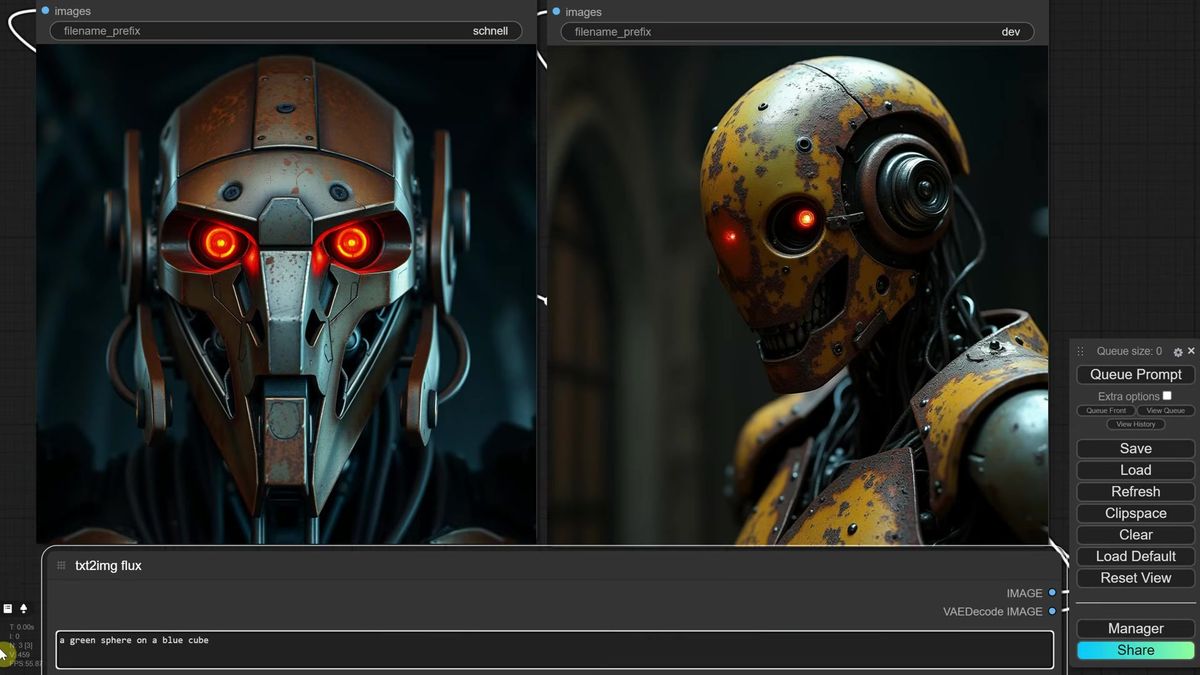
Black Forest Labs ships three Flux v1 models. Pro is API-only, you cannot download it. Dev and Schnell are the two you install locally. Dev produces the better picture: fewer hand mistakes, more detail, more reliable text rendering. Schnell is the fast one, the name means "fast" in German, and it trades quality for needing only four steps to a usable image.
The honest split from the walkthrough's side-by-side tests: Dev handled rain, swords, ice cream, and small-print text that Schnell dropped. Schnell came back faster every time and was good enough for quick drafts.
A simple rule for picking your first ComfyUI Flux install: weak card, start with Schnell. Decent card that is not top tier, try Dev FP8. Top-of-the-line card with spare system RAM, go straight to the full Dev. You can keep all of them and switch the checkpoint per job.
The Flux license trap most people skip
Schnell ships under Apache 2.0 so you can use the model and its outputs commercially, while Dev is non-commercial for the model itself even though you can sell the images it makes.
This is the part that bites teams after launch, not during setup. The Dev license on the Hugging Face page is explicit, and it is worth reading yourself rather than trusting any summary, including this one.
The short read: Dev says you own no rights in the outputs and may use those outputs for any purpose, commercial included. What you may not do is use the Dev model itself commercially, or use its outputs to train, fine-tune, or distill a competing model. So a paid app built on raw Dev weights is a license problem. The images you generate are yours to sell.
Schnell is the clean one. Apache 2.0 covers both the model and its outputs, so you can put Schnell behind a paid product without the asterisk. If commercial use is the goal and you are running weights yourself, that difference decides which version you should install.
ComfyUI Flux install: the FP8 fast path
The quickest ComfyUI Flux install drops a single FP8 checkpoint into the checkpoints folder, because the FP8 builds bundle the CLIP encoders and VAE into one file with no extra downloads.
Start here if you want the fewest moving parts. The FP8 versions of both Dev and Schnell are around 17GB each, and they pack everything the graph needs into one checkpoint, so there is no separate clip or vae hunt.
The steps from the walkthrough:
- Download the FP8 Dev checkpoint (about 17GB) and, if you want both, the FP8 Schnell checkpoint.
- Drop both files in
ComfyUI/models/checkpoints. - Open ComfyUI, open Manager, hit Update All so the new Flux nodes register, then restart.
- Load the example image that carries the workflow, and run it.
That is the impatient route. Schnell came back in about 3 to 4 seconds on a 4090 after the first load, Dev in about 14 seconds on the second run. The first run of either is slower because the model has to load into memory.
Building the Flux workflow from an SDXL graph
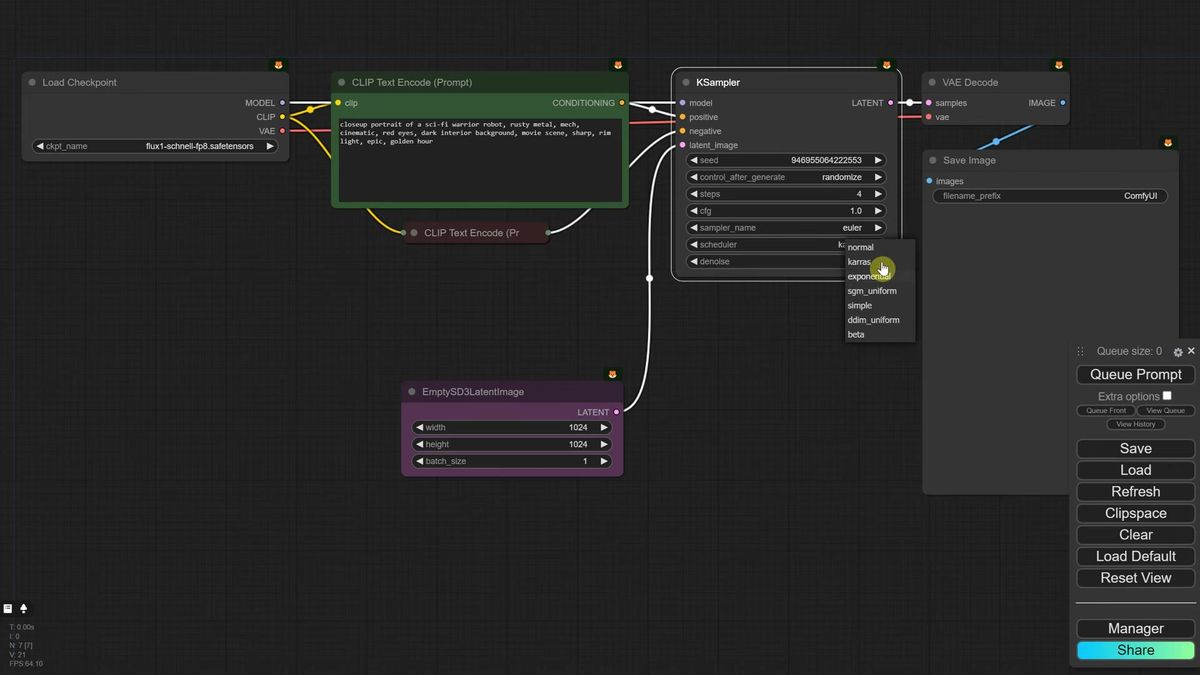
You can convert an existing SDXL workflow into a Flux one by swapping in the model loader, switching to an SD3 empty latent, deleting the negative prompt, and pinning a few Flux-specific sampler settings.
If you would rather understand the graph than download a preset, the changes from a basic SDXL setup are small but specific.
- Load the FP8 model in place of your SDXL checkpoint.
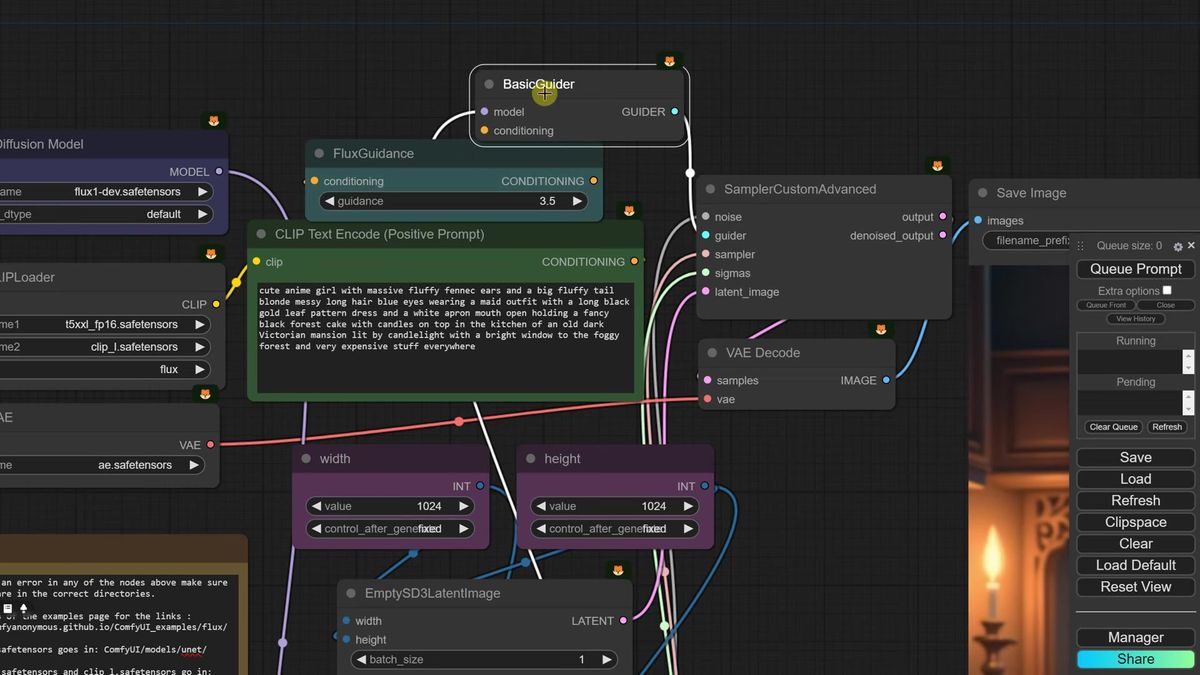
- Replace the empty latent with an Empty SD3 Latent Image. It handles multiples of 16 and plays nicer with Flux.
- Delete the negative prompt. Flux does not use one. Set CFG to 1, which tells the sampler to ignore the missing negative.
- For Schnell, set steps to 4, sampler to Euler, scheduler to simple.
- For Dev, raise steps to around 20 and add a Flux Guidance node (default 3.5, lower toward 2 to 3 for paintings). Flux Guidance only affects Dev, not Schnell.
One fix worth saving: if Dev returns blurred images on certain seeds, switch the sampler to DPM++ 2M with the SGM Uniform scheduler. That cleaned up the blur in the walkthrough's tests without changing anything else.
Flux VRAM and speed: what each version actually costs
Flux VRAM demand scales with file size, so a 4090 runs the full Dev in seconds while a 6GB card runs Dev FP8 in roughly six minutes per image.
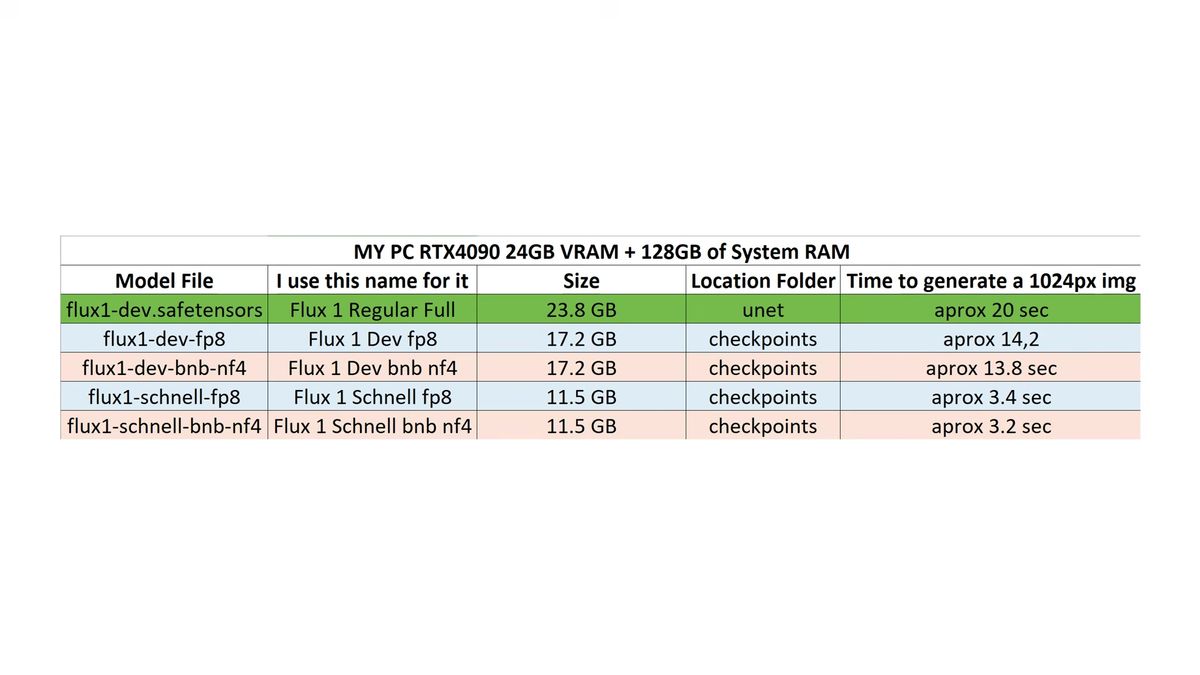
This is the table that decides whether local Flux is fun or painful. Every number below comes from the walkthrough's runs on an RTX 4090 unless noted.
| Version | File size | First run | Repeat run (4090) | Notes |
|---|---|---|---|---|
| Schnell FP8 | ~17GB | ~13s load | ~3-4s | 4 steps, fastest, lower quality |
| Dev FP8 | ~17GB | ~24s | ~14s | 20 steps, strong quality, good default |
| Dev NF4 | ~11GB | slower first | ~3s | 4-bit, smallest, slightly softer detail |
| Dev full (16-bit) | ~23GB unet | ~35s | ~18s | best quality, needs 32GB+ system RAM |
The same Dev FP8 that runs in 14 seconds on a 4090 was still runnable on an older 6GB card, at around 6 minutes per image. That is the whole story of running this model locally: the weights are heavy, and the card you own sets the ceiling. The NF4 4-bit builds (about 11GB) exist precisely to fit weaker cards, at a small cost in sharpness.
The full 16-bit Dev install, and whether it's worth it
The full Dev setup needs separate CLIP, VAE, and unet downloads plus 32GB of system RAM, and in side-by-side tests it barely beat the FP8 version most of the time.
If you have the hardware and want the absolute best, here is the layout. This is the install where most people put a file in the wrong folder.
- Two CLIP models go in
ComfyUI/models/clip. The FP16 text encoder wants more than 32GB system RAM, otherwise use the FP8 encoder. - The VAE file (named
ae.safetensors) goes inComfyUI/models/vae. - The actual Flux model, about 23GB, goes in
ComfyUI/models/unet, not checkpoints. This is the trap. - Load the example image that carries the matching workflow, which uses a basic guider and a custom advanced sampler instead of the K-sampler.
The verdict from the walkthrough was blunt: the full version had a bit more detail (a moon, an eye, a texture), but most prompts came back nearly identical to FP8. Given the extra files, the higher VRAM, and the longer generation time, FP8 is the version most people should run day to day.
Why a local Flux install breaks under real users
A desktop ComfyUI Flux install runs one job at a time on your card, which is perfect for you and falls apart the moment a product sends traffic at it.
None of this is a knock on the install. It is the right place to learn Flux, tune guidance, and pick Dev versus Schnell. It is the wrong thing to be the live backend for software other people use.
Three things change when a hobby workflow becomes a feature.
Concurrency. ComfyUI processes one generation at a time. Ten users hitting the workflow at once means a queue nine deep, and your 14-second Dev run becomes a two-minute wait for the last person.
Uptime. Your app cannot depend on your machine being awake and your GPU being free. A live feature needs an endpoint that answers at 3am.
Operations. Keeping a 4090-class card warm for spiky traffic is wasteful, and the second you add a card you are running a GPU fleet, not building product. That is the AI and DevOps line item most teams underestimate (we've run that math, and it does not end well for one machine).
How to run Flux as a hosted API instead
You POST your prompt to the Flux model's run endpoint, poll the run ID until it finishes, and skip the 23GB download and the GPU entirely.
Runflow runs Flux (and the rest of the family, plus nano-banana, Qwen, and WAN) as hosted models you call over HTTP. Disclosure: Runflow is our product, but the ComfyUI install above works with or without us. The shape is the same for every model: POST inputs, get a run ID, poll until done.
Remember the Pro version the walkthrough mentioned, the one you cannot download? Hosted is how you reach that tier without a local install at all.
# Submit a Flux generation
curl -X POST https://api.runflow.io/v1/models/black-forest-labs/flux-1-1-pro/runs \
  -H "Authorization: Bearer rf_live_your_key" \
  -H "Content-Type: application/json" \
  -d '{
    "input": {
      "prompt": "a painting of a gnome in a magical forest, concept art"
    }
  }'
You get back a run ID. Poll it until the status reads succeeded:
curl https://api.runflow.io/v1/runs/RUN_ID \
  -H "Authorization: Bearer rf_live_your_key"
Wrapped in a small loop, that is the whole integration:
import requests, time

BASE = "https://api.runflow.io/v1"
HEAD = {"Authorization": "Bearer rf_live_your_key"}
MODEL = "black-forest-labs/flux-1-1-pro"

run = requests.post(
    f"{BASE}/models/{MODEL}/runs",
    headers=HEAD,
    json={"input": {"prompt": "a portrait of a viking in the rain at golden hour"}},
).json()

run_id = run["id"]
while True:
    r = requests.get(f"{BASE}/runs/{run_id}", headers=HEAD).json()
    if r["status"] in ("succeeded", "failed"):
        print(r)
        break
    time.sleep(2)
Concurrency, retries, and failover are handled for you, so the tenth user is not stuck behind nine others. Pricing is simple fixed per call, which keeps cost predictable per image instead of per GPU hour. For an app running this at scale, hosting tends to land around 70% cheaper than building the in-house GPU team and ops to do the same, and it needs no AI team to keep alive. Flux sits alongside the other models in the Runflow model catalog, and the same request works against any of them by swapping the slug. The ComfyUI API developer guide is the pillar to read next, and if your real workflow is editing rather than generation, ComfyUI Flux Kontext covers the same jump for the editing model.
If your real workflow is more than one node (a LoRA, an upscale, a face fix), you can deploy the whole graph instead of rebuilding it. ComfyUI Deploy takes your exported workflow JSON and runs it as a hosted endpoint on a real GPU, so the graph you tuned locally ships as-is. The pricing page has the per-call numbers if you want to compare against your own GPU hours.
Frequently asked questions
How do I install Flux in ComfyUI?
The fastest ComfyUI Flux install drops a single FP8 checkpoint (about 17GB) into ComfyUI/models/checkpoints, then you open Manager, hit Update All to register the Flux nodes, restart, and load the example workflow. The full 16-bit setup is more involved, with separate CLIP, VAE, and unet files.
What is the difference between Flux Dev and Schnell?
Dev produces the better image with fewer mistakes on hands, text, and detail, but needs around 20 steps. Schnell is the fast version, needs only 4 steps, and trades some quality for speed. Dev is non-commercial for the model itself, Schnell is Apache 2.0.
Can I use Flux Dev commercially?
You can use the images Dev generates for any purpose, including commercial. You cannot use the Dev model itself commercially, and you cannot use its outputs to train a competing model. Schnell, under Apache 2.0, is the clean choice for a paid product if you run weights yourself. Read the license on Hugging Face before you ship.
How much VRAM does Flux need in ComfyUI?
It depends on the build. The full Dev wants a top-end card and 32GB+ system RAM, the FP8 versions run on decent mid-range cards, and the NF4 4-bit builds (about 11GB) fit weaker cards. A 6GB card can run Dev FP8 but at roughly 6 minutes per image versus seconds on a 4090.
Which Flux version is the fastest?
Schnell FP8 is the fastest at around 3 to 4 seconds per image on a 4090 after the first load, using only 4 steps. On some cards the NF4 builds can be the quickest option. Dev is slower because it uses more steps.
Where do Flux model files go in ComfyUI?
FP8 checkpoints go in models/checkpoints. For the full setup, CLIP encoders go in models/clip, the VAE goes in models/vae, and the main Flux model goes in models/unet, not checkpoints. Putting the unet file in checkpoints is the most common install mistake.
Why are my Flux Dev images blurred on some seeds?
Dev can return blurry results on certain seeds with the default sampler. Switching the sampler to DPM++ 2M and the scheduler to SGM Uniform fixed the blur in testing while keeping the same seeds usable.
Do I need to download Flux at all?
No. You can call Flux over HTTP by posting your prompt to a model run endpoint and polling for the result, with no local install and no GPU. That also reaches the Pro tier you cannot download, and it is the path that holds up when real users send concurrent traffic.
Can I run a full ComfyUI workflow as an API, not just one model?
Yes. ComfyUI Deploy runs your exported workflow JSON as a hosted endpoint, so a multi-step graph with a LoRA, an upscale, and a face fix ships without being rebuilt as separate API calls.
Where to go next
You've got both halves now: the ComfyUI Flux install for designing and tuning locally, and the API for shipping it. The install was never the hard part. The real question is whether your own card is still the thing answering at 3am when the tenth user shows up after a 23GB download you hoped you would only do once.
- Watch the pixaroma walkthrough and do the FP8 install first: one checkpoint in the checkpoints folder, Update All, restart.
- Pick your version by hardware: Schnell for weak cards, Dev FP8 for the everyday default.
- Read the Dev license before you build anything paid, or use Schnell under Apache 2.0.
- Add the Flux Guidance node and the DPM++ 2M / SGM Uniform fix to keep Dev sharp.
- When real traffic shows up, call Flux through the Runflow model catalog so concurrency and failover are handled for you.
- For multi-step graphs, deploy the whole workflow with ComfyUI Deploy.
- Read the ComfyUI API developer guide for integration patterns at scale.
Start free at runflow.io.
Want custom benchmarks for your workload?
We'll run our evaluation pipeline against your production data, for free.
Talk to Founders