Your ComfyUI workflows,run in production by us.
You keep building the graph. We host it, pin the exact build so ComfyUI updates can't touch it, and fail over when a GPU provider goes down. Your endpoint stays live.
25 minutes with a founder · Bring your graph
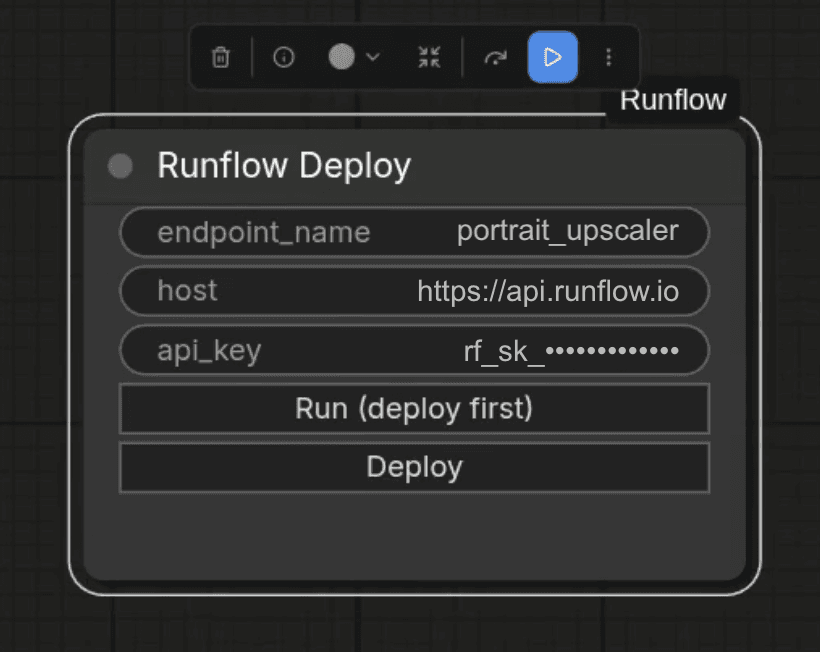
Two minutes from local ComfyUI to live API.
Tibor walks through install, the Deploy node, and the first call.
ComfyUI is graduating to production. Runflow is the managed route.
The graphs that used to live on a single creator's desktop are now powering real products: on-model try-on, headshot pipelines, ad creative at scale. The choice teams face is the same one we faced at BetterPic: stitch together Docker, Redis, Modal, S3, and a queue, or pick a managed route. Runflow is the managed route, with output observability on every call and pay-per-second-of-use pricing so an idle graph costs you nothing.
One ComfyUI graph. One production endpoint.
Mark your inputs, mark your outputs, and push with the Deploy node. We handle hosting, auth, scaling, and the API surface, and we operate it once it is live, so you ship without leaving ComfyUI.
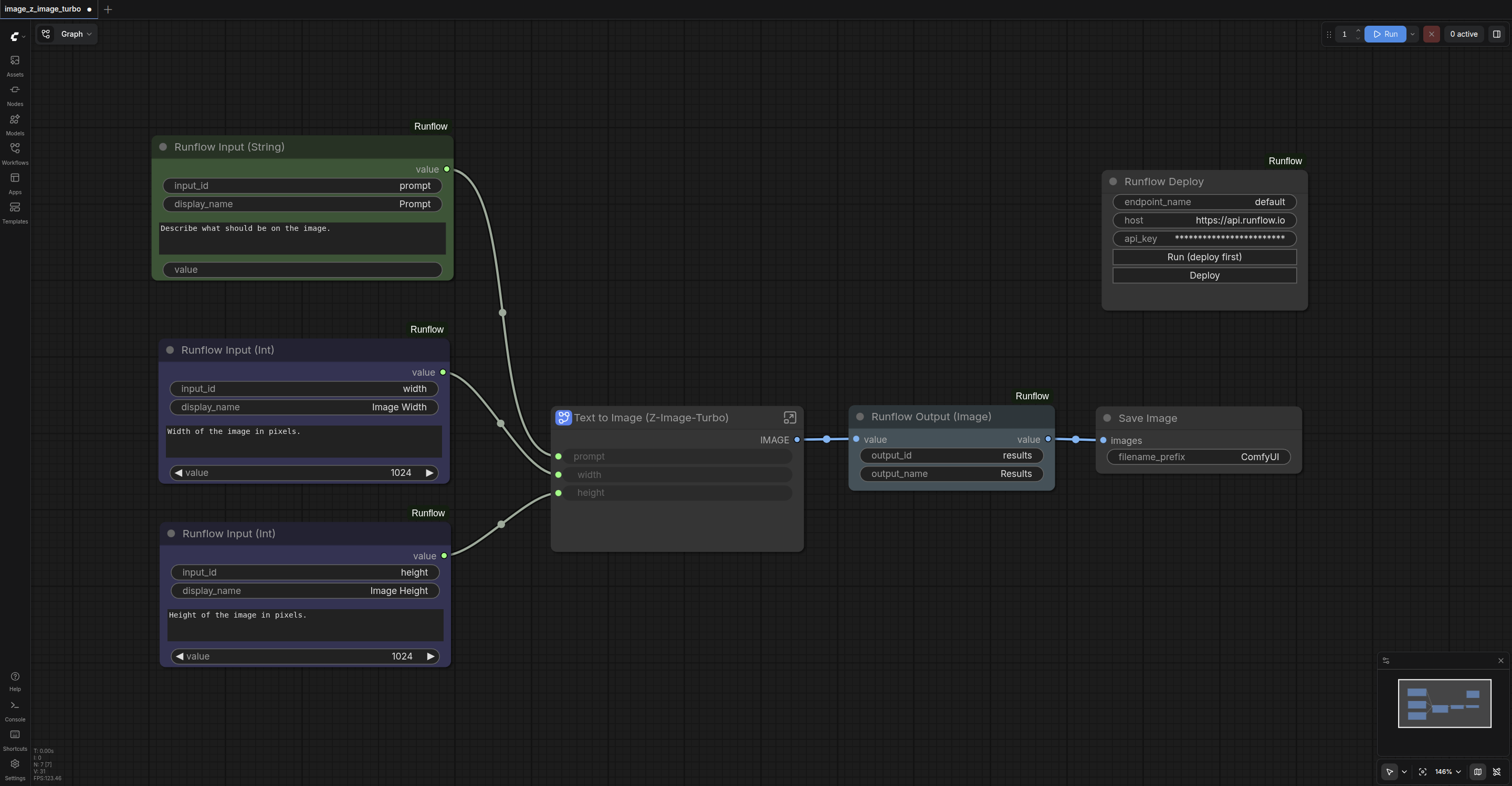
A full Runflow pipeline: Input, Output, and Deploy nodes wired into ComfyUI.
One workflow team. 87% gross margin.
Runflow is built by the team behind BetterPic, running AI image infrastructure in production since 2023. When BetterPic moved headshot generation to Runflow, margins went from 40% to 87% on 100K+ jobs a month, with zero dedicated infra hires. The stack you're deploying on is the same one.
ComfyUI is a tool. Runflow is what makes your workflow shippable.
Output observability is live today. Active controls (auto-retries and quality loops) land in follow-up releases. Everything else is already the floor.
Output observability
Every generation gets scored and logged (identity, framing, artifacts) so you can see where a workflow drifts before your customers do. Think Google Analytics for your outputs.
Pinned to your build
We pin the exact ComfyUI commit, custom node commits, and model hashes you ship with. Upstream churn never touches your workflow. The next ComfyUI update won't break a thing.
GPU auto-failover
When GPU capacity degrades or goes down, we failover in seconds. Your workflow stays up while everyone else's API status page lights up red.
ComfyUI-native deploy
Drop the Runflow Deploy node into your graph, mark inputs, ship. No Dockerfiles, no Python envs, no GPU config.
Active auto-retries
Low-score outputs re-run automatically, so your customer never sees the bad one. Coming soon.
Typed REST API per workflow
Every deploy auto-generates a typed REST endpoint with inputs matching your graph parameters. Call it from any language, hand a spec to your frontend.
Quality loops
Iterate on a prompt until the output passes your quality threshold, no custom code. Coming soon.
Cached models + custom nodes
Popular checkpoints and community nodes stay warm on GPU. Your workflow is seconds from the first call.
Version history
Every workflow update is versioned. Roll back to any previous version in one click and keep full history across your team.
Dev → staging → prod
Promote workflows across environments with the controls your team already expects. Test on staging before pushing to production, no surprises in live traffic.
Pay per second of active use
We only charge while your graph is computing. No idle GPU, no reserved instance, no monthly commit. Scale to zero when nobody's calling.
Per-second GPU pricing. Scale to zero when nobody's calling.
These rates are for teams who already have the workflow and want us to host and run it. Pick the GPU that fits the graph. You pay only while it is computing. No idle instances, no monthly commit, no reserved hours.
When we build the solution with you, pricing is per API call instead. We scope that on the call.
No monthly commits · No reserved instances · Billed per second, not per hour
Self-host it, or let us run it. Same goal, two paths.
Two ways to ship a ComfyUI workflow as an API. Self-host on RunPod means writing Dockerfiles, sizing GPUs, and owning cold starts, driver upkeep, and provider downtime. Runflow runs it for you from the same local ComfyUI you already build in: drop in the Deploy node and your graph becomes a typed API, with output observability on every call and pinned builds that don't break on the next ComfyUI update.
Based on the typical RunPod + Docker self-host path as of May 2026. "Soon" means on Runflow's roadmap.
Questions, answered.
Do I have to leave ComfyUI to use this?
No, that's the whole point. You install the Runflow custom node, paste your API key, and keep building the way you already build. When you're ready, your graph becomes a live endpoint your product can call.
How do I get started?
You book a call with a founder and bring your graph. We look at what it needs, confirm the nodes and models are supported, set up your account, and hand you the API key. From there you install the Runflow custom node in ComfyUI (clone github.com/runflow-io/comfyui-runflow into your custom_nodes folder, or search for Runflow in the ComfyUI Manager), drop the Deploy node into your graph, mark your inputs and outputs, and hit Deploy. The node and endpoint mechanics are documented in the docs.
What ComfyUI workflows do you support?
Standard ComfyUI JSON exports. Most core and popular community nodes are supported. Bring the graph to the call and we'll confirm support for anything exotic before you commit.
Is my workflow private?
Yes. Your workflow stays yours. We deploy it as a private API endpoint that only you can call. We don't resell it, share it, or train on it.
What if my workflow uses custom models or LoRAs?
Most public models on Hugging Face and Civitai are supported. If you depend on a private model, you can upload it from your Runflow dashboard.
What does it cost?
If you already have the workflow and want us to host and run it, you pay the per-second GPU rate above while your graph is computing, and nothing while it sits idle. No subscriptions, no minimums. If you want us to build the solution with you, that is an implementation engagement priced per API call, and we scope it on the call.
Can my workflow combine local GPU models with external paid APIs (Claude, Gemini, etc.)?
Yes. A Runflow custom node wraps the external API call. Your workflow runs locally on GPU as normal, only that one node round-trips through us to hit the external model. The third-party API key stays on our side, never on the GPU host or in the workflow file, and the cost of the external call gets metered into the per-run price your customer pays. The managed wrapper is shipping in a follow-up release. If your workflow already handles its own external API key, that path works today.
Why won't my workflow break on the next ComfyUI update?
When you submit a workflow, we pin the exact ComfyUI version commit, the custom node commits, and the model hashes you built it with. Upstream churn doesn't touch the pinned environment. Public custom nodes get pulled from the original repo and pinned to the commit. Private custom nodes upload once into your tenant container. Models are matched by hash to our pre-cached pool, instant if we have it, one upload if we don't.
How do you protect my custom LoRAs and trained models?
Clear split between internal and external. Everything internal (LoRAs, model weights, the node graph, your configuration) is tenant-isolated and encrypted at rest, processed inside our workers, never exposed outside that boundary. End users only pass runtime inputs like prompt, reference image, or brand asset. They see the input form and the output, never the LoRA, the weights, or the workflow internals.
We already run ComfyUI centrally on our own AWS. What does Runflow add?
Centralised compute is the easy half. Centralised workflow development is the hard half. Self-hosting means your engineers spend real time on EC2 sizing, driver and kernel upkeep, subnets, security groups, and ComfyUI sigterm-killing itself without auto-restart. With Runflow: open your workflow, add 4 nodes, click deploy, get an API endpoint. Our smart router across GPU providers means a single provider hitting capacity doesn't take you down.
More from Runflow
Stay in ComfyUI. Ship to production.
Bring the graph you already built. We pin it, host it, and run it as an endpoint your product can call, with output scoring on every generation.
25 minutes with a founder · Bring your graph