Flux 2 in ComfyUI: install, workflow, and API (2026)
Flux 2 in ComfyUI: the three files, folder paths, the reference-image workflow, real 5090 timings, the active-parameter trick, and the hosted API path with no download.

120 seconds for one image. On a 5090. First run, nobody else in the queue. That is Flux 2 in ComfyUI the moment everything finally lands in the right folder, the model loads into VRAM, and you hit queue.
The 120 seconds is not the hard part. The hard part is the three files, the three different folders they each belong in, and the reference-image nodes that ship bypassed so your first "image to image" run silently runs as text to image instead. Get one of those wrong and the graph either refuses to load or quietly ignores the second image you handed it.
So this guide does two things. First it walks the real Flux 2 ComfyUI install from the Codebreakers demo: the Mistral 3 text encoder, the FP8 diffusion model, the Flux 2 VAE, where each one goes, and the workflow that does text to image and image to image from one graph. Then it covers the production path, because Flux 2 is a 32-billion-parameter model and your own card answering at 3am for ten concurrent users is a different problem than one image at your desk.
The three files Flux 2 needs, and where each one goes
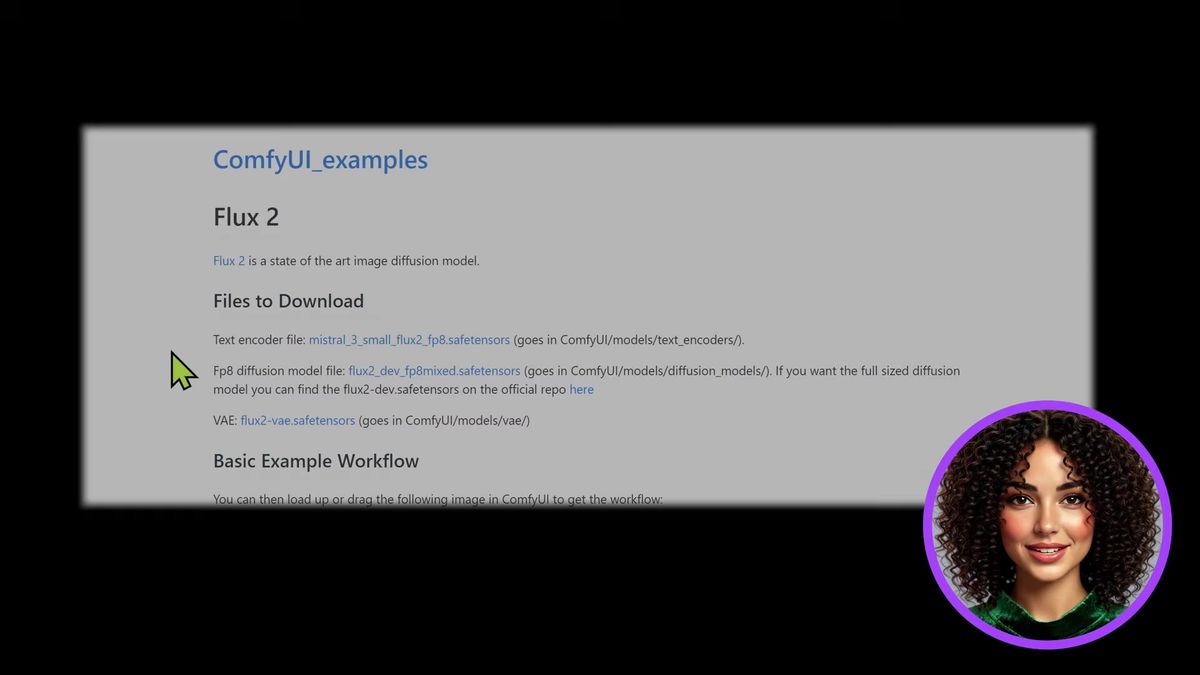
A Flux 2 ComfyUI install is three downloads into three different folders: the Mistral 3 text encoder into text_encoders, the FP8 diffusion model into diffusion_models, and the Flux 2 VAE into vae.
This is where most installs go sideways, so it is worth being exact. The links live on the ComfyUI examples page for Flux 2 (and in the video description). Three files:
- Text encoder.
mistral_3_small_flux2_fp8.safetensorsgoes inComfyUI/models/text_encoders/. Flux 2 swapped the old T5 encoder for a Mistral 3 small model, which is why the file is bigger and why prompt adherence jumped. - Diffusion model.
flux2_dev_fp8mixed.safetensorsgoes inComfyUI/models/diffusion_models/. The FP8 mixed build is the one to start with. If you have the VRAM and want the uncompressed version,flux2-dev.safetensorsfrom the official repo is the full-size option, but FP8 is plenty to learn on. - VAE.
flux2-vae.safetensorsgoes inComfyUI/models/vae/.
Note the folders are diffusion_models, not checkpoints. Flux 2 is not a bundled checkpoint, it is three separate pieces wired together in the graph. Dropping the diffusion file in checkpoints is the most common reason the model loader shows an empty dropdown.
Loading the default Flux 2 workflow
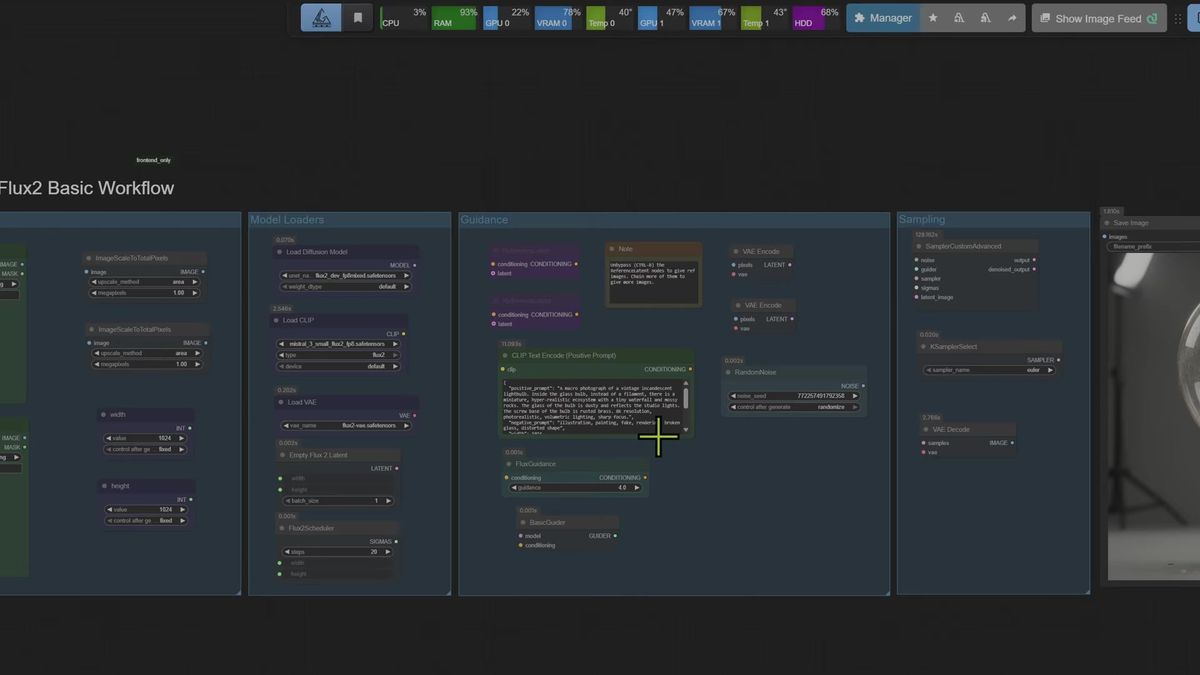
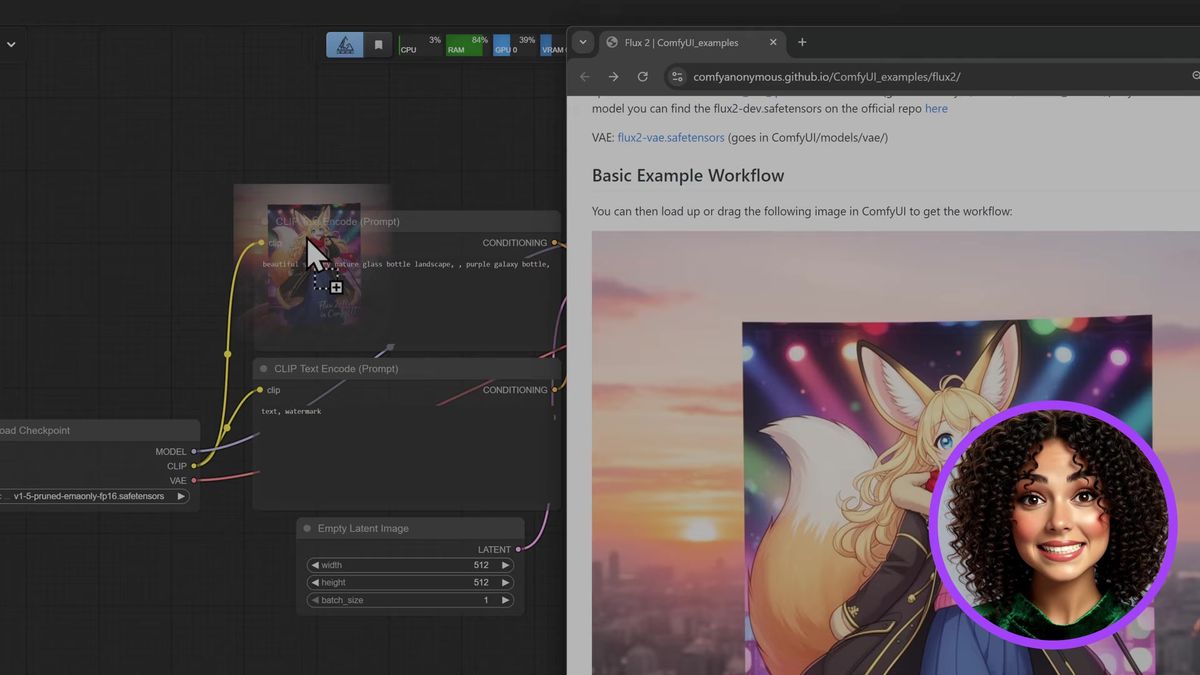
Drag the example image from the Flux 2 page straight into the ComfyUI canvas and the full workflow loads with the right nodes already wired, including two reference-image branches that ship bypassed.
ComfyUI workflows travel inside the example PNG. Drag that image onto the canvas and you get the graph the model author built, no manual node-building. Then you point three loaders at the files you just downloaded:
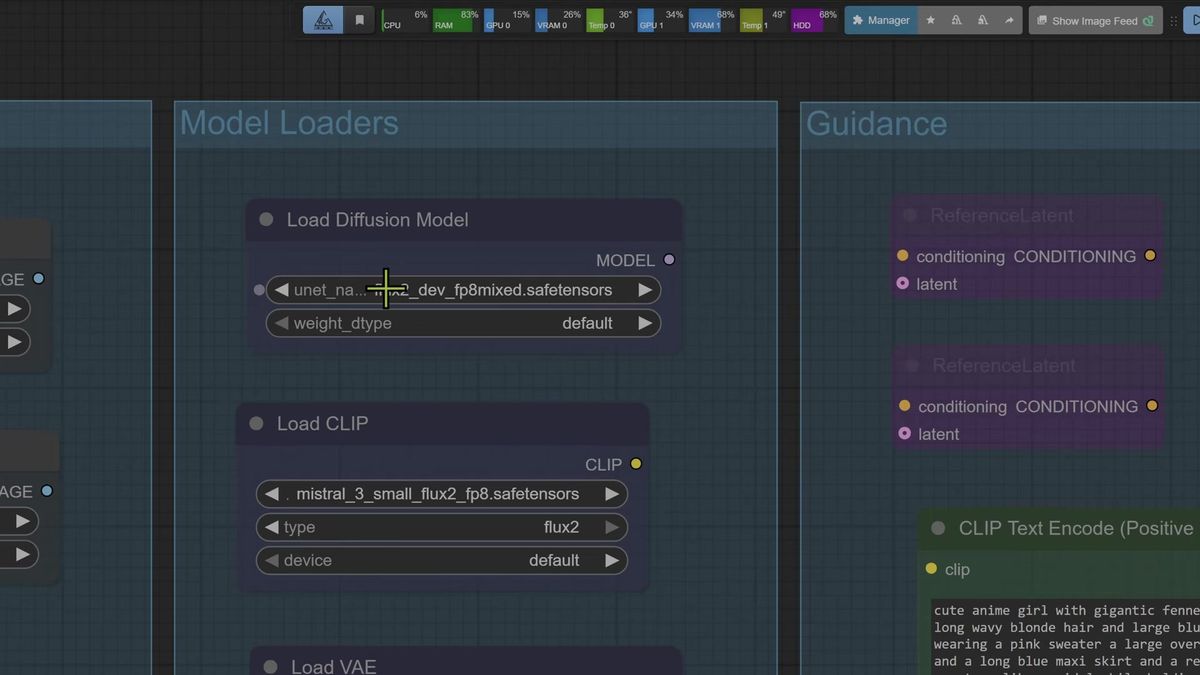
- Load Diffusion Model: select
flux2_dev_fp8mixed.safetensors. - Load CLIP: select
mistral_3_small_flux2_fp8.safetensors, typeflux2. - Load VAE: select
flux2-vae.safetensors.
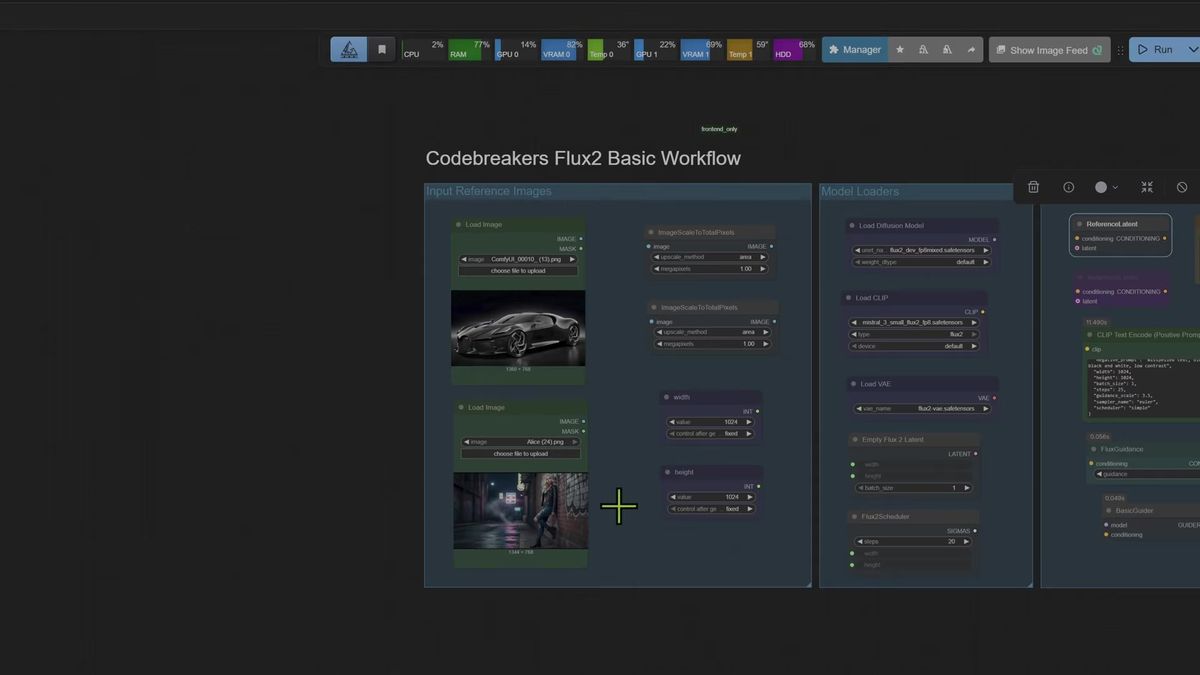
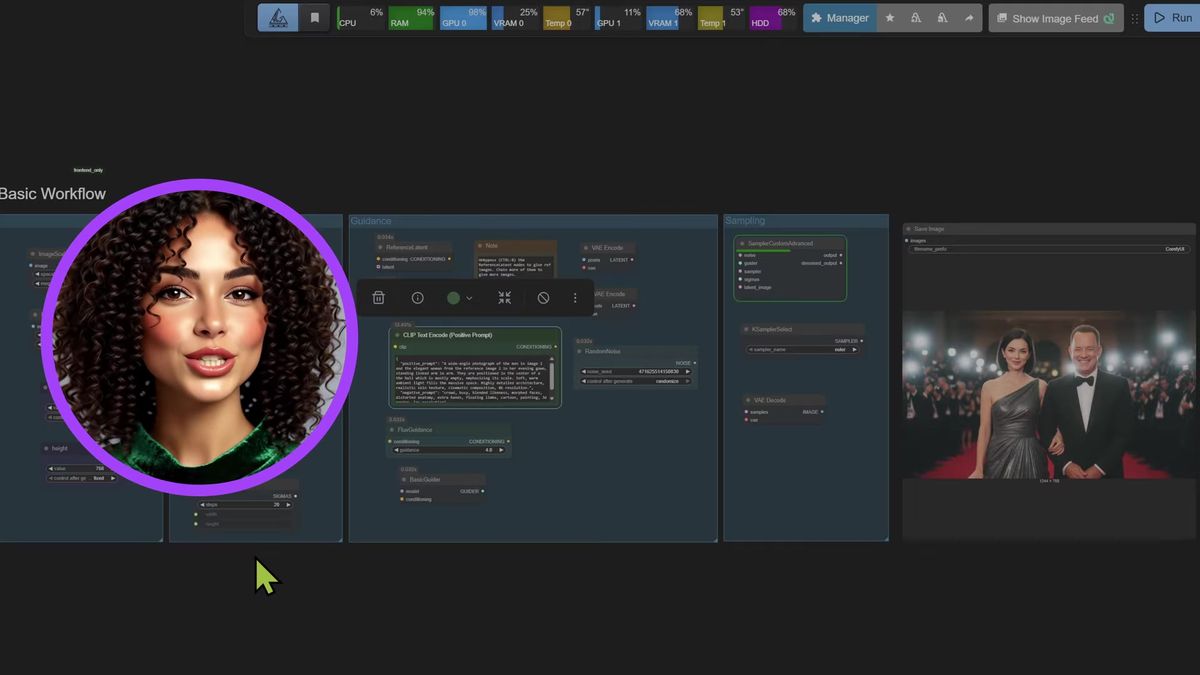
The graph is organized into clear groups: Model Loaders, Guidance, and Sampling. The Empty Flux 2 Latent sets your output size, the Flux2Scheduler holds the step count (20 by default), and a FluxGuidance node sits at 4.0. That is the whole text-to-image path.
The part worth knowing before you run anything: the default workflow has two reference-image branches already built and bypassed. Leave them off and you have a text-to-image model. Enable the reference latent node and the same graph becomes image to image. One workflow, two jobs, and the switch is whether a node is bypassed.
What text to image actually costs on a 5090
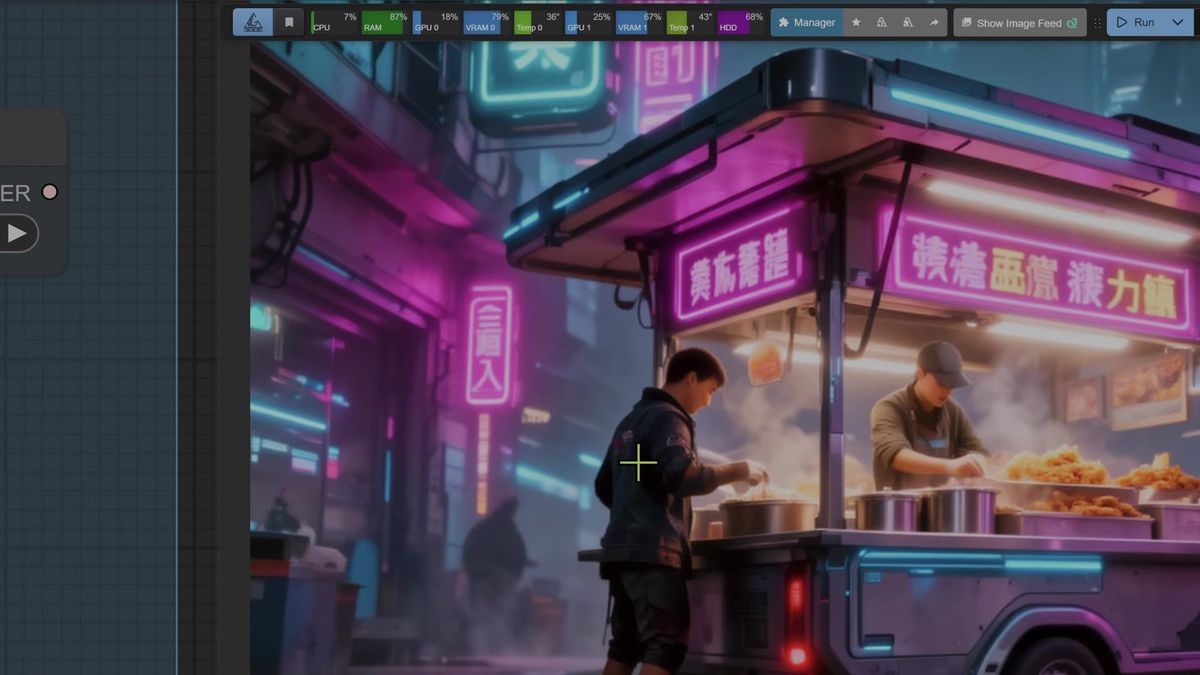
Flux 2 text to image ran between 68 and 145 seconds per image on a 5090 at 20 steps and 1024x1024 in the demo, with the first run slowest because the model has to load into VRAM.
Here is the honest spread from the run, because the numbers matter more than "fast":
| Prompt | Resolution | Steps | Time (5090) |
|---|---|---|---|
| Cyberpunk street food vendor | 1024x1024 | 20 | ~120s (first run) |
| Futuristic female engineer | 1024x1024 | 20 | ~130s |
| Light bulb ecosystem | 1024x1024 | 20 | ~145s |
| Tokyo neon rain scene | 1024x1024 | 20 | ~68s |
The first generation is always the slowest because the model loads into VRAM. After that, timings should drop. They did not drop cleanly in the demo, and the reason is a good lesson: a screen recorder running on the second GPU was changing how the model behaved run to run. Background load on your machine moves these numbers around. Treat any single timing as a sample, not a spec.
Two craft notes that held up across the prompts. JSON-format prompts (structured fields rather than a sentence) gave noticeably better adherence, and the in-image text rendering that the old Flux could not do at all now works. A neon sign reading "Bengal night" came out clean. That alone is a real reason to move up from Flux 1.
Reference images: the node you have to enable
To use a reference image you must enable the reference latent node first, and you need a separate enabled node per image, or the model never sees the picture you handed it.
This is the step that quietly fails. The default branches are bypassed, so loading an image and running does nothing until you un-bypass the reference latent node. The demo made the mistake on camera: two images loaded, only one reference node enabled, and the model produced a clean image that simply ignored the second photo. Good output, wrong job.
Two more things that bit the run, both fixable:
- Aspect ratio. Landscape input images into a 1024x1024 square output came back squashed. Set the Empty Flux 2 Latent to match your input aspect (1280x720 fixed the car), and the geometry holds.
- Prompt beats image. Combining two people from reference photos, Flux 2 leaned on the prompt over the pixels. The fix was rewriting the prompt to explicitly reference "the girl in image two into image one" rather than describing the scene. The prompt is the strong lever here, the reference images guide rather than dictate.
Character consistency, once the nodes and the prompt were right, held up across a two-person composite. The path to a good result was iterative: tweak the prompt, tweak the aspect, run again. That is the normal shape of reference work, not a Flux 2 quirk.
The active-parameter trick that keeps a 32B model cool
Flux 2 is a 32-billion-parameter model that runs cooler than its size suggests because the new Mistral 3 text encoder appears to activate only the parameters a given prompt needs, instead of firing the whole network every generation.
This was the most interesting observation in the demo, and it is worth stating plainly: a 32B model on a 5090 should be pushing the card hard. It was not. VRAM and temperatures stayed lower than the parameter count predicts.
The working theory is active parameters. Instead of running the entire network for every image, the model identifies and activates only the slice relevant to your prompt. Think of an encyclopedia: you do not read every volume to look up one car, you open the volume about cars. The unused weights stay dormant.
That is a theory from observed behavior, not a published spec, so hold it loosely. But the practical takeaway is solid. The headline parameter count does not map straight to the VRAM and heat you will actually see. Flux 2 is more runnable on consumer hardware than "32 billion parameters" makes it sound.
Where a local Flux 2 install stops being enough
A desktop Flux 2 install in ComfyUI runs one job at a time on your card, which is right for learning and wrong as the live backend for software other people use.
None of the above is a knock on installing locally. It is the right place to learn Flux 2, test reference images, and decide whether the FP8 build is enough for your work. It is the wrong thing to be the endpoint your product calls.
Three things change the moment a hobby workflow becomes a feature.
Concurrency. ComfyUI processes one generation at a time. At 68 to 145 seconds each, ten users hitting your graph at once means the last person waits the better part of half an hour. There is no queue worker, there is your one GPU.
Uptime. A live feature needs an endpoint that answers at 3am. Your desktop being awake and your card being free is not a service-level you can promise a customer.
Operations. Keeping a 5090-class card warm for spiky traffic is wasteful, and the second you add a card to handle load, you are running a GPU fleet and an on-call rotation, not building product (we've run that math, and it does not end well for one machine).
Running Flux 2 as a hosted API instead
You POST your prompt to the Flux 2 model's run endpoint, poll the run ID until it finishes, and skip the three downloads, the folder hunt, and the GPU entirely.
Runflow runs Flux 2 as a hosted model you call over HTTP. FLUX.2 [klein] 9B and 4B are live in the catalog from day one, alongside the rest of the Flux family, nano-banana, Qwen, and WAN. Disclosure: Runflow is our product, but the ComfyUI install above works with or without us. The shape is identical for every model: POST inputs, get a run ID, poll until done.
# Submit a Flux 2 generation
curl -X POST https://api.runflow.io/v1/models/black-forest-labs/flux-2-klein-9b/runs \
  -H "Authorization: Bearer rf_live_your_key" \
  -H "Content-Type: application/json" \
  -d '{
    "input": {
      "prompt": "a cyberpunk street food vendor, neon lights, rain on pavement, cinematic lighting"
    }
  }'
You get back a run ID. Poll it until the status reads succeeded:
curl https://api.runflow.io/v1/runs/RUN_ID \
  -H "Authorization: Bearer rf_live_your_key"
Wrapped in a small loop, that is the whole integration:
import requests, time

BASE = "https://api.runflow.io/v1"
HEAD = {"Authorization": "Bearer rf_live_your_key"}
MODEL = "black-forest-labs/flux-2-klein-9b"

run = requests.post(
    f"{BASE}/models/{MODEL}/runs",
    headers=HEAD,
    json={"input": {"prompt": "a macro photo of a vintage light bulb holding a tiny ecosystem"}},
).json()

run_id = run["id"]
while True:
    r = requests.get(f"{BASE}/runs/{run_id}", headers=HEAD).json()
    if r["status"] in ("succeeded", "failed"):
        print(r)
        break
    time.sleep(2)
Concurrency, retries, and failover are handled for you, so the tenth user is not stuck behind nine others for half an hour. Pricing is simple fixed per call, which keeps cost predictable per image instead of per GPU hour. For an app running this at scale, hosting tends to land around 70% cheaper than building the in-house GPU team and ops to match, and it needs no AI team to keep alive. The ComfyUI API developer guide is the pillar to read next, and if your real workflow is more than one node, ComfyUI Deploy runs your exported workflow JSON as a hosted endpoint so the graph you tuned ships as-is. The pricing page has the per-call numbers if you want to compare against your own GPU hours.
Frequently asked questions
How do I install Flux 2 in ComfyUI?
Download three files and place each in its own folder: mistral_3_small_flux2_fp8.safetensors in models/text_encoders, flux2_dev_fp8mixed.safetensors in models/diffusion_models, and flux2-vae.safetensors in models/vae. Then drag the example image from the Flux 2 page onto the canvas, point the three loaders at the files, and queue.
What files does Flux 2 need?
A Mistral 3 small text encoder, the FP8 mixed diffusion model (or the full flux2-dev.safetensors if you have the VRAM), and the Flux 2 VAE. Three separate files, not a single bundled checkpoint.
Why is the diffusion model not showing in my loader?
Almost always because the file is in models/checkpoints instead of models/diffusion_models. Flux 2 is three separate pieces, not a checkpoint, so the diffusion file belongs in diffusion_models.
How long does Flux 2 take per image?
In the demo, between 68 and 145 seconds per image on a 5090 at 20 steps and 1024x1024. The first run is slowest because the model loads into VRAM, and background load on the machine moved the timings around run to run.
How do I use reference images in Flux 2?
Enable the reference latent node first, one enabled node per reference image. If a node stays bypassed the model never sees that image. Match the output aspect ratio to your input, and lean on the prompt because it influences the result more strongly than the reference photos do.
Why does a 32B model run cool on a 5090?
The likely reason is active parameters: the new text encoder appears to activate only the slice of the network a given prompt needs rather than the whole thing, which keeps VRAM and temperatures lower than the parameter count suggests. This is observed behavior, not a published spec.
Can Flux 2 render text in images?
Yes. Text rendering inside the image works in Flux 2 where the older Flux failed at it, which is one of the bigger practical upgrades. JSON-format prompts gave better adherence than plain sentences in testing.
Do I need to download Flux 2 at all?
No. You can call Flux 2 over HTTP by posting your prompt to a model run endpoint and polling for the result, with no local install and no GPU. That path also handles concurrency and uptime, which a single desktop card cannot.
Can I run a whole ComfyUI workflow as an API, beyond a single model?
Yes. ComfyUI Deploy runs your exported workflow JSON as a hosted endpoint, so a multi-step graph with an upscale or a face fix ships without being rebuilt as separate calls.
Where to go next
You have both halves now: the Flux 2 ComfyUI install for designing and testing locally, and the API for shipping it. The install was never the hard part. The real question is whether your own 5090 is still the thing answering at 3am when the tenth user shows up, each generation 68 to 145 seconds deep in a queue with no worker behind it.
- Do the install first: three files, three folders, then drag the example image to load the workflow.
- Run text to image at 20 steps and 1024x1024, and try a JSON-format prompt to see the adherence jump.
- For reference images, enable a reference latent node per image and match the output aspect to your input.
- Treat the 68 to 145 second timings as samples, not specs, and watch background GPU load.
- When real traffic shows up, call FLUX.2 in the Runflow catalog so concurrency and failover are handled for you.
- For multi-step graphs, deploy the whole workflow with ComfyUI Deploy.
- Read the ComfyUI API developer guide for integration patterns at scale.
Start free at runflow.io.
Want custom benchmarks for your workload?
We'll run our evaluation pipeline against your production data, for free.
Talk to Founders