3 failure modes that kill production AI product isolation (tested on Nano Banana Pro + GPT Image 2)
We ran the same product-isolation task through Runflow, Nano Banana Pro, and GPT Image 2 on real e-commerce inputs. Three repeatable failure modes came out of the generalists: color drift, object substitution, and mask leakage. Each one breaks a different stage of an automated catalog pipeline.

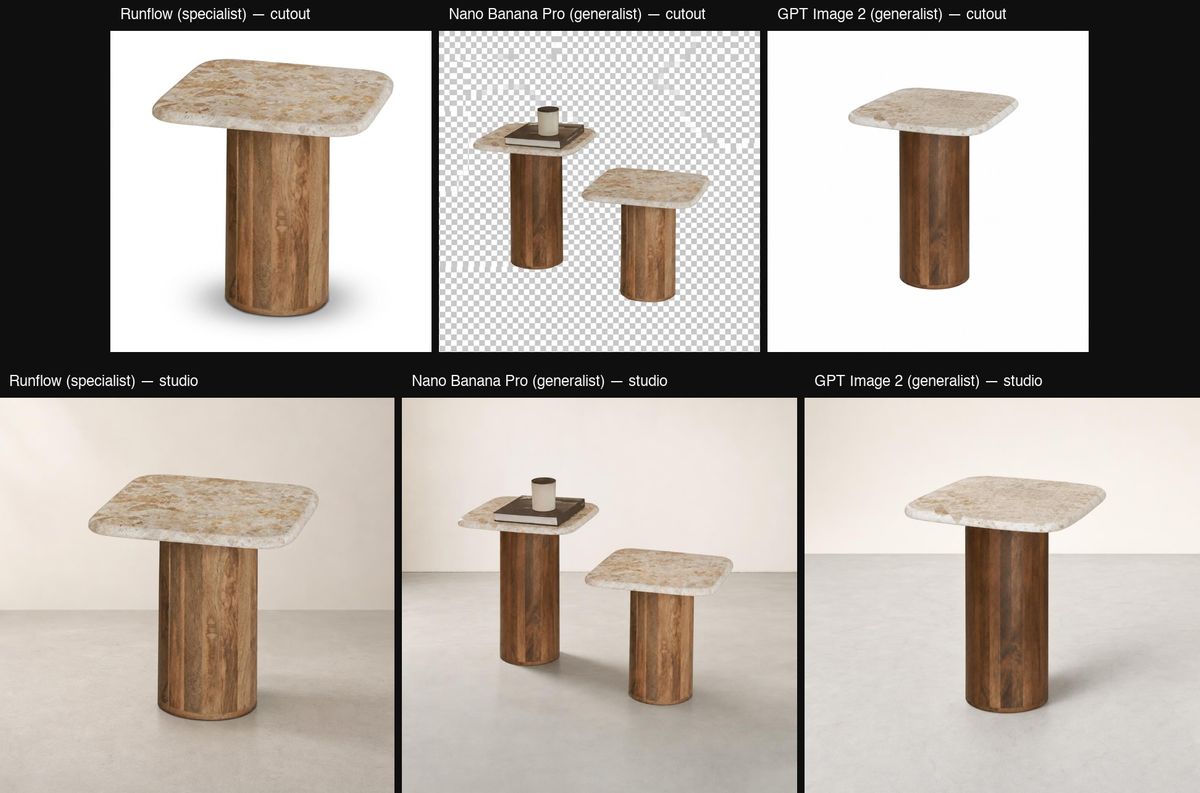
We ran the same product-isolation task through three engines: Runflow's product-isolation solution, Google's Nano Banana Pro edit model, and OpenAI's GPT Image 2 edit model. Two inputs (a poster and a busy lifestyle scene) with masks on a single product in each.
Runflow returned the masked product cleanly on both. The generalists failed in three repeatable ways: the right object came back in the wrong colors, the wrong object came back entirely, and the mask got treated as a hint that let extra pixels through. Each one breaks a different stage of an automated catalog pipeline.
TL;DR
- Runflow
product-isolation: kept the masked object, kept the color, honored the mask boundary on both tests. - Nano Banana Pro edit: stripped the poster from full color to grayscale on test 1; returned 2 tables on a fake transparent background on test 2.
- GPT Image 2 edit: returned a completely different poster on test 1; returned a clean single table on test 2.
If you want to skip ahead: the bottom of the post shows the chained pipeline (isolation → studio relight) that we use to take a lifestyle photo all the way to a marketplace-ready shot.
The setup
Two test inputs, picked to stress different parts of an isolation pipeline.
Test 1 is a vintage hip-hop poster (MF DOOM's "Operation: Doomsday") pinned to a record-store wall. The mask covers just the poster. The wall around it is full of other posters, shelves, t-shirts, and lighting, so the engine has to lock onto exactly the masked region and ignore everything else.
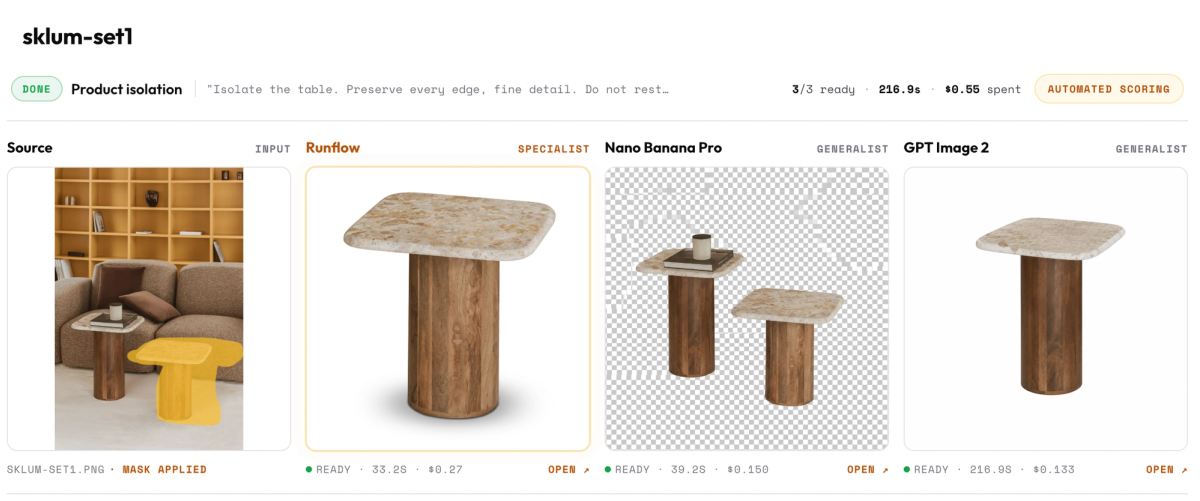
Test 2 is a Sklum-style lifestyle shot with a small side table on a sofa scene. The mask covers the table. There is a second, visually similar object in the same frame, so the engine has to honor the mask boundary rather than guess at "a side table."
The task is the same every time: keep the masked product, drop the rest, return a clean cutout suitable for the next stage of a product pipeline (catalog crop, studio relight, multi-angle render).
For Runflow, the mask plus the prompt is the contract. For the closed models, we pass the same masked image and the same instruction through their edit endpoint. No prompt engineering tricks. Fair brief, same surface, three outputs.
Failure 1: color drift on the kept object
The model returns the right object. The composition is right, the structure is right, the resolution is right. The colors are wrong.
On the MF DOOM poster, Nano Banana Pro kept the poster but stripped the entire image to grayscale. The source poster is warm orange and red with green and cream accents. Nano returned the same artwork in black and white.
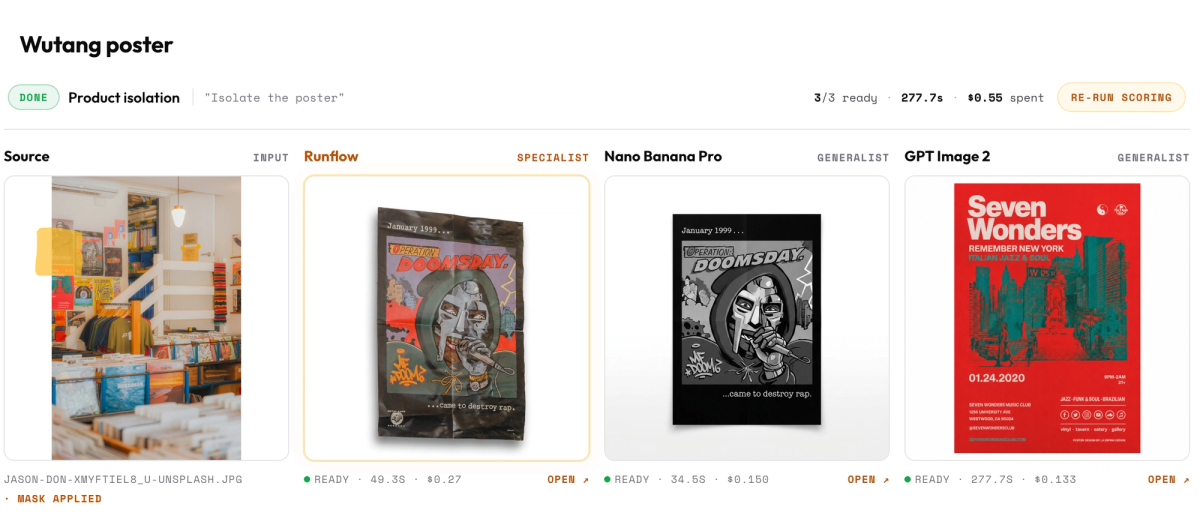
The output is recognizable as the same composition. The brand colors are gone.
Why this happens
Edit models are general-purpose generators with a conditioning signal. The masked region tells them where to draw, not what to preserve. When the model regenerates the masked area, it samples from its own prior, not from the source pixels. The prior collapses high-variance features like color palette toward the model's training distribution, which for "poster on wall in a record store" includes a lot of monochrome reference imagery.
A dedicated isolation pipeline does the opposite. It segments the source pixels and carries them forward verbatim. The model never has to "draw" the kept region, so it cannot drift on it.
Why this breaks production
E-commerce catalogs are checked against the brand kit. Color fidelity is one of the first auto-checks any QA system runs (typically a ΔE comparison against the source). A grayscale shift fails that check on the first pixel sampled and the asset gets sent back for manual review. Manual review at scale is the cost your pipeline was supposed to eliminate.
Failure 2: object substitution
The model returns a different object entirely.
On the same MF DOOM poster test, GPT Image 2 returned a poster. A completely different one. The output was a "Seven Wonders, Remember New York" jazz/funk event poster in red and teal, designed for a 2020 club night that has nothing to do with the input. The artwork, the typography, the color palette, the subject matter, none of it matched the source.
The model parsed "isolate the poster on the wall" as "generate a poster that fits this scene" rather than "preserve this specific poster."
Why this happens
When the model cannot lock the masked region to a specific pixel set, it falls back to category-level generation. "Poster on a record-store wall" is the category cue. The output is statistically a poster. It is not the poster the customer is trying to sell.
The wrong-table case on test 2 is the same failure with a smaller magnitude: the engine picks a generic object from the category instead of preserving the specific one in the mask. Substitution is the same root cause whether the model returns a different basket, a different table, or a different poster.
Why this breaks production
If your catalog automation can substitute the product, you cannot run it unattended. Every output needs human verification that the returned image is actually the SKU you sent in. That defeats the point of automation.
The case that hurts most is the resale and secondhand market. Sellers shoot one phone photo, the pipeline isolates and relights it for the storefront. If the pipeline returns "a leather bag" instead of this leather bag, the listing photo does not match the item the buyer receives. Returns and disputes follow.
Failure 3: mask leakage and phantom transparency
Pixels outside the mask leak into the output. Sometimes the bleed is content (a second object), sometimes it is a rendering artifact the model added because its prior expected it.
On the Sklum table test, Nano Banana Pro returned both tables visible in the source frame, side by side, on a baked-in fake-transparent-background checkerboard pattern. The mask covered one table. The output included two tables plus a rendered checkerboard that was never asked for.
Why this happens
The mask is a soft conditioning signal on these models, not a hard boundary. Anything in the source image that the model's prior considers relevant to "product cutout" can leak through, and anything in the prior that the model expects ("product cutouts have transparent backgrounds, rendered as checkerboards in JPEGs") can get rendered in even when you did not ask for it.
A specialist isolation pipeline runs segmentation first, then composition. The mask boundary is a hard edge in pixel space, not a prompt suggestion.
Why this breaks production
A pipeline that sometimes outputs a checkerboard pattern instead of a clean cutout cannot feed a downstream relight or background-generation step. The next stage assumes the cutout has a real alpha channel or a real background. A baked-in fake transparency renders as visible checker pattern on the final asset. The catalog ships with a broken image.
Why specialists win on this kind of task
The pattern across all three failure modes: general-purpose edit models treat the mask as a hint and treat the masked content as something they can regenerate. A specialist isolation pipeline treats the mask as a contract and the masked content as pixels to preserve.
Two different architectures. Two different output guarantees.
For one-off creative work, the general model is fine. You can review the output, regenerate if needed, pick the best of four. The flexibility is the point.
For an automated catalog pipeline that runs 10,000 SKUs unattended, the guarantees are the point. You need every output to honor the same contract. The specialist is the only path.
The chained pipeline (isolation → studio relight)
A cutout is not the finished asset. The finished asset is a studio product shot ready to drop on a marketplace.
The way we ship it: chain two steps. First step is runflow/product-isolation on the lifestyle source. Second step is openai/gpt-image-2/edit on the cutout, with a prompt that only has to render a studio backdrop and a contact shadow. The cutout step locks the product identity. The edit step has no chance to substitute or drift because it never sees the original scene.
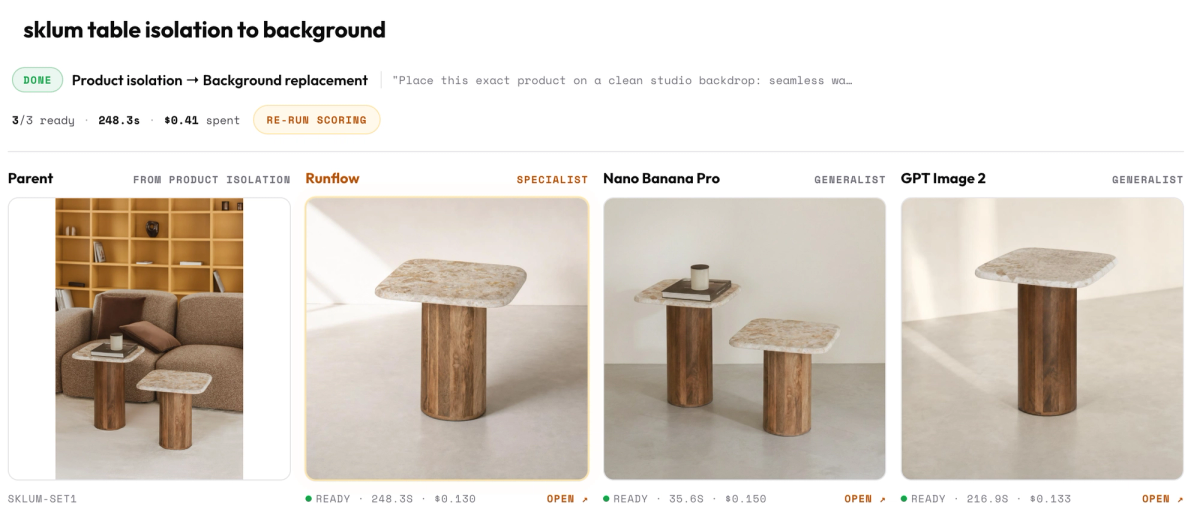
The chained pipeline works because each step has a narrow, verifiable job. The Nano Banana column shows what happens when step 1 fails: the duplicated-table failure on the isolation step carries straight through to the final backdrop. The one-shot path is asking a general model to do segmentation, identity preservation, scene reconstruction, and relighting in one inference. If it loses on the first job, everything downstream inherits the loss.
GPT Image 2 holds identity through the chain on this input, but the test 1 substitution failure (returning a completely different poster) is the version of the same problem on a different input. You cannot rely on a general edit model to lock the product identity at step 1.
Production implications
Pick the engine by the failure mode you can tolerate.
- Marketing asset work, human in the loop: any of the three is fine. Regenerate until you like the result.
- Catalog automation, unattended: specialist isolation in step 1, then any model for the cosmetic step 2. Do not ask a general edit model to do identity-preserving isolation.
- Resale and secondhand listings: identity preservation is non-negotiable. The seller's actual item has to come back. Substitution is a customer-trust failure on top of a quality failure.
Rule of thumb: if the QA step needs to verify that the returned image is the same product as the input, the isolation step has to guarantee it. Do not push that guarantee into a general model and hope.
Try it
runflow/product-isolation is live. Drop a lifestyle photo and a mask, get a clean cutout back.
- API docs: runflow.io/api/product-isolation
- Chained pipeline reference: the product-photography automation post walks the full source → cutout → studio relight pipeline with code.
- Previous benchmark: the inpainting failures post covers the same comparison for masked inpainting tasks.
Questions on a specific SKU pipeline or want us to run your inputs through the comparison? Reply to thibaut@runflow.us with the source images.
Want custom benchmarks for your workload?
We'll run our evaluation pipeline against your production data, for free.
Talk to Founders