3 failure modes that kill production AI inpainting (tested on Nano Banana Pro + GPT Image 2)
We ran three test images through Runflow's specialist object-removal endpoint, Nano Banana Pro, and GPT Image 2. Two of them broke in three repeatable ways. Here is what we saw.

We ran the same images through three AI editors: Runflow's specialist endpoint, Nano Banana Pro, and GPT Image 2. Two of them broke in three repeatable ways. Here is what we saw.
TL;DR
Same three test images, same masks, three engines.
- Runflow object-removal returned the exact frame we uploaded with the masked region removed and filled from context.
- Nano Banana Pro and GPT Image 2 failed in three repeatable ways: frame drift, hallucinated content, and object substitution.
- Any one of those failure modes will silently corrupt a production catalog before you notice.
The setup
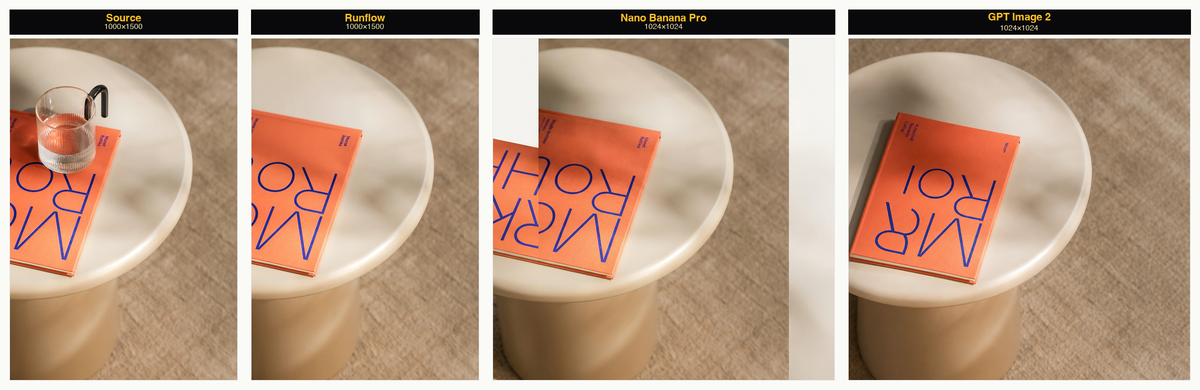
Three test images, each a category we wanted to stress: a glass sitting on a book on a side table (easy case, isolated object), a tourist standing in front of the Lisbon panorama (harder case, the object you're removing occludes a large background), and a small plate of croissants on an outdoor café table (typical e-commerce shot where the surrounding pixels matter).
The same mask was painted on each image. We fired all three engines in parallel against each test and captured the results side by side. Runflow returned a clean output every time. The Nano Banana and GPT Image 2 columns each surfaced a different category of failure across the three tests. By the third test, the pattern was undeniable.
Failure 1: frame drift
The output came back at a different aspect ratio than the input.
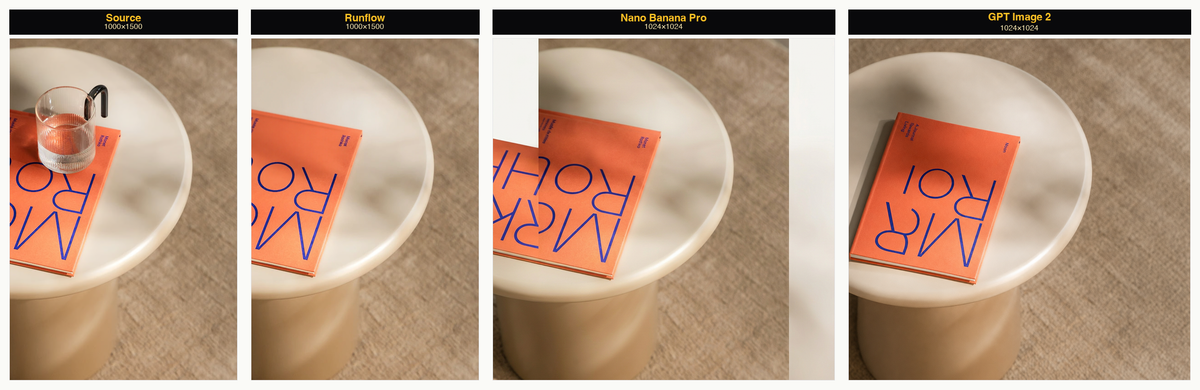
The input was 1000×1500. Runflow's output came back 1000×1500. Nano Banana Pro and GPT Image 2 both came back 1024×1024, the model's default canvas, regardless of what we sent in. Across all three tests, every generalist output collapsed to that same square.
Why this happens. Generalist image models treat the edit endpoint as a regeneration task. The source image is resampled into the model's internal canvas, the edit is performed, and the result is decoded back out at the canvas's native resolution. Aspect ratio is a side effect, not a contract.
Why it breaks production. If you're piping outputs into a downstream layout (a product grid, a banner template, an ad set being shipped to Meta), every variant has to match the input dimensions. Frame drift means a manual review on every output, or you ship layouts where the product is cropped, off-center, or missing entirely.
Failure 2: hallucinated content outside the mask
Pixels that weren't in the mask came back regenerated, with plausible-but-different content. The output ratio also drifts here, same story as failure 1, so the comparison is doubly unfair to the generalists.
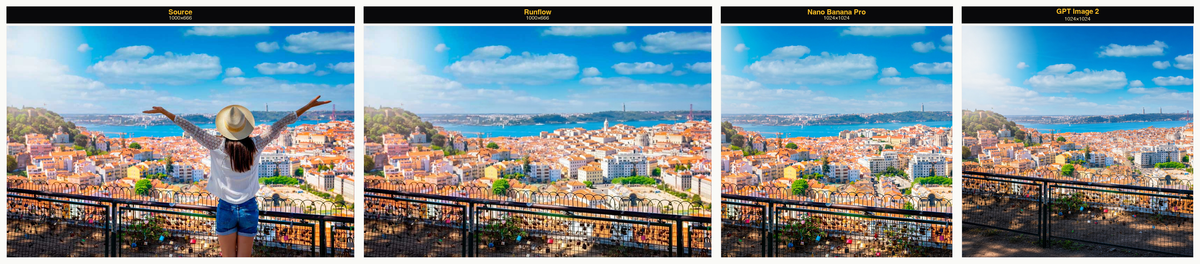
The format drift is the same story as failure 1. Worth flagging because it makes any direct visual comparison between the input and the generalist outputs already misleading before we even talk about content.
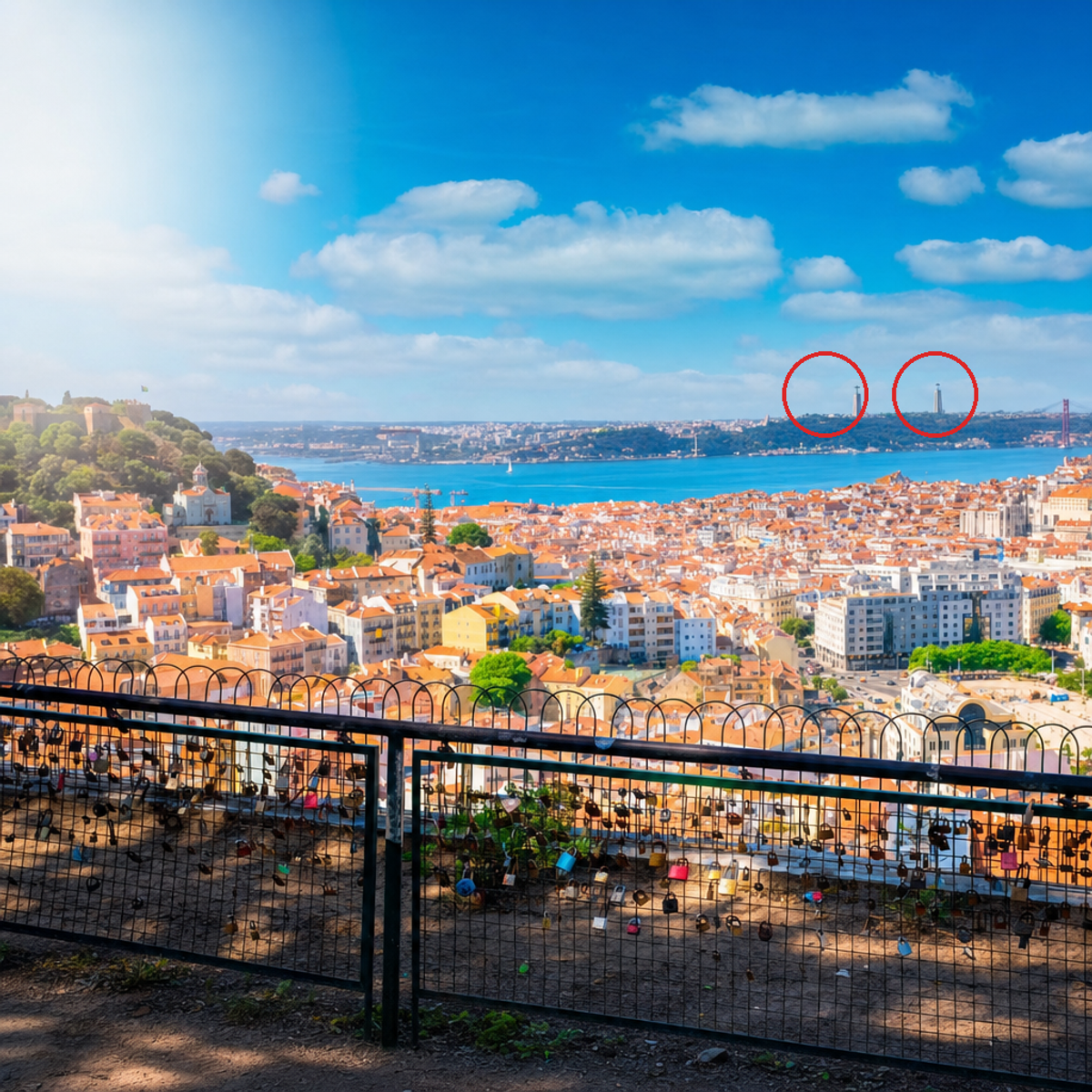
Two specific failures inside the panorama on the right two panels. Nano Banana Pro repainted some of the rooftop buildings in the background; the rest is plausible Lisbon, just not the Lisbon we uploaded. GPT Image 2 went further and duplicated the Cristo Rei statue: the figure that sits on the hill across the Tagus river appears twice in the output. There is only one of those in the real world. The model invented a second.
Why this happens. Image inpainting on a generalist model is a generation task. The model encodes the whole image, reconstructs the masked region, and decodes the whole thing back out. Pixels outside the mask pass through the same lossy round-trip. They come back close to the original, but never identical, and the model's prior fills in anything it can't reconstruct cleanly.
Why it breaks production. The failure is invisible to anyone who didn't have the source side-by-side. A product image with a hallucinated logo, a real-estate photo with an invented chimney, a marketing creative with a landmark that doesn't exist. The asset looks plausible, ships through any automated quality pass, and damages trust with the end customer when someone eventually notices.
Failure 3: object substitution
Objects that weren't in the mask came back missing or replaced.
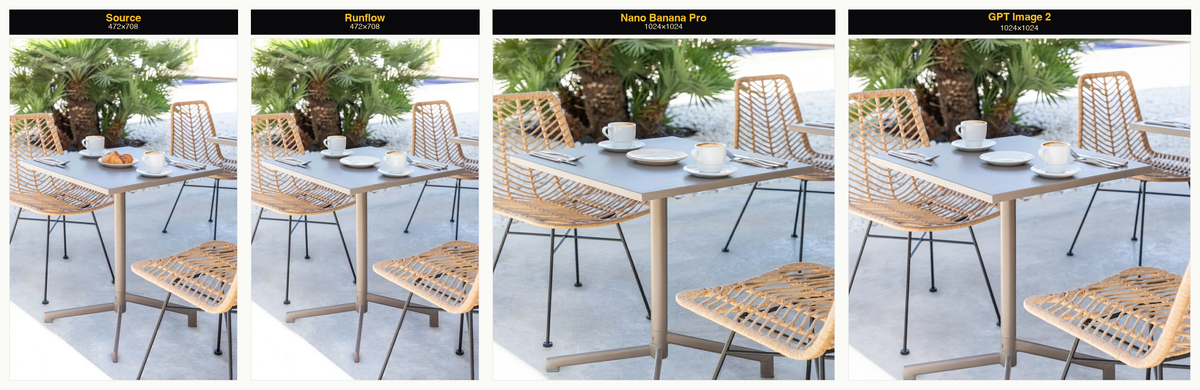
The croissants disappeared cleanly in all three engines. The plate disappeared too in both generalists, even though we never put the plate inside our mask. The Runflow output is the only one where the plate is still there.
Why this happens. As in failure 2, the model regenerates the whole image with the masked area replaced. Pixels well outside the mask pass through the same lossy round-trip. The plate, sitting right next to the mask, gets touched by the regeneration and the model's prior decides the cleanest fill is "empty table, no plate." There is no constraint that says "keep this thing that wasn't masked."
Why it breaks production. Catalog data integrity. A product photo where the prop disappears, a real-estate photo where a piece of furniture moves, a marketing creative where the brand-relevant element gets scrubbed. None of those are visible to the model. All of them are visible to the end customer.
Speed
Three engines, three tests, side by side:
| Engine | Test 1 · book | Test 2 · Lisbon | Test 3 · croissants |
|---|---|---|---|
| Runflow object-removal | 27.5s | 63.2s | 37.0s |
| Nano Banana Pro | 79.3s | 50.9s | 34.6s |
| GPT Image 2 | 184.6s | 214.0s | 213.9s |
GPT Image 2 was consistently 3 to 6x slower than the other two. For one-off creative use, the wait is fine. For a pipeline processing 10K product photos a month, the latency compounds.
Why specialists win this task
The differences above are all rooted in one design choice. Generalist image editors treat the edit task as a generation: regenerate the whole image with the masked area replaced. The model has no contract with the rest of the pixels.
A specialist object-removal endpoint inverts that contract. Pass the source image and a mask, and the only pixels that can change are the ones inside the mask. The rest of the image is held byte-identical. Frame stays the same, aspect ratio stays the same, every pixel outside the mask is the pixel you sent in. The model's job is small and specific: reconstruct the masked region from the surrounding context.
Smaller surface area, less to break.
What this means for production pipelines
For one-off creative work, the generalists are fun, and sometimes their hallucinations look better than the original. For production pipelines where the same workflow runs on every new asset and humans aren't reviewing every output, the failure modes silently corrupt your catalog before anyone notices.
A useful rule of thumb: if the answer to "how many of these images can I review before this ships" is anything less than 100%, you need the specialist endpoint, not the generalist.
Ship the same comparison in your own pipeline
One API call. Image plus mask in, clean output at the original dimensions out. $0.48 per image, no retainer.
Want custom benchmarks for your workload?
We'll run our evaluation pipeline against your production data, for free.
Talk to Founders