How to Fix AI-Mangled Brand Logos on Garment Images (2026 Guide)
AI image generators get brand logos wrong on garments. Here's why it happens, why most fixes fail, and the right way to put a real brand logo on AI catalog images.

How to fix AI-mangled brand logos on garment images (2026 guide)
In early 2026, J.Crew, Shein, and Skechers all got publicly dragged for AI-generated ad campaigns where the imagery looked off. Backward-bending feet. Distorted props. Generic, poorly rendered figures. And underneath the more visible glitches: garment logos that didn't quite read right, brand marks that looked almost-but-not-quite like the real thing. The internet noticed. Consumer trust took a hit.
This piece is about that quieter failure mode. AI image generators are good at clothing now. They get fabric, drape, lighting, and models right most of the time. But they don't get brand logos right, and they probably never will at the model level. This is a guide to why that happens, what teams try (and what fails), and the right way to put a real brand logo onto an AI-generated garment image at production scale. Runflow's Logo Fix API is the solution we built for this; it's disclosed honestly up front and covered in detail in Section 4.
Why AI image generators get brand logos wrong
Diffusion models invent text and logos pixel by pixel during generation. They reconstruct an approximation of what a logo looks like rather than reproducing a specific brand mark. The result is a logo that's recognizable as "a logo" but rarely correct as your logo.
The mechanism is simple once you know it. When a text-to-image model generates an image, it doesn't have access to your brand asset library. It draws on its training data, which contains millions of garment images with millions of different logos and text on them. The model learns the general shape of "logo on chest" or "text on hoodie," but when it generates a new image, it composes a plausible-looking mark from that distribution. Your specific logo with your specific kerning, color, and geometry isn't something the model can produce, because your logo wasn't in the training set in any meaningful way.
Every DTC brand using AI imagery has seen this at least once: a hoodie that looks great except the chest logo is a melted, semi-readable version of your brand name. A graphic tee where the text says something close to your tagline but not quite right. A cap where the embroidered mark looks like your logo's distant cousin.
Visually, the model did the hard work (the garment, the fit, the lighting). Then it stumbled on the one thing brands cannot ship wrong.
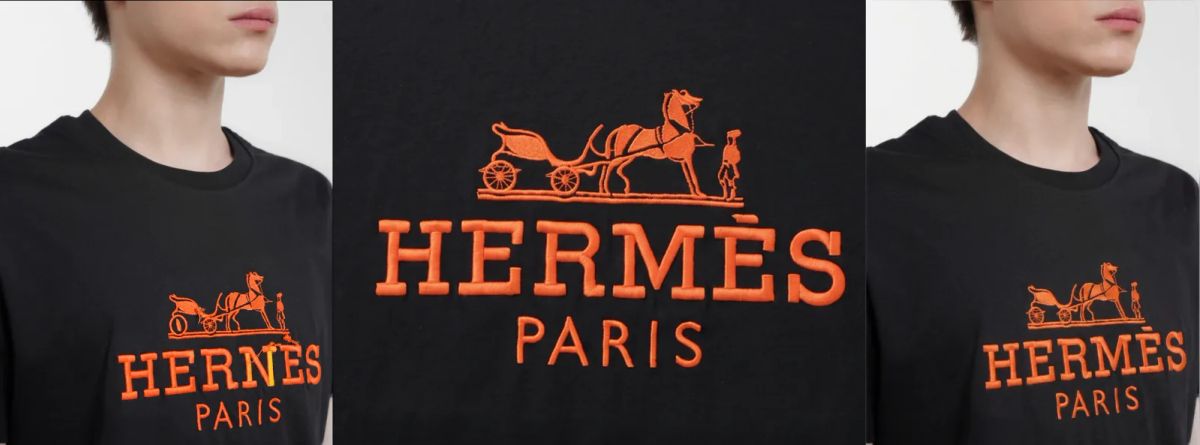
We hear this from customers constantly. At PI Apparel London earlier this year, an in-house AI content creator at Bestseller described his workflow as "rolling the dice every time." 45+ images a week, and when a garment detail comes out wrong, the only fix is full regeneration. No targeted edits. No retry on just the logo. Start over. At that volume, a 5% logo failure rate turns into hours of wasted production time per week.
Better prompts won't fix it. Bigger models won't fix it. Even fine-tuned brand-specific models drift on logo fidelity within a handful of generations. The fix has to happen after generation.
The three fixes teams try (and why two of them fail)
Most teams try three approaches to get brand-accurate logos on AI-generated clothing. The first two fail for the same underlying reason. Only the third works at scale.
Fix 1: prompt engineering (cheap, fast, doesn't work)
The first instinct is to describe the logo in the prompt. "A black hoodie with the Acme Co. logo on the chest, white text in Helvetica Bold." This fails because the model still doesn't know what your logo looks like. It generates a black hoodie with some white text that vaguely resembles your prompt. If you're lucky, the letters are readable. If you're unlucky, they spell something close to but not quite your brand name. Either way, the output isn't shippable as catalog imagery.
Some teams escalate to longer, more detailed prompts. The failure stays the same because the limitation is in the model.
Fix 2: generic inpainting models (better, still wrong)
The second instinct is to inpaint the logo region after generation. Mask the chest area, prompt "the Acme Co. logo, white text on black fabric," let an inpainting model regenerate that zone. This is better for the rest of the image because the surrounding garment doesn't change. But the logo problem is identical: the inpainting model invents a logo from the prompt rather than placing your real logo file.
There's a related category of tool that genuinely removes logos from images (Pincel and similar inpainting apps are designed for this; strip out an existing logo and replace it with blank fabric). That works for logo removal. It doesn't solve placement of a specific brand mark, because the underlying mechanism is still "ask a diffusion model to invent something." Your logo never enters the equation.
Fix 3: dedicated logo placement APIs (the actual fix)
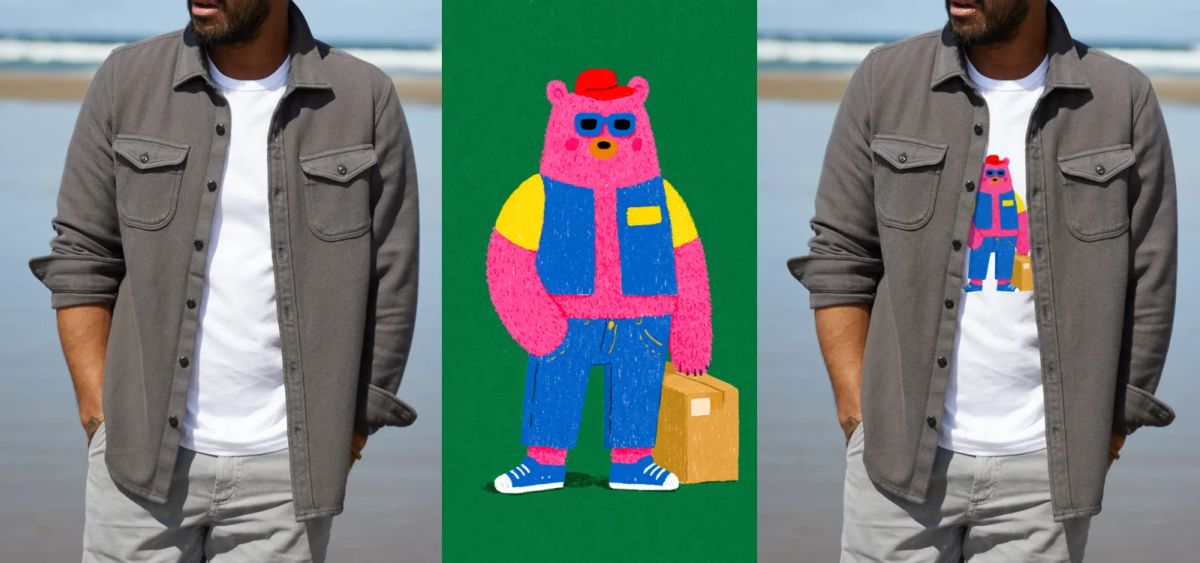
The third approach treats the problem differently. Instead of asking an AI model to generate or regenerate the logo, you supply your real logo as a PNG file. The API composites the actual logo onto the garment, using AI only for the blending step: matching fabric texture, surface curvature, lighting, and color tone so the placed logo reads as if it were printed or embroidered.
This works because your brand mark with your exact kerning, color, and geometry appears in the output. The output mark is rendered straight from your uploaded file. The AI handles only the parts where AI is good (blending, perspective, lighting). The part where AI is bad (reproducing arbitrary marks) is sidestepped entirely.
Runflow's Logo Fix is one such API; there are a small number of similar tools emerging in 2026, and the category is still finding its name. We cover Logo Fix specifically in Section 4 because it's our product. The mechanism described above is what any solution in this category should do. If a tool says it "generates" your logo rather than "places" it, that's the prompt-engineering trap with a fresh coat of paint.
What logo placement should actually do
A production-grade logo placement system has to do four things at once. Anything less produces a sticker-on-photo effect that catalogs and ad platforms reject.
Preserve exact logo geometry. The output mark should be your logo with the same kerning, proportions, and color values as the file you uploaded. If your brand uses a specific Pantone, that Pantone appears in the output. If your wordmark has tight kerning between the L and the O, that kerning is preserved. No regenerated approximation. No stylized interpretation.
Match fabric texture. A logo placed on a cotton tee, a polyester hoodie, and a knit sweater should read differently in each case because the fabric is different. A flat overlay looks pasted-on. A texture-matched placement looks printed or embroidered. This is where the model underneath matters. Our first version of Logo Fix used CLIP-based encoding and broke on complex textures (embroidered logos on knit, woven patches on denim). The current version runs on Qwen, which required reworking image encoding and inpainting logic entirely, but handles textured and embroidered logos reliably. Prompts can steer the rendering style: embroidery, screen print, woven patch, heat transfer.
Follow surface curvature. This is the failure mode for naive compositing. Chest curves, sleeve curves, drape folds, wrapped fabric. A flat 2D overlay that doesn't account for curvature looks wrong immediately and is the single most common giveaway that an image has been edited.
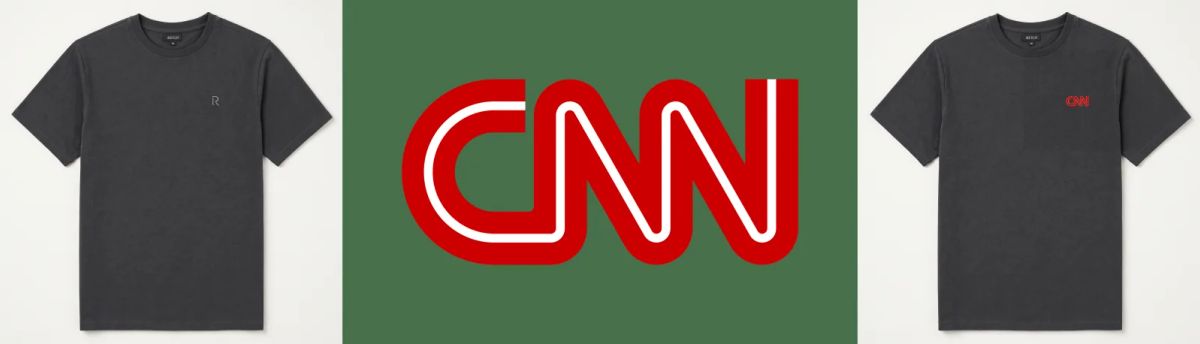
Match lighting and color tone. A logo placed on a brightly lit hero shot shouldn't look like it was lit by a different light source. The color values of the placed logo should sit naturally inside the target image's lighting environment. This is subtle, but it's the difference between catalog-ready output and an obvious composite.
When all four work together, the output reads as if the garment was photographed with the logo already on it. When any one fails, the human eye catches it instantly. So do ad platform review systems, which have gotten quite good at flagging AI-edited imagery.
Logo Fix: how it works in 60 seconds
Logo Fix is Runflow's API for placing your real brand logo onto any garment image. Send a target photo, your logo PNG, and an optional mask. The API blends the logo into the fabric, matching texture, curvature, lighting, and color. Output costs $0.20 per image.
Honest disclosure: Logo Fix is our product. The rest of this section walks through exactly what it does and how to call it. If you want the deeper marketing version, the Logo Fix product page covers it.
Some backstory on why we built it. Logo placement was the #2 customer request on Runflow's backlog in early 2026, and the previous version (built during our Ayakucho era) required multiple runs and manual post-processing to get right. It blocked roughly 10 downstream workflows that depended on brand-accurate output. When we rebuilt it on Qwen, the quality jumped enough that it became a single-call API rather than a multi-attempt workaround.
The three-step flow:
1. Send the target image, logo, and prompt. POST the garment photo, your logo file (PNG with transparency preferred), and a short prompt describing the placement. Optionally include a black-and-white mask that pins the exact zone where the logo should go. The mask is optional, but strongly recommended for the most accurate result.
2. The API places the logo. Logo Fix blends your real logo into the placement zone, matching fabric texture, surface curvature, lighting, and color tone. The logo itself stays exact (it's rendered straight from your uploaded file). Only the surrounding integration is generated.
3. Receive a brand-accurate output. The finished image lands via async webhook, ready for catalog upload, marketplace listing, or ad campaign delivery.
The minimal curl call:
curl -X POST https://api.runflow.io/v1/logo-fix \
  -H "Authorization: Bearer YOUR_API_KEY" \
  -H "Content-Type: application/json" \
  -d '{
    "image_url": "https://cdn.example.com/garments/hoodie-blank.jpg",
    "logo_url": "https://cdn.example.com/brand/logo.png",
    "mask_url": "https://cdn.example.com/garments/hoodie-mask.png",
    "prompt": "logo printed on chest, slight fabric texture",
    "callback_url": "https://your-app.com/webhooks/logo-fix"
  }'
The webhook returns the composited image URL when processing completes. Each call costs $0.20 with no volume discounts published. The pricing is intentionally simple for pipeline budgeting.
Where this fits in an AI fashion pipeline
Logo Fix sits between the image generation step and the delivery step. It's a branding accuracy layer: a single API call added to your existing pipeline.
The standard AI fashion pipeline in 2026 looks roughly like this:
- Generation step: a text-to-image or image-to-image call produces the base garment shot (blank tee, generic hoodie, model wearing unbranded clothing).
- Logo placement step: Logo Fix takes the generated image and your real logo, returns a branded version.
- Quality and delivery step: automated QA checks (resolution, format, brand compliance) and CDN delivery to your storefront, marketplace, or ad platform.
We've seen this pattern at every layer of the fashion stack. At Stride Europe 2026, we talked with Hugo Boss's digital creation team. Their biggest AI workflow pain? Approval and QC of generated assets: keeping every AI output faithful to the original 3D keyshot. The logo fidelity problem is a specific instance of that broader bottleneck. Brands at Hugo Boss's scale (500+ people in 3D, running their own ComfyUI and Temporal pipelines) have the orchestration layer to drop Logo Fix into. The integration is one HTTP call between the generation node and the QA gate.
Async webhook delivery means Logo Fix doesn't block your user-facing flow. Batch usage means a full catalog pass (50 SKUs, 200 SKUs, 5,000 SKUs) runs in parallel rather than serially. The endpoint is drop-in: if you can call the generation API in your existing code, calling Logo Fix is one additional HTTP request.
If you're building this kind of pipeline from scratch, our AI image workflows guide covers the broader pattern (the 10 use cases that AI image pipelines handle, including the branding layer this article addresses). If you'd rather build the placement step yourself in ComfyUI rather than calling an external API, the ComfyUI workflows guide covers the inpainting and IP-Adapter patterns that get closest to this functionality.
Who's using this pattern in 2026
Four categories of team run into the AI-logo problem most often.
DTC fashion brands with strong visual identity. Brands that have spent years building a recognizable logo can't ship imagery where that logo looks wrong. AI-generated catalog imagery is otherwise an enormous productivity win for DTC (lower cost than studio shoots, faster turnaround, more SKUs covered). The branding layer is what makes it shippable rather than a science project. We've seen this firsthand: the in-house AI content creators at fashion brands like Bestseller are processing 45+ images a week through ComfyUI, and logo accuracy is the single detail that blocks delivery most often.
Brand-licensed apparel. Sports, music, and entertainment licensing lives entirely on logo accuracy. A jersey with a slightly-wrong team logo isn't a jersey; it's a counterfeit. Licensed apparel pipelines need dedicated logo placement at every step because the legal and commercial risk of getting it wrong is severe.
Fashion marketplaces moderating seller imagery. Marketplaces accepting seller-uploaded AI imagery face a moderation problem: sellers' generated images often have wrong brand logos, especially when sellers are listing licensed or branded product. A platform-level Logo Fix pass before publishing keeps listings on-brand and reduces both moderation load and customer complaints.
AI fashion image platforms. Products that let users generate their own clothing imagery (Canva-for-fashion, custom merch platforms, brand asset generators) need a way to keep user-uploaded logos accurate in the output. Adding Logo Fix as the final step in their generation pipeline solves this without retraining their base model.
If your team fits one of these patterns and the logo problem is currently costing you designer hours or ad spend, this is the layer that fixes it.
FAQ: fixing AI-mangled logos on clothing
Why does Midjourney get my logo wrong?
Midjourney, like other diffusion-based image generators, doesn't have access to your specific brand logo file. It composes a plausible-looking mark from its training data rather than reproducing your exact logo. This happens with every text-to-image model, not just Midjourney. The fix has to happen after generation.
Can I just use better prompts to fix AI logos?
No. The limitation is in the model. More detailed prompts produce more detailed wrong logos. The only reliable fix is to supply your real logo file as a separate input and have it composited onto the generated image.
How do I add my real logo to an AI-generated clothing image?
Use a dedicated logo placement API like Runflow's Logo Fix. You upload the AI-generated garment image, your real logo as a PNG, and optionally a mask defining the placement zone. The API blends the logo onto the garment, matching fabric texture, curvature, and lighting.
What's the difference between logo placement and logo inpainting?
Generic inpainting models regenerate a region of an image from a text prompt, which means they invent a new logo rather than placing yours. Dedicated logo placement APIs take your actual logo file as input and composite it onto the garment, preserving your exact brand mark.
Does AI logo placement work for embroidered logos?
Yes. Logo Fix's Qwen-based model accounts for fabric texture and surface depth, and you can steer the rendering style in the prompt (embroidery, screen print, woven patch). The placed logo reads as embroidered or printed depending on the prompt and the surrounding garment context.
Can I use AI logo placement for licensed apparel (sports, music, entertainment)?
Yes. Licensed apparel is one of the strongest fits for dedicated placement APIs because the legal and commercial risk of getting the logo wrong is high. The output mark is rendered straight from your uploaded logo file, so the brand asset stays exact.
How much does it cost to fix an AI-generated logo on a clothing image?
Runflow's Logo Fix is priced at $0.20 per image. Generic AI image inpainting tools are cheaper per call but don't reliably place your specific logo. The actual cost comparison depends on whether you need brand accuracy or not.
Can I run logo placement in batch for a whole product catalog?
Yes. Logo Fix supports async batch processing via webhook delivery. A 500-SKU catalog can run through the API in parallel rather than serially, with each finished image arriving back at your webhook endpoint as it completes.
Does logo placement handle different garment types (hoodies, tees, caps, sleeves)?
Yes. Logo Fix handles chest, sleeve, and back placements, plus curved surfaces like caps and wrapped fabric. The mask input lets you pin the exact zone for any garment type, which is recommended for accuracy.
Is there an open-source way to fix AI logos on clothing?
Not currently. The closest you can get with open tooling is a ComfyUI workflow combining inpainting with IP-Adapter reference conditioning, which produces inconsistent logo fidelity. A dedicated placement API is the only category that reliably produces brand-accurate output today.
Where to go next
If you're fixing AI-mangled logos for a real product right now, here's the order of operations:
- Audit your current AI imagery for logo accuracy. If 5% or more of your output has mangled or wrong-looking brand marks, you have the problem this article solves.
- Decide whether to fix in-pipeline or post-hoc. In-pipeline (Logo Fix as a step between generation and delivery) is the right answer at scale. Post-hoc fixing (Photoshop, designer hours) works for one-off campaigns but doesn't survive volume.
- Try Logo Fix on your hardest example. Pick the garment image where the AI logo is most obviously wrong and run it through the playground. The output will either solve the problem or it won't, and you'll know in 5 minutes.
- Review the AI image workflows guide if you're designing the broader AI fashion pipeline. Logo placement is one piece; the other pieces matter too.
- Look at ComfyUI workflows if you want to build the placement step into your own custom pipeline rather than calling an external API.
The J.Crew, Shein, and Skechers backlash earlier in 2026 wasn't really about AI being bad. The technology to generate good catalog imagery exists. The technology to keep brand logos accurate on top of it exists too. The teams shipping cleanly in 2026 are the ones using both.
Want custom benchmarks for your workload?
We'll run our evaluation pipeline against your production data, for free.
Talk to Founders