ComfyUI consistent character with FLUX: the 2026 workflow
A ComfyUI consistent character workflow with FLUX: build a character sheet, train a LoRA, then turn the whole thing into a repeatable API endpoint.

Same face, shot one. Different jaw, shot two. By shot five it's a stranger in the same coat. That's the wall every ComfyUI consistent character attempt hits, and we hit it the expensive way: a whole afternoon burned rerolling seeds before we admitted prompts alone will never pin a face. The fix is a FLUX LoRA trained on the character, and it changes everything downstream.
The method has two halves. First you generate a character sheet: one image showing the same person from multiple angles and expressions against a controlled background. Then you cut that sheet into a small dataset, 10 to 15 clean crops, and train a FLUX LoRA on it. The demo finishes in about 37 minutes on a 20GB card (a 12GB card works, it just takes longer). After that, every future image of the character is one prompt away.
Mickmumpitz published the workflow that popularized this approach, and it's the cleanest version I've seen. This post walks through what it does, then covers the part the tutorial doesn't: how to run it for fifty characters on a schedule without a GPU under your desk.
Why character consistency is hard in the first place
Diffusion models have no memory of a character between generations, so without an anchor every image is a fresh roll of the dice.
When you prompt "a woman with red hair in a brown coat," the model picks a face that fits. Run it again with a new seed and it picks a different face that also fits. Both are valid. Neither is the same person. The text prompt is too loose a handle to pin down the thousands of tiny features that make a face recognizable.

ControlNet and pose conditioning get you part of the way. They lock body position and rough composition, but they don't lock identity, which is why even a careful pose-guided run still drifts on the face and on details like clothing texture.
The fix is to give the model an actual reference of the person, learned into its weights. That's what a LoRA does, and why the character-sheet-then-LoRA pattern beats prompt engineering every time.
Step one: generate a character sheet with FLUX
The character sheet is a single OpenPose-driven image that shows your character from several angles at once, which gives you a coherent set of views to train on.
The workflow starts from a pose sheet: a grid of OpenPose skeletons, each a different angle or stance. You drag it into ComfyUI as the ControlNet input, then write a short prompt describing the character. Hair, clothing, build, a vibe. The tutorial example is a woman in autumn fashion, brown coat, for a magazine look.
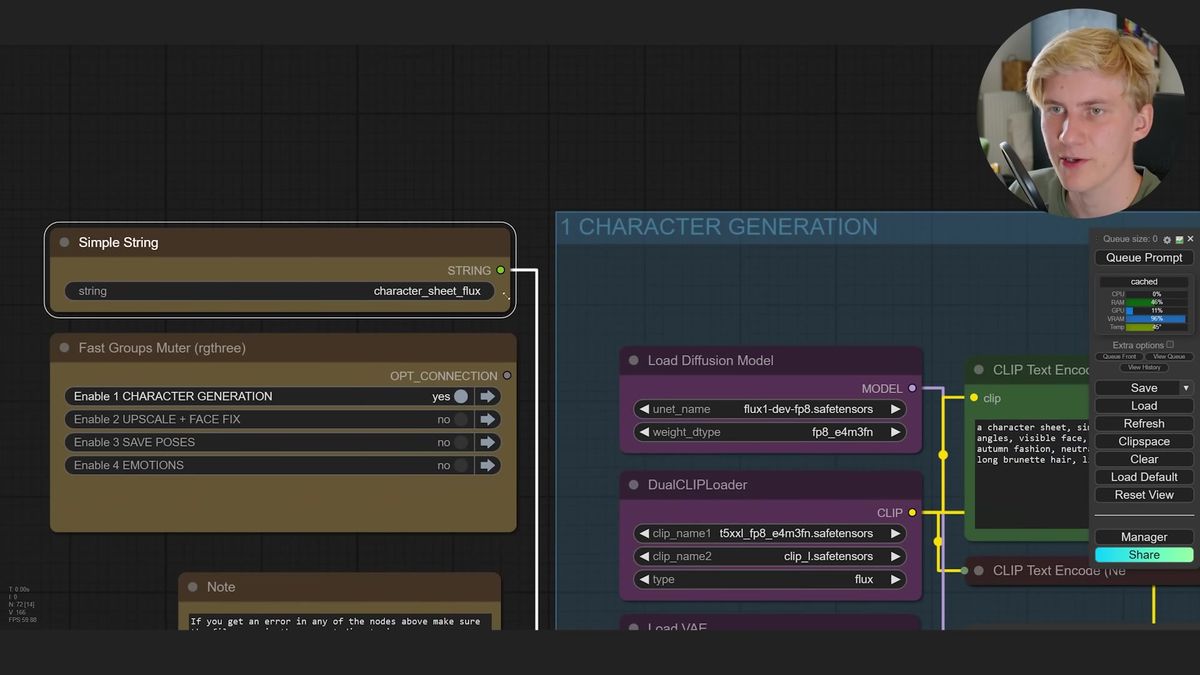
You run the first group, look at the result, and reroll the seed until you get a sheet you like. FLUX is slower than SDXL here and its ControlNet is less reliable, so expect a few broken sheets before a clean one lands. When it works, it works well.
Once you've locked a sheet, the later groups run automatically. They upscale it, then slice out the individual faces, the individual poses, and a set of emotion variations driven by expression sliders. You can rotate head pitch and yaw to capture left and right three-quarter views, which matters a lot for the next step.
The tutorial also ships an SDXL version of the same graph. It's faster and more consistent than FLUX, so keep both around. Use FLUX when you want its look, SDXL when you want speed and a higher hit rate.
Step two: turn the sheet into a FLUX LoRA
A FLUX character LoRA learns one specific person from 10 to 15 clean images, after which a single trigger word reproduces them on demand.
Collect the best crops into a folder: varied angles, a spread of emotions, sharp faces. Ten to fifteen images is plenty. The tutorial crops a couple of extreme side views down to the face so the dataset covers profile angles too.
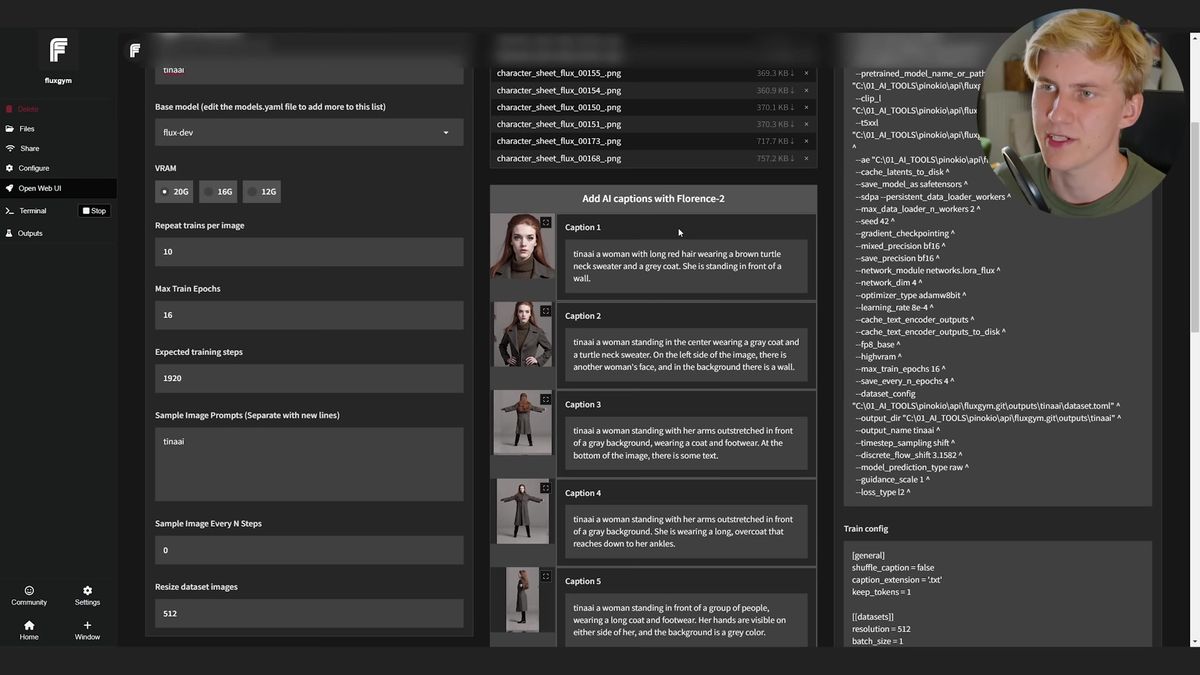
Give the character a unique trigger word, something invented so it doesn't collide with the model's vocabulary. "Tina_ai" rather than "Tina." That token is the handle you'll type in every future prompt.
For training, FluxGym is the tool of choice. It's a small web UI for FLUX LoRAs, and the one-click route is to install it through Pinocchio. Drag your images in, write short captions (gray background, the pose, the emotion, the shot type), and start training. Captions stay simple on purpose. Over-describing teaches the model the wrong things.
Training FLUX Dev wants real VRAM. The demo uses a 20 GB-plus card and finishes in about 37 minutes; a 12 GB card works but takes longer. FluxGym writes snapshots at several stages, so you can test an earlier checkpoint if the final one overfits.
Step three: generate consistent images, even with two characters
Once the LoRA is trained, you load it into your FLUX graph at strength 0.9 to 1.0, drop the trigger word in your prompt, and every image is the same person.
Drop the trained LoRA into your ComfyUI models/loras folder, point the workflow at it, and prompt as normal with the trigger word included. Keep strength high, around 0.9 to 1.0, lowering it when you want more freedom on pose and styling. The first generation usually already looks like the character. No cherry-picking.
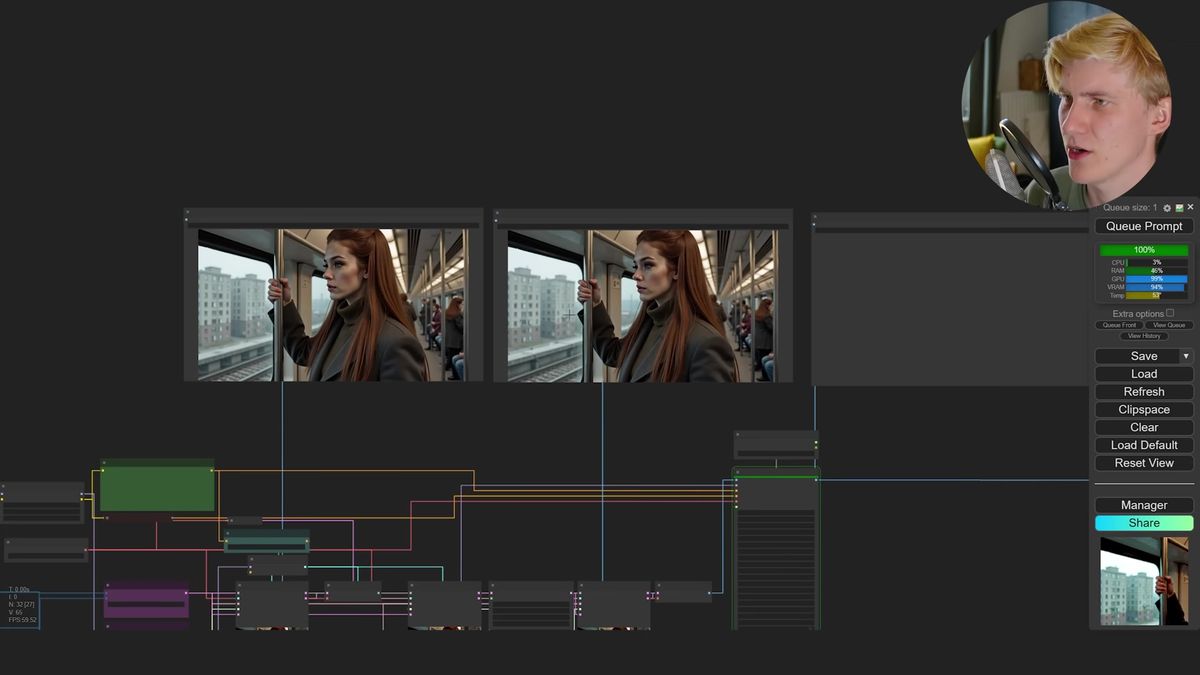
The polished version of the graph adds tricks worth copying: injecting extra noise partway through generation to break the plastic look, an optional upscaler, and a film-grain node for an analog feel. None of that is required for consistency. It's about output quality once consistency is solved.
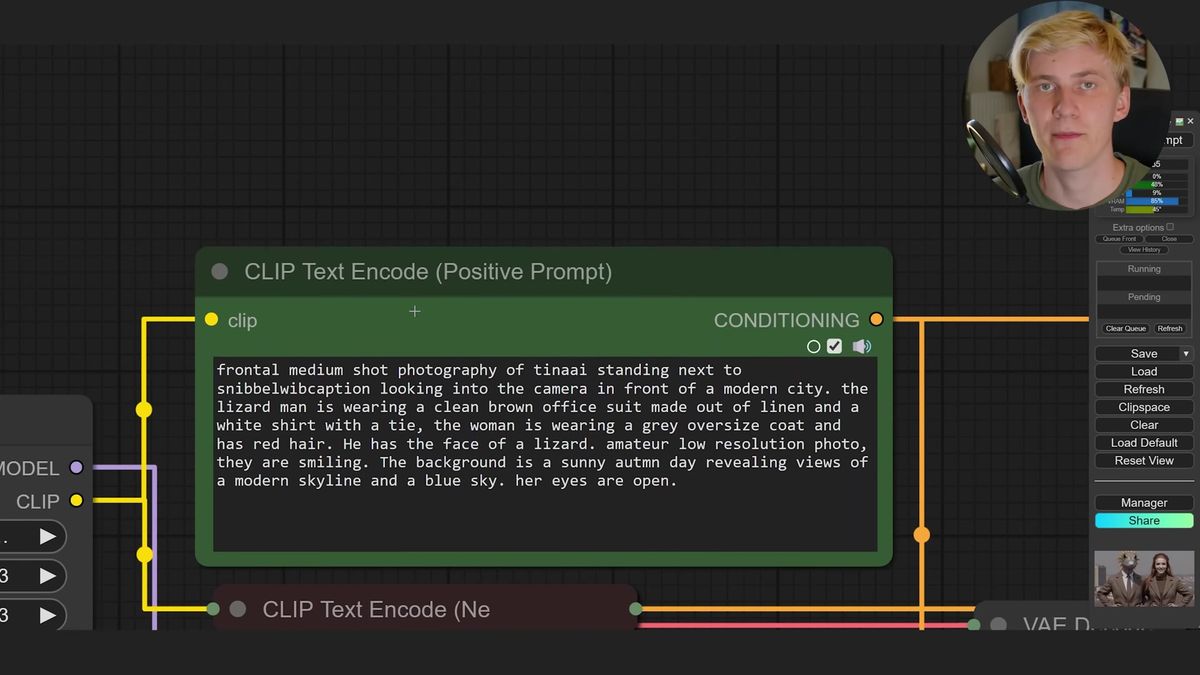
Two characters in one frame is the part people assume is hard, and it mostly isn't. Load both LoRAs, drop each strength a little to give FLUX flexibility, then write a prompt that places the two ("standing next to each other") followed by a short description of each character. That spatial separation plus per-character detail stops the LoRAs from blending into one hybrid creature, the most common failure when stacking LoRAs.
For where pose conditioning fits alongside identity, our pose-guided generation endpoint handles the composition half as a hosted API, which pairs naturally with a character LoRA for identity.
Where this breaks at scale
The desktop workflow is perfect for one creator and a handful of characters; it falls apart the moment you need it to run reliably for many characters, on demand, inside a product.
A few things bite once you go past hobby scale.
Training is slow and GPU-bound. Thirty-plus minutes per LoRA on a 20 GB card is fine for your own project. It's a non-starter when a customer signs up expecting their character in minutes, or when you're onboarding fifty characters for a content pipeline.
The graph is fragile. FLUX ControlNet produces broken sheets some fraction of the time. A human reroll fixes that in seconds. An unattended batch job has nobody watching, so you need retries, validation, and fallbacks baked in.
And it all lives on one machine. Two concurrent jobs means two machines, or a queue, or both. Now you're running infrastructure instead of making images. That's the gap between a great tutorial and a shipped feature: the workflow is correct, but running it a thousand times a day without you in the loop is a different job.
Turning the workflow into a repeatable API endpoint
Runflow runs the same ComfyUI graphs and FLUX models as a hosted API, so the character pipeline becomes an endpoint your app calls instead of a machine you maintain.
The shape we see work: keep the creative workflow in ComfyUI, then deploy it so your product can trigger it programmatically. You upload the graph, Runflow handles the GPUs, queueing, and retries, and you get a URL that takes inputs and returns outputs. No local card, no idle compute bill, no 3am pager.
A run looks like this. Submit the job, then poll for the result:
# Kick off a generation against a hosted model or workflow
curl -X POST https://api.runflow.io/v1/models/{owner}/{slug}/runs \
  -H "Authorization: Bearer $RUNFLOW_API_KEY" \
  -H "Content-Type: application/json" \
  -d '{
    "input": {
      "prompt": "tina_ai, autumn fashion editorial, brown coat, three-quarter view",
      "lora": "tina_ai",
      "lora_strength": 0.95
    }
  }'

# Response includes a run id
# { "id": "run_8f2c...", "status": "queued" }

# Poll until the run finishes
curl https://api.runflow.io/v1/runs/run_8f2c... \
  -H "Authorization: Bearer $RUNFLOW_API_KEY"

# { "status": "succeeded", "output": { "images": ["https://..."] } }
Same pattern whether you're calling a base FLUX model or your own deployed character graph. Pricing is simple fixed per-call, so you can cost a feature before you ship it.
Runflow hosts 700+ models including the FLUX family, so the base generation, upscaling, and post-processing in your graph all have a hosted equivalent. Browse the model catalog, and to push your own ComfyUI workflow into production see how ComfyUI Deploy turns a graph into an endpoint.
Frequently asked questions
What is a ComfyUI consistent character workflow?
It's a two-stage process in ComfyUI: generate a character sheet showing one person from many angles, then train a LoRA on that sheet. After training, a single trigger word in your prompt reproduces the same character across any new image.
Do I need FLUX, or does SDXL work too?
Both work. FLUX gives a stronger, more photographic look but is slower and its ControlNet breaks more often. SDXL is faster and lands a clean sheet more reliably. Many creators keep both graphs and pick based on the look they want.
How many images do I need to train a FLUX character LoRA?
Around 10 to 15 clean images. Aim for variety: several angles, a spread of emotions, and sharp faces. A small high-quality set beats a large noisy one.
Why does my character still change across images?
Almost always one of two things: LoRA strength set too low, or a trigger word that collides with a real word the model already knows. Push strength to 0.9 to 1.0 and pick an invented trigger token like "tina_ai" rather than a common name.
How do I keep two characters from blending together?
Load both LoRAs at slightly reduced strength, then write a prompt that places them spatially ("standing next to each other") and gives each one its own short description. The separation plus per-character detail lets each LoRA settle into its own region instead of merging into a hybrid.
How long does FLUX LoRA training take?
Roughly 30 to 40 minutes on a GPU with 20 GB or more of VRAM. A 12 GB card works but runs slower. The first run is longer because FLUX Dev is a large download.
Can I run this without a powerful GPU?
For the desktop workflow, no, you need a capable local card. For production, yes: a hosted AI character generator API runs the same FLUX models and ComfyUI graphs on cloud GPUs, so you call an endpoint instead of owning hardware.
How do I turn my ComfyUI character workflow into an API?
Deploy the graph to a platform that runs ComfyUI in the cloud. You upload the workflow, it handles GPUs, queueing, and retries, and you get an endpoint that takes inputs and returns images. Our ComfyUI to production guide covers the gotchas, and the ComfyUI API developer guide covers the integration details.
Is the character sheet step strictly necessary?
It's the most reliable way to get a varied, consistent dataset in one shot. You could assemble training images by hand, but the sheet gives you matched angles and emotions of the same person in one generation, exactly what a clean LoRA needs.
Where to go next
- Watch the Mickmumpitz tutorial end to end and download the workflow files so you can follow the node groups in order.
- Build one character sheet in FLUX or SDXL, reroll seeds until you get a clean one, and slice out the faces, poses, and emotions.
- Train your first LoRA in FluxGym on 10 to 15 of the best crops, with simple captions and an invented trigger word.
- Test the LoRA at strength 0.9 to 1.0, then try a two-character prompt to see the stacking behavior firsthand.
- To run this for more than one character, read the ComfyUI to production guide for how the desktop graph becomes a hosted job.
- Deploy your workflow as an endpoint with ComfyUI Deploy, or call a base FLUX model from the model catalog.
- Wire the endpoint into your app using the poll pattern above, so a new character image is one API call away.
The LoRA solved the stranger-in-the-same-coat problem. The real question is whether the thing answering at 3am when your fiftieth character signs up is a card under your desk, or an endpoint that just works.
Start free at runflow.io.
Want custom benchmarks for your workload?
We'll run our evaluation pipeline against your production data, for free.
Talk to Founders