ComfyUI advanced tutorial: conditioning and sampling (2026)
ComfyUI advanced tutorial on noise, ControlNet timestepping, and tiled upscaling, plus how that hand-tuned control survives once it runs as a production API.

Eight nodes for one image. Then forty. Then a graph so dense the author apologizes for the mess on camera. That is what a ComfyUI advanced tutorial actually looks like once you stop generating from an empty latent and start steering every step. The Latent Vision walkthrough we are paraphrasing here spends thirty-five minutes pulling apart three things most people treat as magic: how noise carries the whole picture before a single step runs, how ControlNet bends that noise mid-sampling, and how upscaling is really just controlled re-noising at higher resolution.
We learned the second half of this the expensive way. Every knob in that graph is a knob someone has to set, watch, and re-set per checkpoint and per image. Glorious on your own machine, where you have all afternoon. A different proposition the moment the same workflow has to answer a thousand requests without a human nudging the strength slider (we have run that math, and it does not end well for the person holding the slider).
So this guide does two passes. First the deep one: noise, ControlNet, sampling, and tiled upscaling, the way the video lays them out. Then the production pass: what happens to all that control when the graph has to run as an API instead of in front of your eyes.
Why the noise already contains your image
The starting noise is not random filler the sampler removes. It already holds every element of the final picture, and you can drive the result by deciding what that noise looks like.
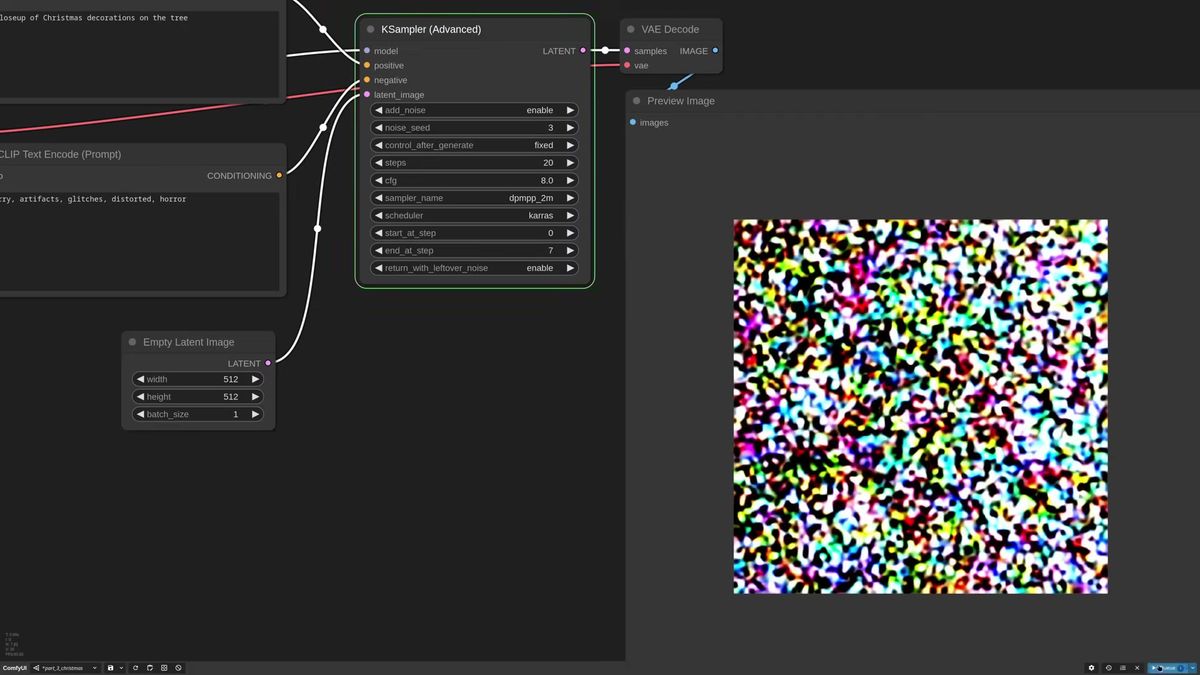
Set a KSampler Advanced to return leftover noise and end at step one, and you see the first frame: pure static that looks like nothing. Push the end step to ten and the image is already roughly there. That is the part worth sitting with. The composition is decided early, in the first handful of steps, not polished into existence at the end.
Which means you can cheat. Instead of feeding an empty latent, you feed your own noise. Drop in a prepared noise image, send it to the latent and the sampler, and the generation starts from a pattern you chose. The video shows a stone-frame prompt that keeps drifting off-target, then a rough reference fed through a Set Latent Noise Mask so the model only re-noises inside the masked edges. Same seed family, four-up batch, and the composition holds across all four. It is the crudest form of composition conditioning, and it already gives you a handle the empty-latent path never does.
The lesson under it: the first steps set the structure, later steps fill detail. Every advanced trick that follows is some version of "control the early steps hard, let go later."
How ControlNet bends the noise mid-sampling
ControlNet keeps influencing the latent throughout sampling instead of only at the start, so you can force a pose, an outline, or a depth layout while the prompt still drives the style.
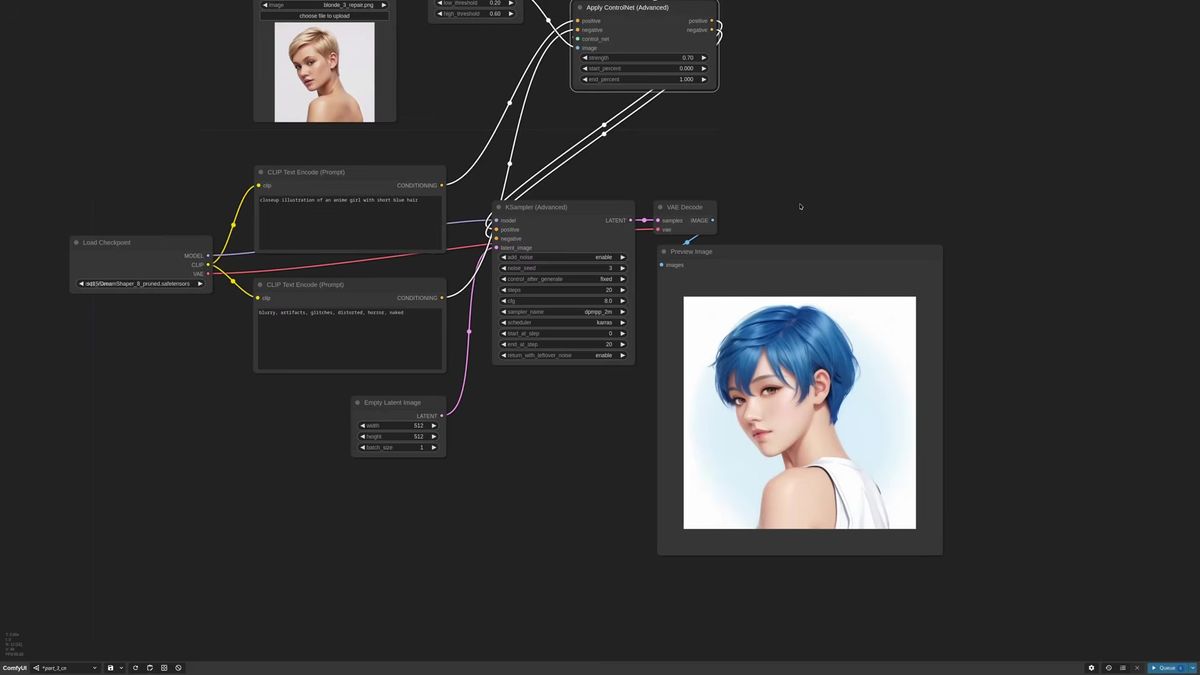
Use the Apply ControlNet Advanced node and ignore the rest, it is the one you will reach for ninety-nine times out of a hundred. The pattern never changes: load a reference, run it through a preprocessor the ControlNet can read, load the matching ControlNet model, wire positive and negative back to the sampler.
Canny is the fast, simple one. Feed a pose reference, run a Canny edge preprocessor, lower the thresholds when you want finer lines, then pick a Canny model (the ControlNet++ family is a safe SD1.5 starting point). The video gets an anime girl into a reference pose this way, but the catch shows up immediately: at full strength the output borrows the reference subject's face too. Strength one is almost always too high. Around 0.7 gives the checkpoint room to stay on-style while still honoring the structure.
The mental model that makes this click: ControlNet strength behaves like a blur filter on the conditioning. Low strength is a heavily blurred reference, so the model sees only rough shapes and fills the rest from the prompt. High strength is a sharp reference it has to obey. That single analogy explains every "too strong, lost the style / too weak, lost the pose" frustration you will hit.
Timestepping: strong at the start, free at the end
Mixing ControlNet strength with start and end percentages is the real fine-tuning tool, because the early steps own the composition and the late steps own the detail.
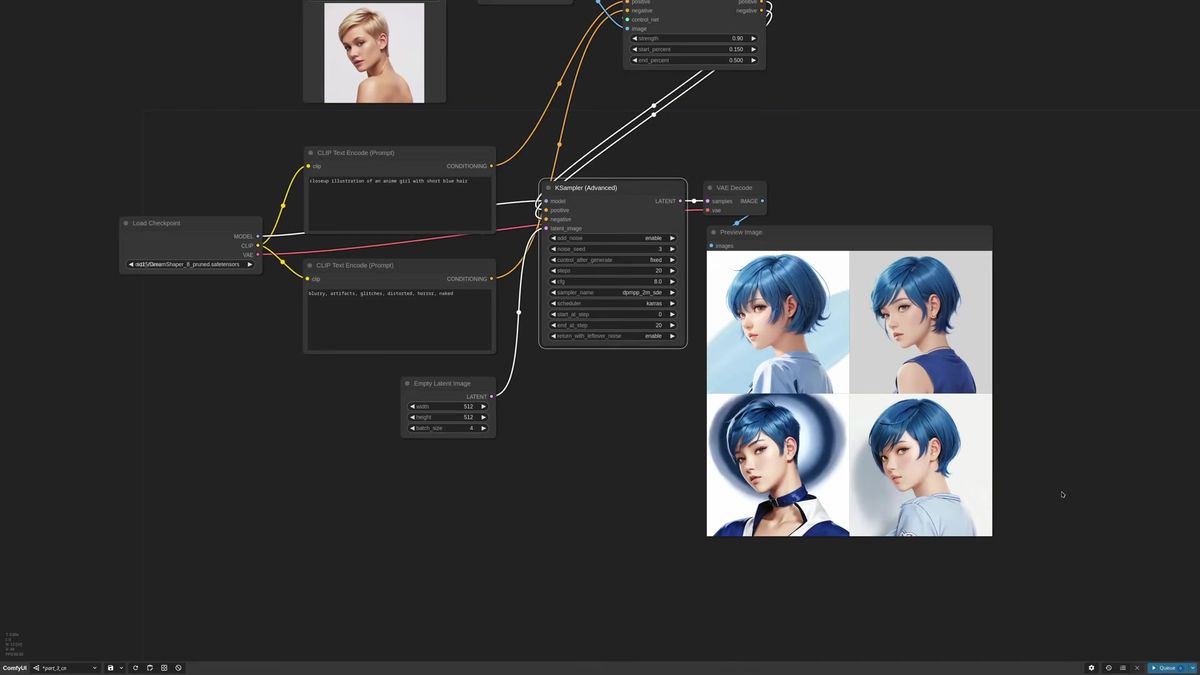
Strength alone is a blunt instrument. Timestepping is the scalpel. The end-percent field stops the ControlNet's influence partway through, the start-percent field delays when it kicks in.
The recipe from the walkthrough: let the model follow the prompt cleanly at the very start for a strong style, then have the ControlNet take over to lock the composition. Set a small start percent, keep the strength high, and the pose snaps into place once the structure-setting steps arrive. One detail that matters here. If you start a ControlNet later than step zero, switch to a stochastic sampler like DPM++ 2M SDE or Euler Ancestral. A non-converging sampler has more freedom moving between steps, so it adapts better when the conditioning changes partway through. A converging sampler can lock in too early and fight the late-arriving control.
The video also makes a point worth stealing for any tool: the most obvious ControlNet is not always the best one. An OpenPose stickman looks like the "correct" choice for a pose, but on that particular generation Canny caught the shoulders better. Try the logical option, then try the one you did not expect.
Tile, depth, and IP-Adapter for harder control
Tile ControlNet transfers color and layout straight from pixels with no preprocessor, depth ControlNet handles volume, and IP-Adapter pulls a reference's look, so stacking them gives layered control over one generation.
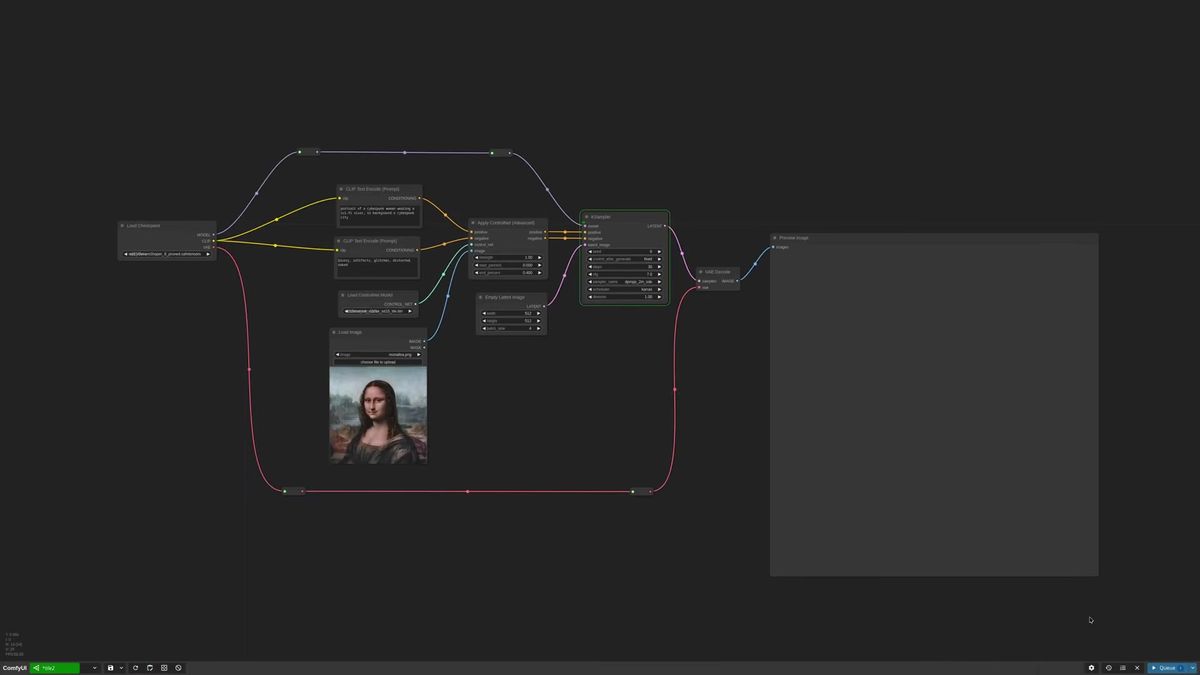
Tile is the quiet workhorse, and it matters most because it paves the road to upscaling. It reads pixel values directly, so no preprocessor. Push the strength high but stop its influence at forty percent and you get a loose resemblance to the reference with the prompt's style on top. Push the end percent to eighty and the output hugs the reference much tighter. It is, at heart, a color-and-layout transfer you can dial from "inspired by" to "almost a copy."
Depth, via something like Depth Anything V2, captures the volumes of a scene rather than its edges. Stack a high-strength depth ControlNet for structure with a looser tile ControlNet for color and you get two independent dials on the same image.
IP-Adapter is the third lever. Where ControlNet conditions on structure, IP-Adapter conditions on appearance. The video uses an IP-Adapter Advanced with a low weight, around 0.45, to borrow a reference dress without overpowering the rest. Light touch on purpose. These stack, and each one you add is another value to tune by hand.
Upscaling is controlled re-noising, not magic
Every upscaling method here is the same loop: enlarge the image, add noise, and run another sampling pass with guidance so the model fills the new pixels instead of hallucinating mutants.
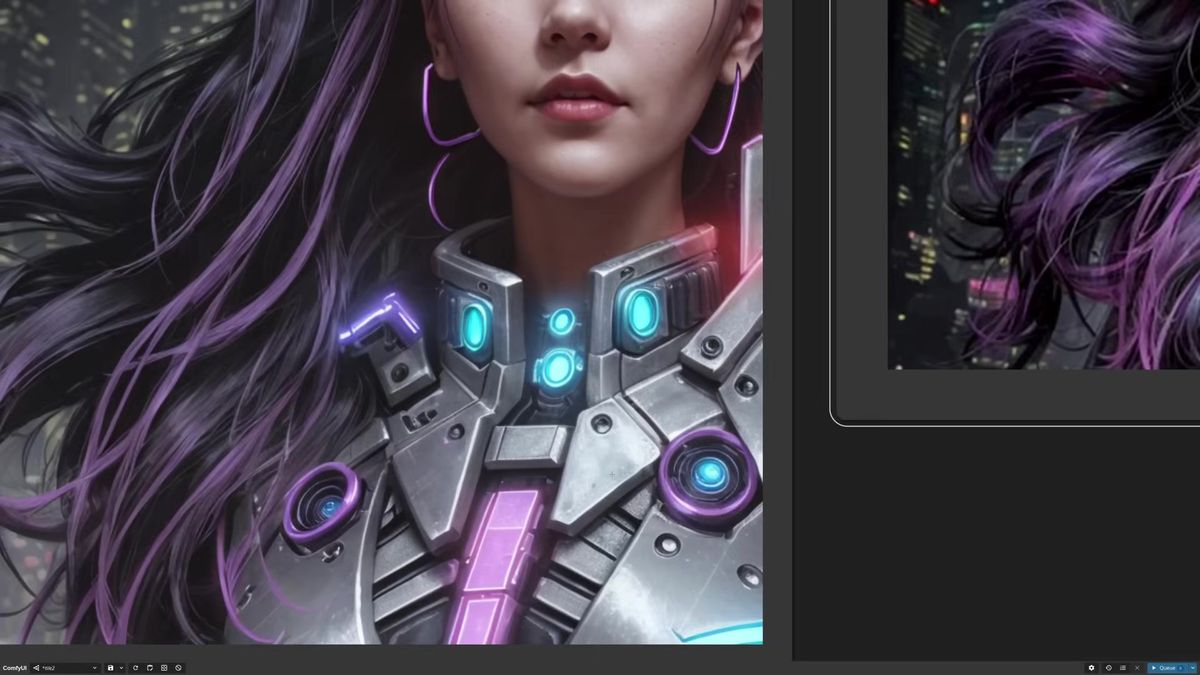
The naive route fails in an instructive way. Upscale by latent factor two, encode, run a second KSampler at low denoise. That works at 2x. Push to 3x or 4x and the model produces a mutant, because the sampler suddenly has a huge canvas and no guidance on how to fill it. The fix is a tile ControlNet pointed at the original generation, giving the disoriented model a color-and-layout map to follow. That alone gets a clean 2K image out of an SD1.5 checkpoint.
To add real detail rather than just pixels, inject noise. Run a first KSampler Advanced to about half the steps with leftover noise enabled, merge in a generated noisy latent with an Inject Noise node, then a second sampler finishes from where the first stopped. Crank the noise strength and the armor in the example sprouts fine weathering and small features. Sync the first sampler's end step to the second's start step with a shared primitive so they never drift apart.
For the highest detail, go tiled. Split the image into padded quadrants (ComfyUI has no loops yet, so you process each tile by hand), run depth plus tile ControlNet per tile with a per-tile prompt, then composite the tiles back with feathered masks to hide the seams. A final light pass with a dedicated upscale model like UltraSharp, a color match to recover the original palette, and optionally a LUT for grade, and you are done. Forty-plus nodes for one image. As the author says, you would not run this daily, but understanding it means the automated upscalers stop being a black box.
What advanced ComfyUI looks like as a production API
A workflow this hand-tuned runs beautifully in front of one operator and falls apart the moment it has to answer real traffic, because every strength value, timestep, and seed is a human decision the API cannot make per request.
Three things break when this graph becomes a product feature.
Determinism. Half the magic above is the operator watching a preview and nudging a slider. "Lower the strength a bit, try another seed, the most logical ControlNet was not the best one." That judgment does not exist behind an HTTP endpoint. You either lock the parameters that work for your use case or you expose them and let callers melt their own results.
Concurrency. ComfyUI runs one graph at a time on one card. A forty-node tiled upscale that takes a minute for you becomes a queue when ten users hit it at once, and the tenth person waits ten minutes. Disclosure: Runflow is our product, but this concurrency wall is real whether you use us or not.
Cost and operations. Keeping a card warm for a graph this heavy, with the AI and DevOps people to babysit it, is the line item teams underestimate. Running it well usually means no AI team required on your side and simple fixed pricing per call instead of a GPU you rent by the hour. Our own infrastructure work is roughly 70% cheaper than building the same thing in-house, which is the only reason the per-call number stays reasonable.
None of this is a knock on ComfyUI. It is the right place to design and tune a workflow like this. It is the wrong thing to be the live backend for software other people depend on.
How to call advanced workflows as an API
You either call a single hosted model for the parts that map to one model, or deploy the whole tuned graph as an endpoint, then poll the run until it finishes.
For the model-shaped pieces, the call is the same every time. POST your inputs to a model's run endpoint, get a run ID, poll it.
# Submit a run against a hosted model
curl -X POST https://api.runflow.io/v1/models/black-forest-labs/flux-dev/runs \
  -H "Authorization: Bearer rf_live_your_key" \
  -H "Content-Type: application/json" \
  -d '{
    "input": {
      "prompt": "cyberpunk woman in sci-fi metal armor, neon palette, sharp detail"
    }
  }'
You get back a run ID. Poll it until the status reads finished:
curl https://api.runflow.io/v1/runs/RUN_ID \
  -H "Authorization: Bearer rf_live_your_key"
Wrapped in a small loop, that is the whole integration:
import requests, time

BASE = "https://api.runflow.io/v1"
HEAD = {"Authorization": "Bearer rf_live_your_key"}
MODEL = "black-forest-labs/flux-dev"

run = requests.post(
    f"{BASE}/models/{MODEL}/runs",
    headers=HEAD,
    json={"input": {"prompt": "cyberpunk woman in sci-fi metal armor, neon palette"}},
).json()

run_id = run["id"]
while True:
    r = requests.get(f"{BASE}/runs/{run_id}", headers=HEAD).json()
    if r["status"] in ("succeeded", "failed"):
        print(r)
        break
    time.sleep(2)
Concurrency, retries, and failover are handled for you, so the tenth caller is not stuck behind nine others. Any model swaps in by changing the slug, and there are 700-plus of them in the Runflow model catalog. The ComfyUI API developer guide is the pillar to read next for the integration patterns at scale.
The multi-ControlNet, tiled-upscale graph above is not one model, though, it is a whole pipeline. For that you deploy the graph itself. ComfyUI Deploy takes your exported workflow JSON and runs it as a hosted endpoint on a real GPU, so the forty-node monster you tuned by hand ships exactly as-is, parameters and all. If you want patterns for keeping those graphs reliable under load, the production-ready ComfyUI workflows guide and the Solutions API overview are the next stops.
Frequently asked questions
What does an advanced ComfyUI tutorial actually cover?
The level past prompt-and-generate: how the starting noise already encodes the composition, how ControlNet conditions the latent throughout sampling, how strength and timestepping fine-tune that influence, and how upscaling is really controlled re-noising at higher resolution.
How does noise control the composition in ComfyUI?
The starting latent noise holds the image structure before any step runs, decided in the first few steps. Feed your own noise instead of an empty latent, or mask part of it with a Set Latent Noise Mask, and you steer the composition before sampling even begins.
What is ControlNet timestepping and why use it?
Timestepping uses the start and end percent fields on Apply ControlNet Advanced to control when the conditioning is active. Because early steps own composition and late steps own detail, a high-strength ControlNet that stops partway locks the structure while letting the prompt finish the style.
What ControlNet strength should I start with?
Around 0.7 for most cases. Strength one is usually too high and the output starts copying the reference subject. Think of strength as a blur filter on the conditioning: lower is blurrier and freer, higher is sharper and more obeyed.
Why does my image become a mutant when I upscale?
At high upscale factors the sampler has a large canvas and no guidance, so it hallucinates. Add a tile ControlNet pointed at the original generation to give it a color-and-layout map, and the artifacts go away. That gets clean 2K out of an SD1.5 checkpoint.
What is noise injection in upscaling?
Run a first sampler to about half the steps with leftover noise, merge in a generated noisy latent with an Inject Noise node, then a second sampler finishes from there. The extra noise convinces the sampler to add fine detail instead of just enlarging existing pixels.
Can I run a full multi-node ComfyUI workflow as an API?
Yes. A tiled-upscale graph with depth and tile ControlNets is a pipeline, not a single model, so you deploy the graph. ComfyUI Deploy runs your exported workflow JSON as a hosted endpoint, parameters intact, instead of rebuilding it as separate calls.
Should I use this manual upscaling workflow every day?
No, and the video says so. Extensions like Ultimate SD Upscale or tiled diffusion automate most of it. The point of building it by hand is to understand the mechanics so you use the automated tools better and debug them when they misbehave.
How is a hosted model API different from running ComfyUI locally?
Locally you tune parameters live and run one graph at a time. An API has to make those choices ahead of time, answer concurrent requests, and stay up without you watching, which is why production usually means locking the parameters and handing the GPU operations to a hosted endpoint.
Where to go next
You have both halves now: the deep ComfyUI control over noise, conditioning, and upscaling, and the path to running it when the slider-nudging human is no longer in the loop. The workflow was never the hard part. The real question is whether your own card is still the thing answering at 3am when the tenth request lands mid-tiled-upscale.
- Build the noise-preview setup with a KSampler Advanced and watch the composition appear in the first ten steps.
- Add a Canny ControlNet at strength 0.7, then layer in timestepping to keep the style and the pose.
- Stack a depth ControlNet for volume and a tile ControlNet for color on one generation.
- Build the noise-injection upscale, syncing the two samplers with a shared primitive.
- When real traffic arrives, call the model-shaped pieces through the Runflow model catalog so concurrency and failover are handled for you.
- For the full tuned graph, deploy it with ComfyUI Deploy and keep the parameters you fought for.
- Read the ComfyUI API developer guide for integration patterns at scale.
Start free at runflow.io.
Want custom benchmarks for your workload?
We'll run our evaluation pipeline against your production data, for free.
Talk to Founders