Build your own AI product photography generator for ecommerce with two API keys
Deploy a modular AI product photography generator for ecommerce that turns one product photo into a full lifestyle and social media pack, running on open Runflow workflows at ~$0.26 per pack.

If you run a DTC store, your product photography live in three places: the supplier listing, your storefront, and a Pinterest board you abandoned last quarter. Each one needs its own crop and aspect ratio.
Most teams pick one of two compromises. Pay a $30+ a month subscription to a closed photography tool that does decent generic versions of all of it. Or pay a human photographer per shoot and wait a week.
This walkthrough shows a third path. An AI product photography generator for ecommerce that runs on open Runflow workflows you can fork, modify, and execute pay-as-you-go on your own API keys. Around $0.26 per generated pack, paid directly to Runflow and OpenAI. No subscription tax.
I recorded a 14-minute Loom going through it end to end. The post below is the companion if you'd rather read or skim.
Why open workflows beat closed-source models for ecommerce
Closed image models like Nanobanana or GPT-Image-2 ship a single API call: prompt in, image out. That's the right shape for a one-off mockup when you need a quick visual.
A product catalogue is a different problem. You need cleanup, then isolation, then scene generation, then resize. Each step has different inputs and a different cost profile. Bundling them into one prompt loses you control over every individual operation.
A workflow-based approach chains those steps separately. You can swap any one of them without rebuilding the rest. If GPT-Image-2 gets replaced next quarter by something cheaper, you swap that node and everything else keeps working.
There's a price element too. Subscriptions to closed ecommerce image tools start at $30 a month minimum, regardless of volume. Generate one pack a month, you still pay. Generate 200, you still pay until you bump tier. Pay-as-you-go scales linearly with actual usage and tops out at whatever you're willing to spend.
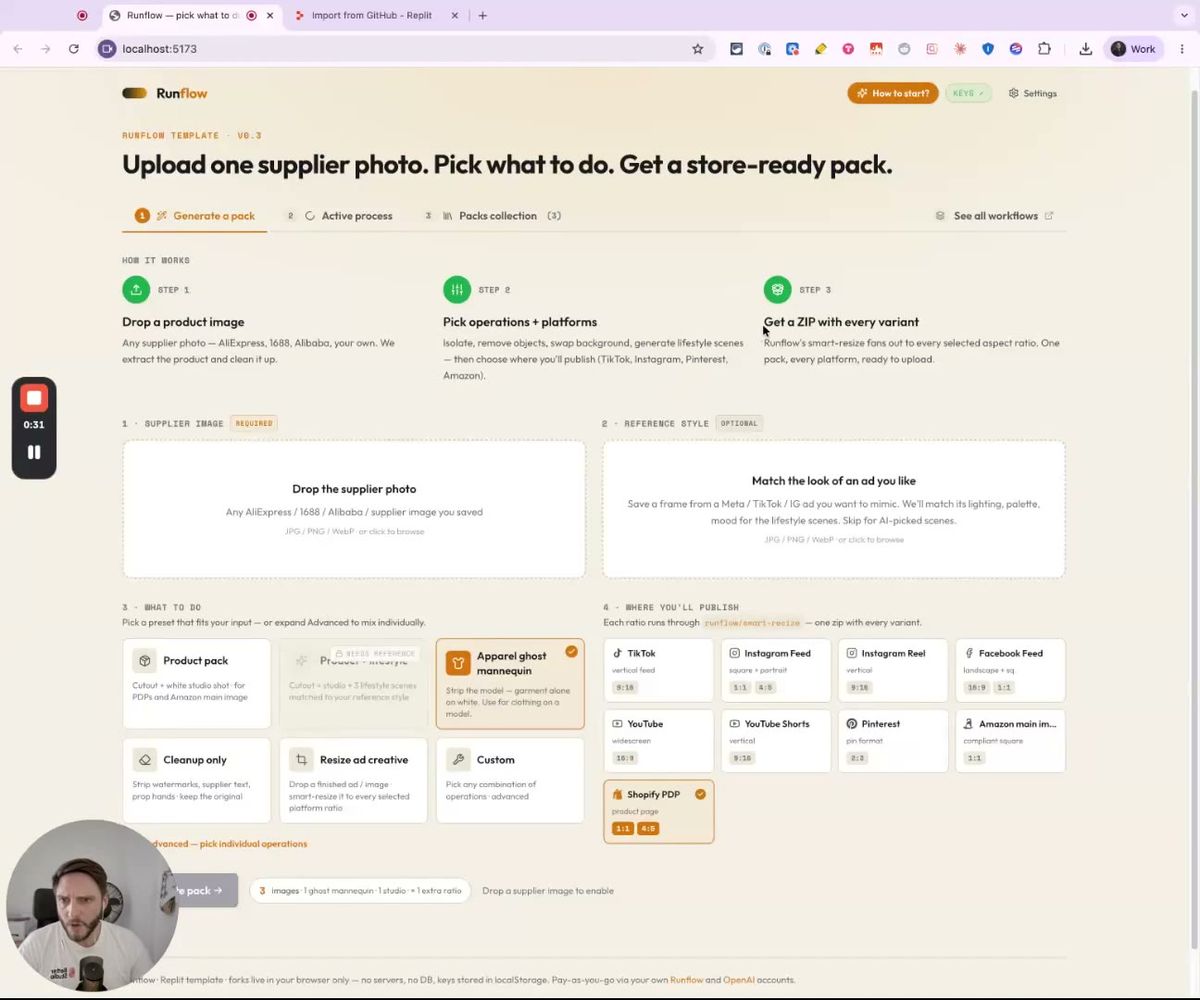
The template I'll walk through is open. You fork the GitHub repo, run it on Replit, and pick the operations and target platforms for each pack.
The two-key Replit setup
Setup is intentionally boring. Two click-throughs get the app running on your Replit account.
Open the template page on Runflow's site. Click "Open in Replit". A new tab opens at replit.com/import/github/runflow-io/dtc-ad-builder, pulling the repo into your workspace.
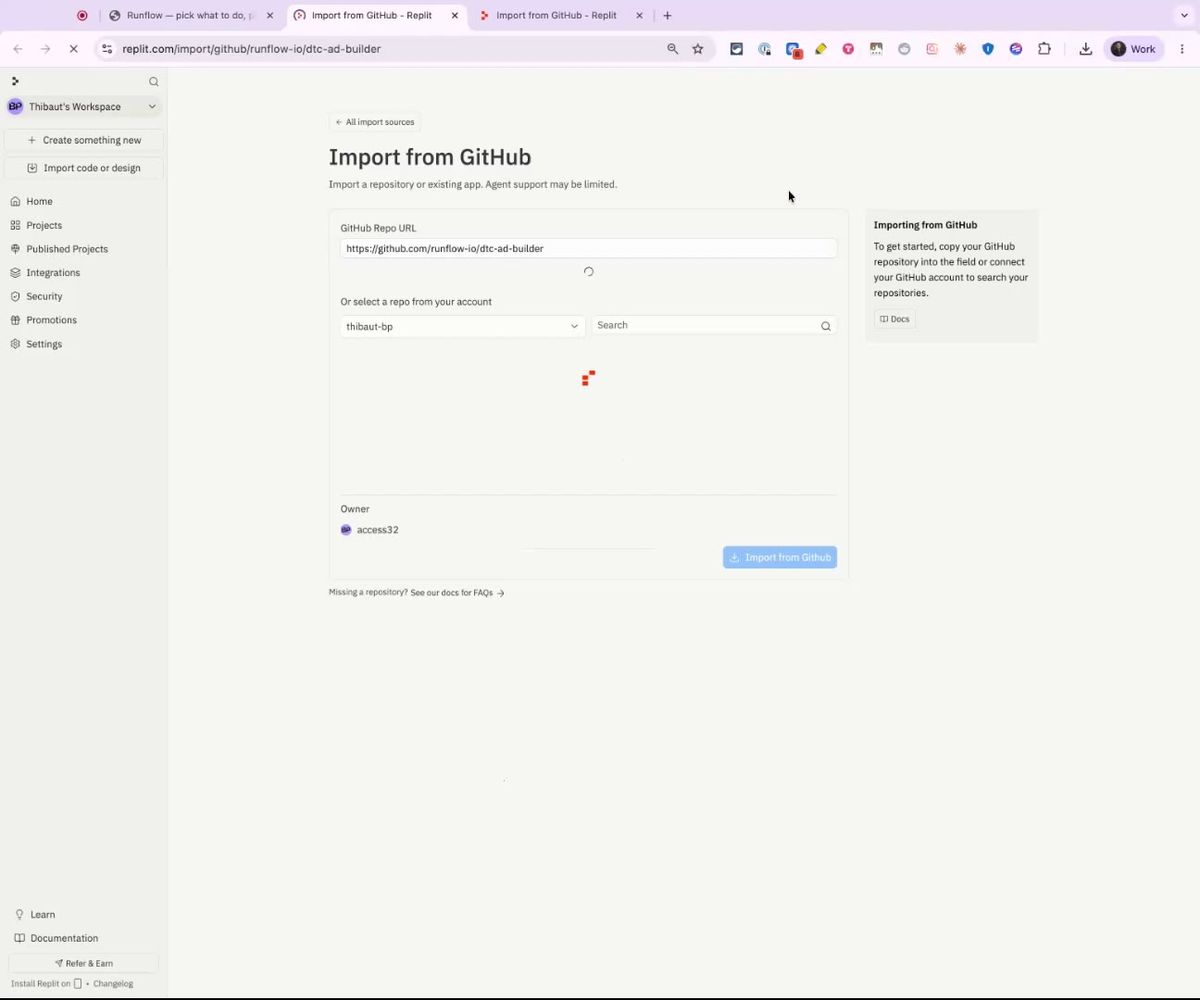
Hit Import. Replit installs dependencies and boots the dev server at localhost:5173 inside the IDE. From there you've got the app running, but it can't talk to anything yet because there are no API keys configured.
Two API keys to set:
- Runflow (the workflows engine): runs object removal, product isolation, GPT-Image-2 generation, outpaint, and smart-resize. Costs about $0.25 per pack. Get the key from your Runflow dashboard.
- OpenAI (gpt-4o vision): reads the product photo to categorize what it is and what kinds of scenes would suit it. About $0.01 per pack. Get the key from platform.openai.com.
Total cost per brand pack lands at roughly $0.26, paid directly to Runflow and OpenAI on your own accounts.
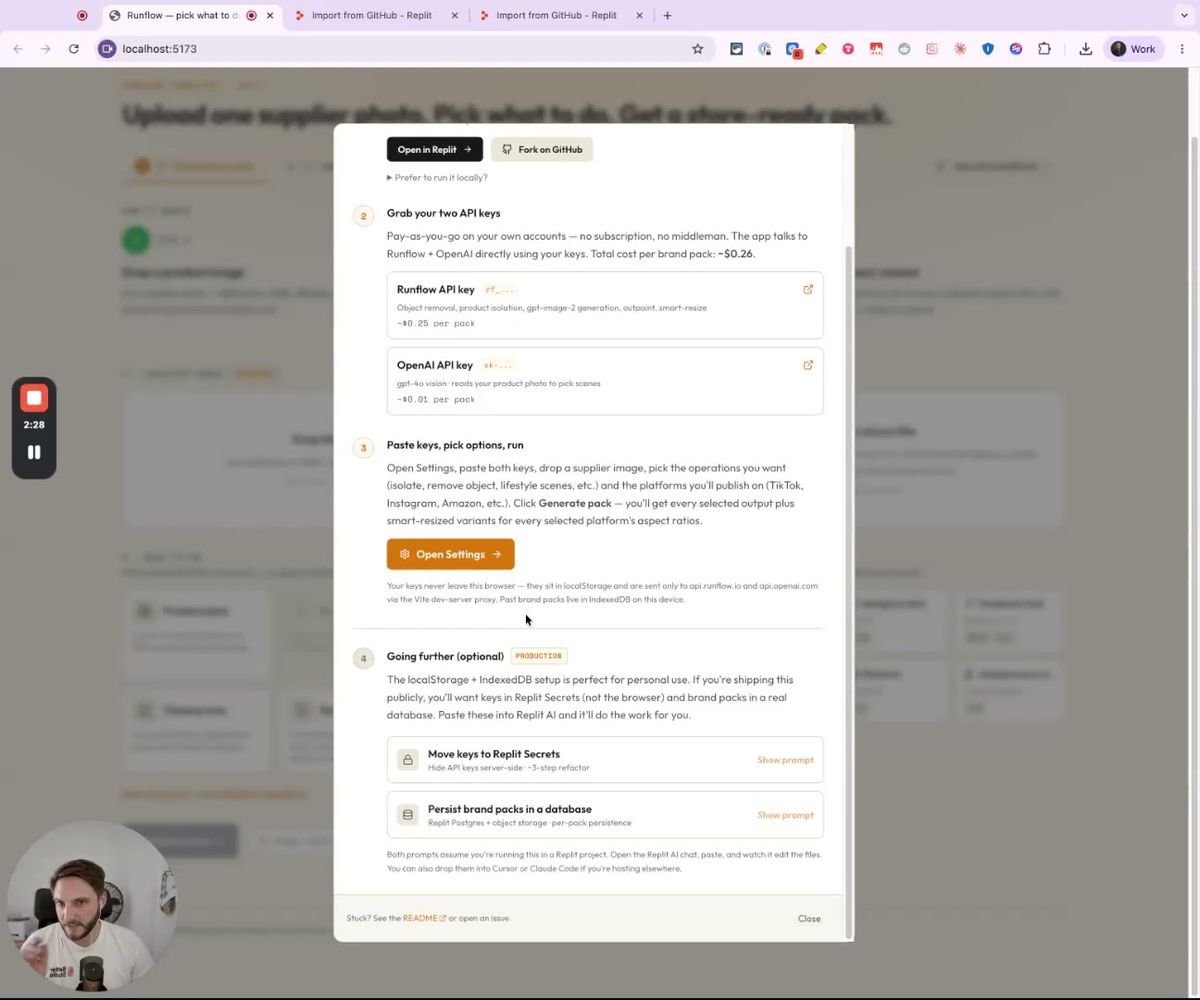
Keys live in localStorage. The Vite dev server proxies API calls directly to api.runflow.io and api.openai.com, so your keys never leave the browser. Brand packs persist in IndexedDB on the device.
If you're shipping this publicly (running it for clients, hosting a service in front of it), the docs include two follow-up prompts you can drop into Replit AI. One moves keys into Replit Secrets so they're server-side. The other persists brand packs into a Postgres + object-storage setup so you can serve multiple users. Each is a 3-step refactor.
From one product photo to a store-ready pack
The first scenario covers the typical case. You've got one supplier image (an AliExpress photo, an Alibaba listing, an iPhone shot of a sample) and you need:
- A clean cutout for PDPs and Amazon main image listings
- Lifestyle scenes for IG, the on-site gallery, and Pinterest
- Square and portrait variants of each for paid ads
The flow looks like this. Drop the image. Crop if you need to. Pick an operation preset (Product pack covers the cutout + lifestyle + ratios combo). Pick the platforms you want to publish to (TikTok, Instagram Feed, Instagram Reel, Facebook, YouTube, Shorts, Pinterest, Amazon main image, Shopify PDP). Hit Generate.
In the demo I ran it on a bamboo chair with cushion, uploaded as a 1:1 supplier shot. The whole pack took about 12 minutes end to end. Most of that is GPT-Image-2 generation latency, not the orchestration itself. The output is downloadable per-asset or as one zip from the Packs collection tab.
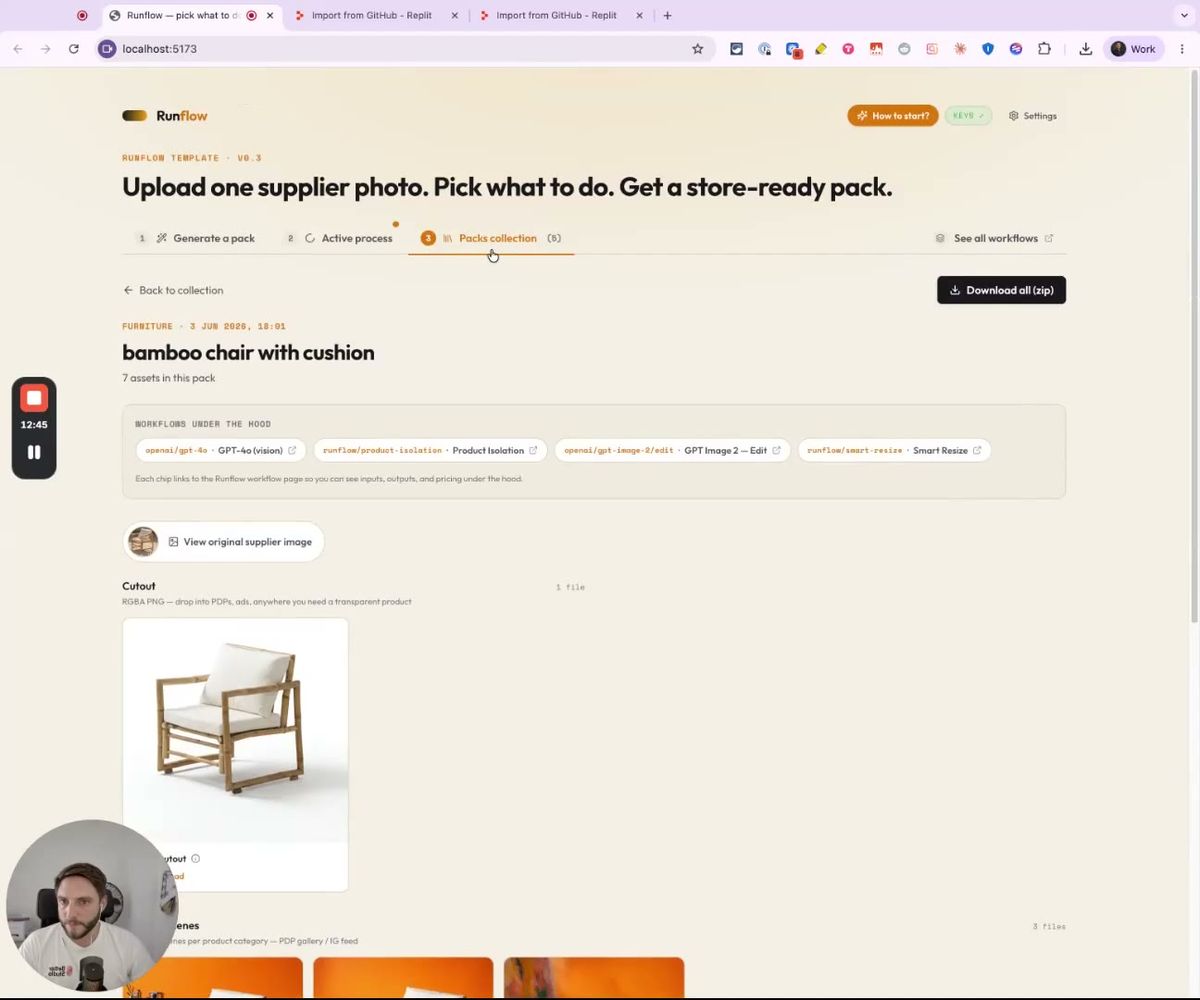
The pack came back with seven assets. The Cutout is a transparent RGBA PNG you can drop into a PDP template or an Amazon main image slot without needing to remask. Below that are three Lifestyle scenes: AI-picked compositions per the product category (furniture in this case), in styles that match what works on PDP galleries and IG feeds.
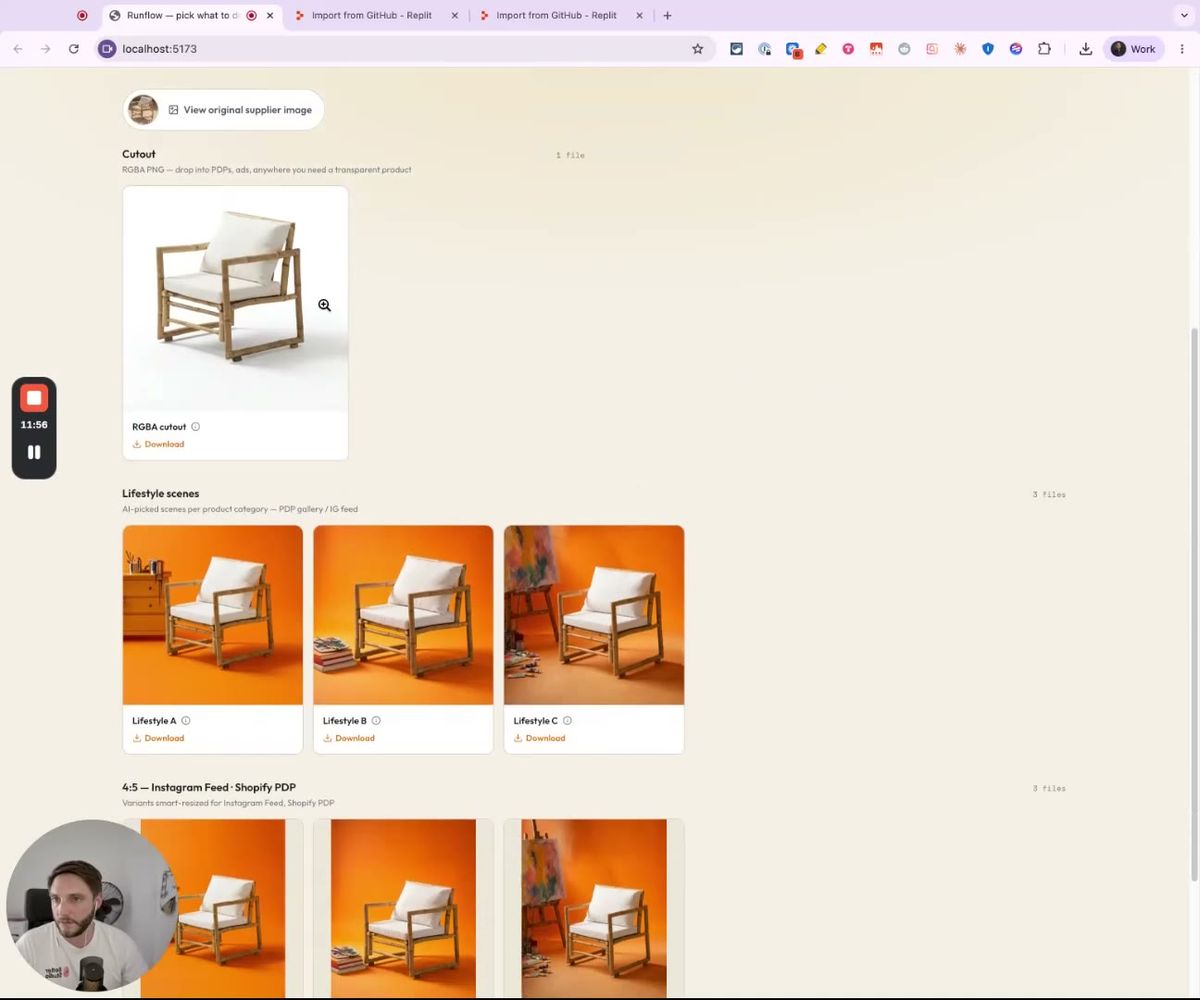
Below the lifestyle row, the same three scenes get fanned out to 4:5 Instagram Feed and Shopify PDP variants automatically, plus 9:16 vertical for stories and reels. Click Download all (zip) at the top and the whole bundle compresses into a single file.
What's actually running under the hood
While the pack is generating, the app shows you the pipeline live so you can see which step is currently running and which Runflow workflow it's calling. This is the part that matters for understanding what you're paying for and what you can customize.
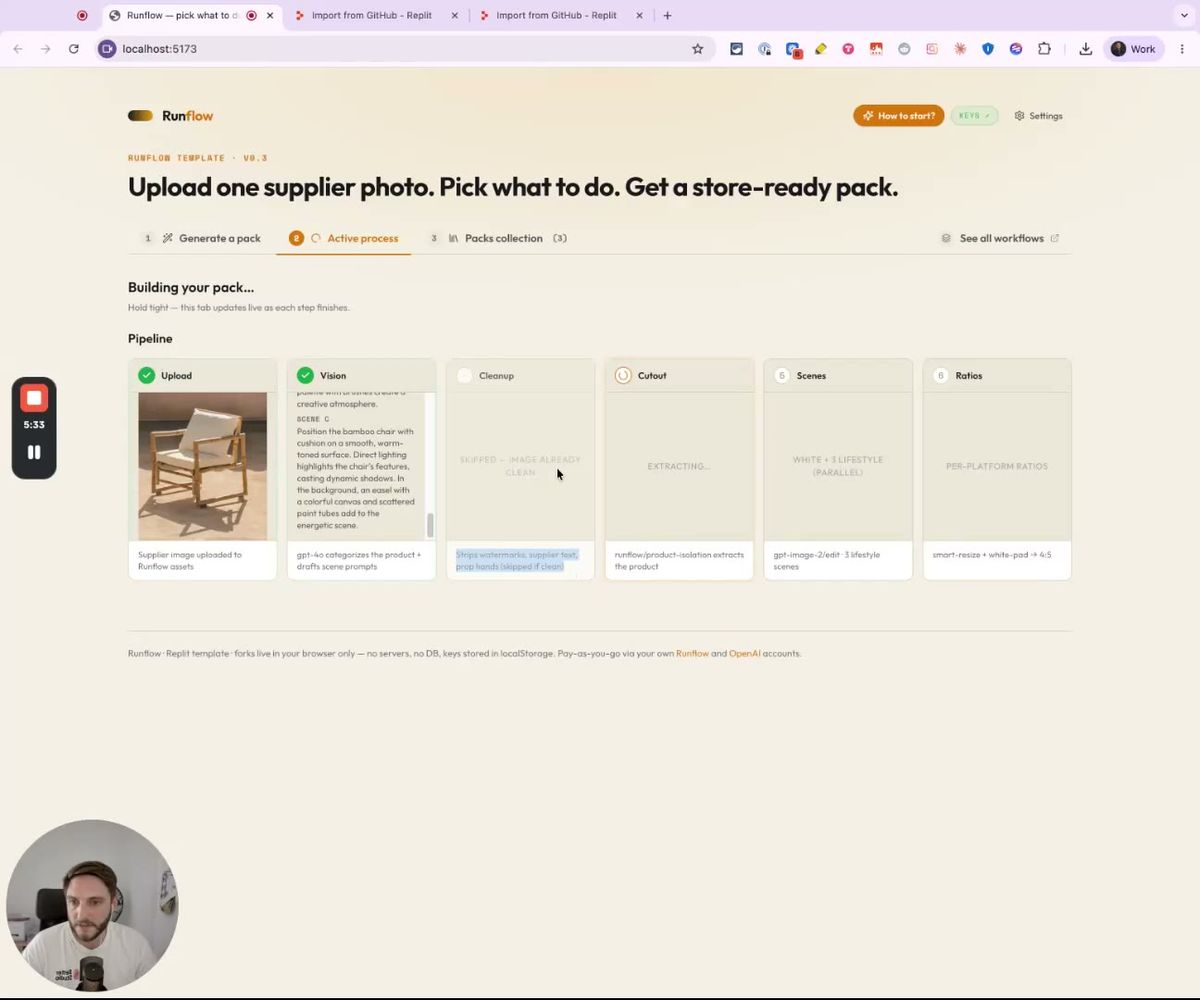
The pipeline runs in six visible steps:
- Upload: your image is sent to Runflow assets and tracked through the rest of the run.
- Vision (
openai/gpt-4o): categorizes the product (furniture, apparel, food, etc.) and drafts the scene prompts that match the category. This is the only step OpenAI touches. - Cleanup (
runflow/cleanup): strips watermarks, supplier text, prop hands, and other marks that shouldn't ship. Skipped automatically if the input is already clean (the chair shot was, so this step was bypassed). - Cutout (
runflow/product-isolation): extracts the product with a transparent background. Returns the RGBA PNG. - Scenes (
openai/gpt-image-2/edit): generates the lifestyle scenes in parallel. Three by default. This is the slowest step and the largest portion of the per-pack cost. - Ratios (
runflow/smart-resize): fans the scenes out to every selected platform's aspect ratio. Pads with white for compliance-strict formats (Amazon main image at 1:1) and outpaints with context for everything else.
Each chip on the Active Process screen is a direct link to the Runflow workflow page for that operation. You can see the exact inputs, outputs, and pricing per call. If you want to swap one (a different cutout workflow, or SDXL instead of GPT-Image-2 for scene generation), the Custom mode lets you assemble individual workflows by hand instead of using a preset combo.
Smart resize that respects TikTok safe zones
Aspect ratio is where most AI image tools fall over. They generate one image, then either letterbox it for vertical platforms or crop it badly. Both look amateur on a feed.
Smart resize is its own Runflow workflow (runflow/smart-resize) that handles this case differently. It takes the input image plus knowledge about each platform's UI and outpaints the missing pixels so the composition still works at the new ratio. For TikTok specifically, it knows the bottom roughly-third of the screen gets covered by buttons, captions, and the creator profile (the safe zone), so it lifts the subject upward before resizing.
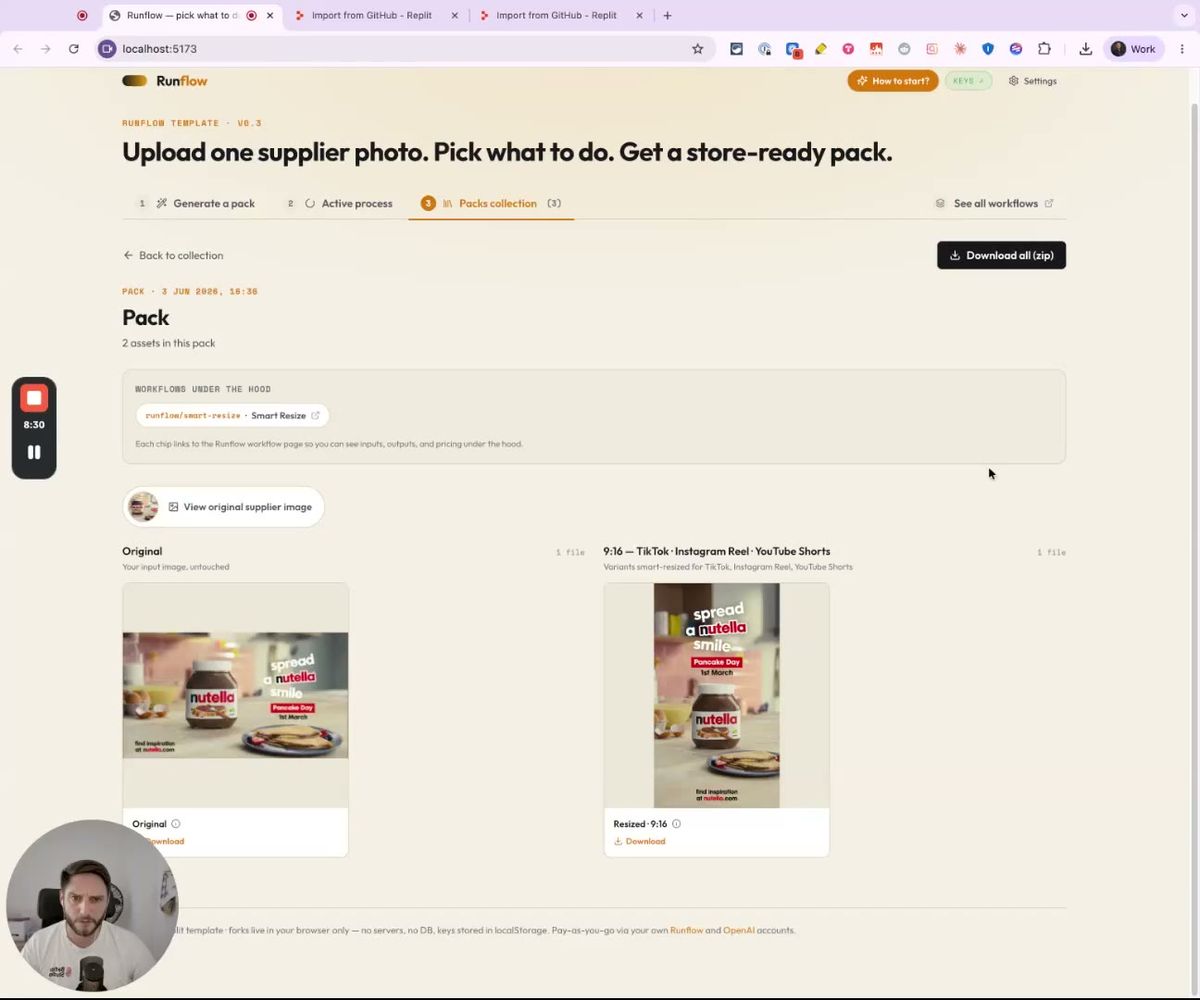
In the Nutella example from the walkthrough, the input was a 1:1 square ad. The 9:16 variant ended up with the jar and the "spread a Nutella smile" headline pushed into the upper two-thirds of the frame, exactly where TikTok renders content without UI overlap. The original square ad input was somewhat blurry (a phone snap, basically); the workflow also runs an upscale pass so the resized output looks like it was shot on a camera rather than enlarged from a thumbnail.
The same logic applies for every platform target the app supports:
- Instagram Reels (9:16, caption safe zone)
- YouTube Shorts (9:16)
- Pinterest (2:3 pin format)
- Amazon main image (1:1, white background compliance)
- Shopify PDP (4:5)
- Facebook Feed (16:9 landscape, 1:1 square)
You pick the platforms once on the Generate a pack screen, and every output gets resized automatically with the appropriate safe-zone handling.
Mix and match workflows for your own pipeline
The template ships with five operation presets visible on the homepage: Product pack, Apparel ghost mannequin, Product + lifestyle, Cleanup only, Resize ad creative. There's also a Custom option that lets you assemble individual workflows yourself.
If you need something the presets don't cover, the full Runflow workflows library is one click away ("See all workflows" on the homepage). Multi-angle generation is a good example. Drop a front-on product shot, get the same product from a 3/4 angle for the PDP secondary image. It's not in the template by default. Adding it to the operation picker takes one prompt.
That's the whole point of shipping this as an open Replit + GitHub project rather than a closed SaaS. Two ways to extend it:
- Prompt-driven: open the repo in Replit AI (or Cursor, or Claude Code if you're hosting locally) and tell it what scenarios you want added. The codebase has a clean separation between the operation presets, the workflow chain definitions, and the UI, so prompt-driven extension lands cleanly in most cases.
- Fork for updates: fork the GitHub repo rather than just importing. Updates we push downstream will land in your fork as patches you can review and merge. We're iterating on this template, especially around new workflow types as Runflow ships them, and you'll want the patches.
If you build something specific on top (an apparel-only variant, a furniture catalog generator, a multi-language variant for a regional Shopify store), drop a comment on the Loom or ping us via the site. I want to see what you ship.
Want custom benchmarks for your workload?
We'll run our evaluation pipeline against your production data, for free.
Talk to Founders