
AI agents for business: a buyer's guide to 10 platforms
A screenshot-backed comparison of ten AI agent platforms, with pricing, billing shape and published limits taken from each vendor's own pages.

Four of the ten third-party platforms here publish no usable price.
Microsoft puts $30.00 user/month on the page, but that figure belongs to Microsoft 365 Copilot, while Gumloop's $37/month appears at the slider's lowest 20k-credit stop.
This guide exists because comparing agent pricing pages is genuinely annoying. I had one page after another open on my laptop, feeling very clever until the numbers stopped meaning what they looked like (I checked twice). You can get to the end of a demo call before the real rate appears, so I pulled the public receipts into one place.
Seats, workspaces, credits, activities, executions, conversations. A monthly price by itself tells you very little.
I read the public product and pricing pages for ten third-party platforms, and every screenshot here comes from those pages. Short on time? The 60-second shortlist gives you two candidates for each situation.
Key takeaways
- Four platforms make you ask for the real price: Cassidy AI, CrewAI, Relevance AI and standalone Microsoft Copilot Studio publish no usable dollar rate.
- Three headline numbers need a second look: Gumloop's $37 is a slider floor, Zapier's $33.33 requires annual prepayment, and n8n shows euros with annual billing selected.
- Two paid entry prices are ready to act on: Tasklet and Lindy publish paid entry rates without a billing qualifier. Salesforce publishes seven figures across two buying models and routes every paid option through Contact us.
Shortlist in 60 seconds
Find your situation first. Keep the disqualifier attached, then take that pair to the three-step comparison.
- You want a free start for a team of 3: Cassidy AI publishes 3 seats and 10,000 monthly credits. Zapier Agents publishes 400 monthly activities and web browsing. Disqualifier: Cassidy's fourth seat requires the unpriced Business path.
- You need shared access for a team of 10 to 50: Gumloop publishes unlimited seats from $37/month at its 20k-credit slider floor. n8n publishes unlimited users on Starter at 20€/mo billed annually. Disqualifiers: Gumloop puts RBAC and SCIM/SAML in its unpriced Enterprise tier; n8n puts SSO, SAML and LDAP first on Business at 667€/mo billed annually.
- You want paid workflow work below $50/month: Tasklet is $25/month with an agent browser. Gumloop starts at $37/month with unlimited seats. Disqualifier: Gumloop puts RBAC and SCIM/SAML in its unpriced Enterprise tier.
- You need inbox or calling work: Lindy documents email and meeting tasks. Relevance AI lists calling and meeting agents. Disqualifier: Relevance AI has no published price or self-serve tier.
- You care about technical deployment control: n8n publishes execution billing and a self-hosted Business plan. CrewAI documents GitHub plus cloud, VPC and own-infrastructure deployment. Disqualifier: CrewAI publishes no paid dollar rate.
- You already live inside an enterprise suite: Microsoft Copilot Studio connects its buying paths to Microsoft 365 and Azure. Salesforce Agentforce documents CRM objects and customer conversations. Disqualifier: standalone Copilot Studio has no published rate on the captured page.
Six situations. Two candidates each. Your call!
What an AI agent for business actually is
An AI agent for business works toward an assigned outcome across connected tools. It keeps context, chooses permitted actions and returns a result for review.
A chat assistant answers inside a conversation. Workflow automation follows a preset trigger and action path. An agent can use both: chat supplies the request, while fixed workflows set the guardrails.
Simple enough. The bill is where it gets messy.
Ask what consumes a unit, whether retries count, whether units expire and whether the team shares one pool.
AI coworker, AI teammate, AI agent: what the category is being called
"AI coworker" and "AI teammate" are category labels. Cassidy AI calls its agents AI teammates, and Relevance AI calls its product an AI Workforce.
The name tells me very little. I care where it runs, what it remembers, which actions need approval and how the finished work comes back to you.
What to look for when choosing one
I built this guide from what these vendors publish on their public product pages, pricing pages and docs. The research stops at those pages; nothing here ranks the products by output quality.
I use four weighted criteria when I read a page:
- Billing clarity (40%). Is a price published, is the billable unit defined, and can a buyer model a real month from the page alone?
- Published limits (25%). Seats, credit allowances, execution caps, concurrency and rollover terms, stated as numbers rather than adjectives.
- Governance disclosure (20%). Role controls, audit logs, SSO and SAML, retention and deployment options, and whether the price of those controls is published or gated.
- Documented fit (15%). Which stack, team size and job the vendor's own material says the product is for.
The weights describe how much each criterion moved my read of a platform. No composite score is published.
All prices were checked on each vendor's own pricing page on 30 July 2026. Every other figure comes from the vendor pages listed under Sources.
No affiliate links. No sponsored placements.
The tools at a glance
The table and the price counts below cover the ten third-party platforms. Every cell comes from the vendor's own pages, linked again inside each entry.
Jump to a platform:
- Patricia
- Cassidy AI
- Zapier Agents
- Tasklet
- Lindy
- Gumloop
- n8n
- CrewAI
- Microsoft Copilot Studio
- Salesforce Agentforce
- Relevance AI
| Tool | Entry price (lowest published, as shown) | Billing model | Vendor's documented fit | What the entry price includes |
|---|---|---|---|---|
| Cassidy AI | Free Starter; no paid price published | Subscription with AI credits | Small shared workspaces | 3 seats, 1 workspace, 10,000 AI credits/mo |
| Zapier Agents | Free | Metered activities | Zapier-centered teams | 400 activities/mo |
| Tasklet | Free | Metered credits | Browser and service tasks | 300 bonus credits/day, 10 executions per trigger |
| Lindy | $49.99/month | Subscription with usage | Inbox and calendar work | Standard usage, up to 2 inboxes |
| Gumloop | From $37/month | Metered credits | Shared workflow teams | 20k+ credits/mo at the slider's lowest stop, unlimited seats |
| n8n | 20€/mo, billed annually | Completed workflow executions | Technical automation teams | 2,500 executions/mo on Starter |
| CrewAI | Free; no dollar figure published | Workflow executions | Engineering-led agent systems | 50 workflow executions/mo |
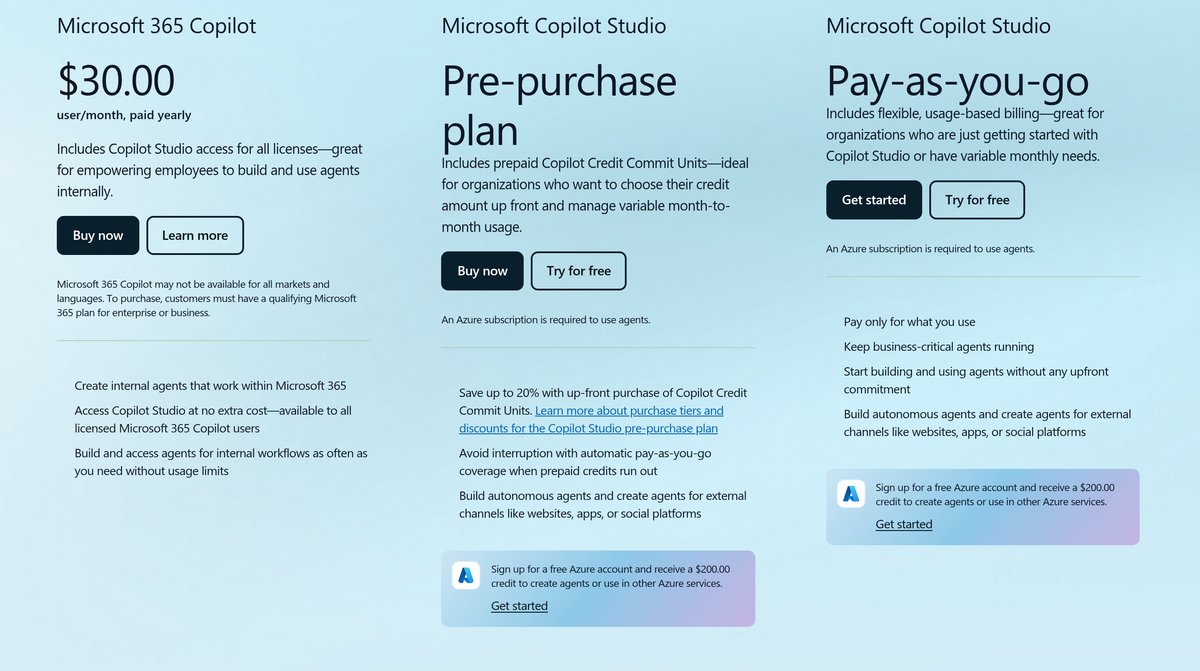
| Microsoft Copilot Studio | Standalone rate not published; Microsoft 365 Copilot is $30.00 user/month, paid yearly | Prepaid Copilot Credits or pay as you go | Microsoft 365 and Azure estates | The published $30.00 rate is a different SKU that includes Copilot Studio access |
| Salesforce Agentforce | Foundations $0; Flex Credits $500/100k; Conversations $2; add-ons $125 to $150 user/mo; Agentforce 1 from $550 user/mo; User License $5 user/mo | Credits, conversations and licenses | Salesforce estates | Several buying models, all routed through Contact us |
| Relevance AI | No published pricing | Custom enterprise plan | Enterprise AI workforces | Not published |
Four of ten vendors publish no usable price
🔥 Four.
Cassidy AI has two plans, both labelled Start for free, with no dollar figure. CrewAI gives you one hard number, a 50-workflow-execution monthly cap on Free, while Enterprise is Custom. Relevance AI has one Enterprise plan, a Talk to sales button and no price.
Standalone Microsoft Copilot Studio is credit-metered, with no per-credit rate on the captured page. Its only list price is $30.00 user/month, paid yearly, for the separate Microsoft 365 Copilot licence that includes Copilot Studio access.
Then come the prices with strings attached. Gumloop starts at $37/month with its slider at the 20k-credit floor. Zapier Agents shows $33.33/month against a $400 annual prepayment. n8n shows euros with annual billing selected.
Exactly two platforms publish a paid entry price a buyer can read and act on without a billing qualifier: Tasklet at $25/month and Lindy at $49.99/month. Salesforce Agentforce publishes seven figures across two tables; every paid option has a Contact us button, while the $0 Foundations card says Try for free.
When a pricing page withholds the rate, the sales process becomes part of your product decision. I would count that before booking the demo.
How to choose: six questions to ask before you buy
Bring these six questions to the sales call. Better yet, send them before the call!
- What creates a billable unit? Get a definition for the credit, activity, execution or conversation, then price one real weekly workflow.
- Which systems can the agent read and write? Ask for permission scopes, credential ownership, retention terms and the actions that can change a system of record.
- Where does human approval happen? Ask to see the action preview, the approver, the timeout and the decision record.
- How are identity and governance handled? Confirm role controls, audit logs, account removal and the price of every control you need.
- What happens on failure or retry? Find out whether failed work consumes usage, who sees errors and what prevents duplicate actions.
- Can the company leave cleanly? Ask how to export prompts, workflows, knowledge, logs and credentials.
Eleven AI agent platforms for business
This order is my opinion, using the four criteria above. I put Patricia first because I see it handle daily work in our own workspace and its published plan gives a team one workspace price to reason about.
Each entry separates list prices, qualified rates, free labels and custom quotes.
🥇 1. Patricia
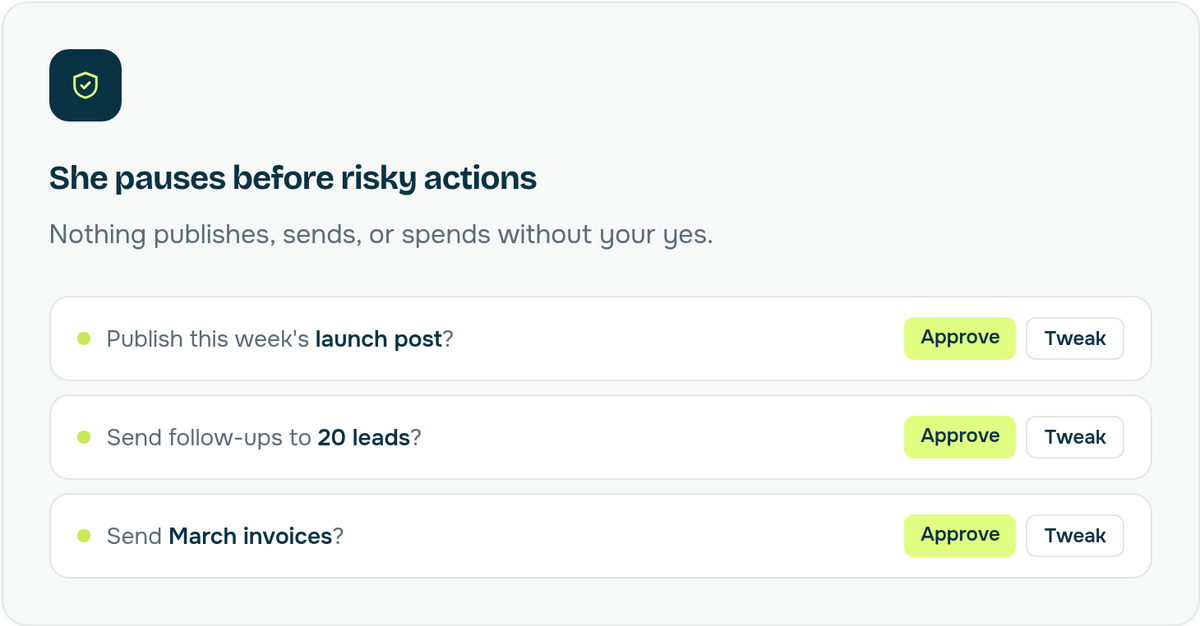
Patricia is the one I would actually hire for a non-technical team. She runs marketing, sales, ops and finance work from Slack across 1,000+ connected tools, then hands back finished deliverables such as on-brand images and ad variants. She can publish to Instagram, TikTok and LinkedIn once someone approves.
That approval step matters. The illustration above shows the launch post, lead follow-ups and invoices waiting for a person to approve or tweak.
Price: Patricia's pricing file and agent skill put the published plan at $45/workspace/month. That includes 20,000 monthly credits and covers every seat, client and channel.
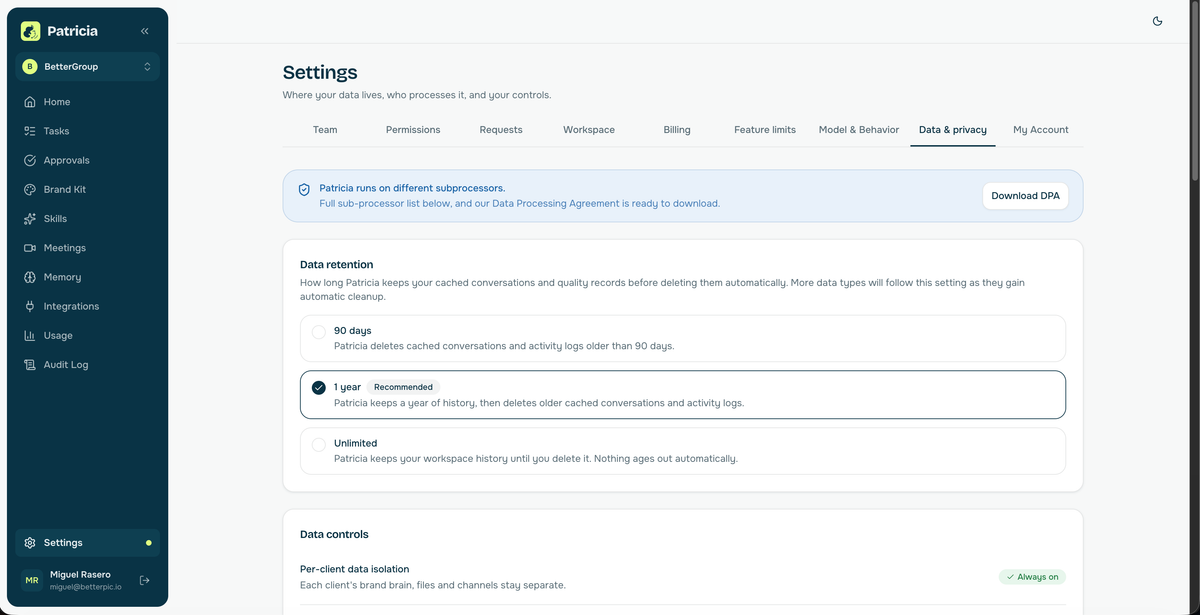
These three product screenshots come from our own workspace. On my screen, the first one is the boring but important bit: the DPA download, retention choices and per-client data isolation.
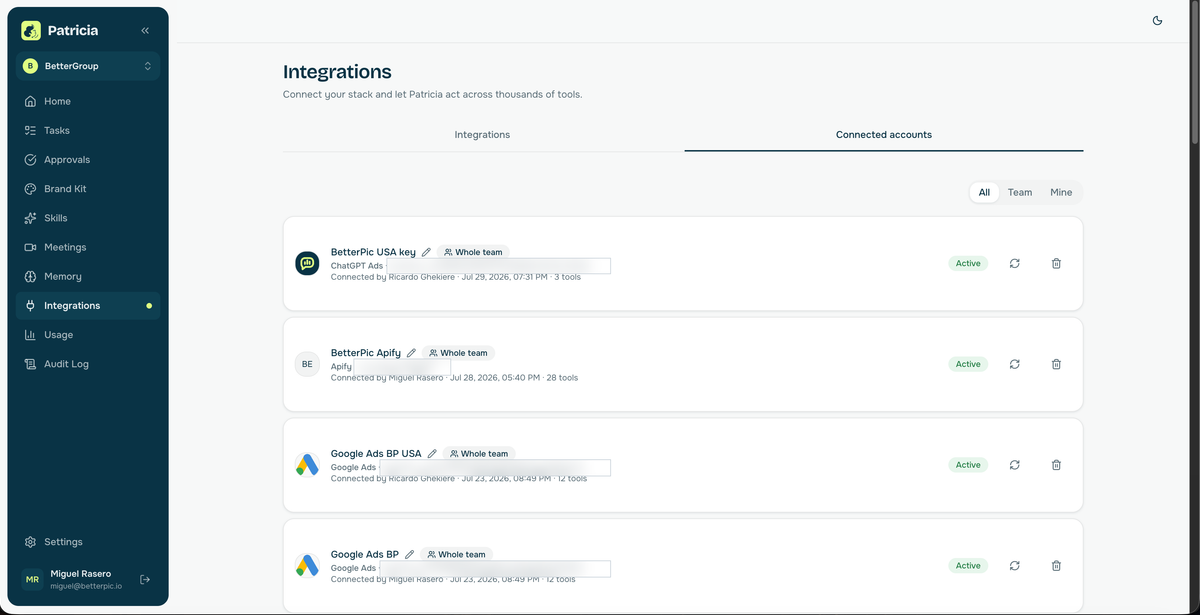
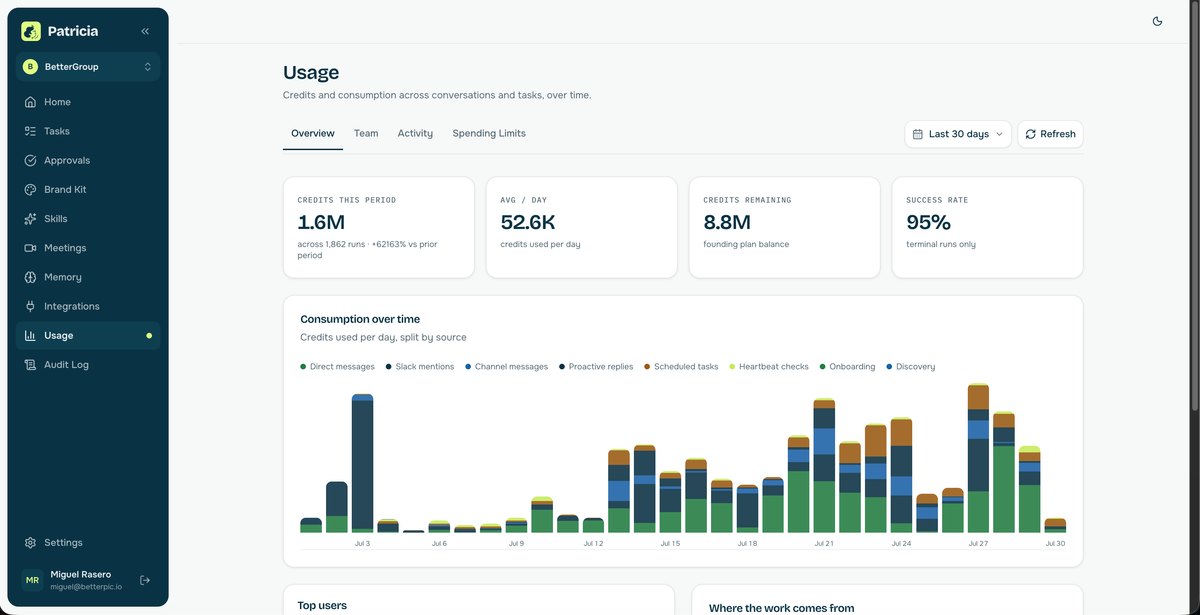
The other two are easier to read: four active connections out of 46, then our usage screen.
On-brand image generation and ad creative are live in our workspace. This Slack thread shows Patricia producing a Runflow banner from a written brief that specifies the aspect ratio, size, black-and-amber style and an uncluttered layout.
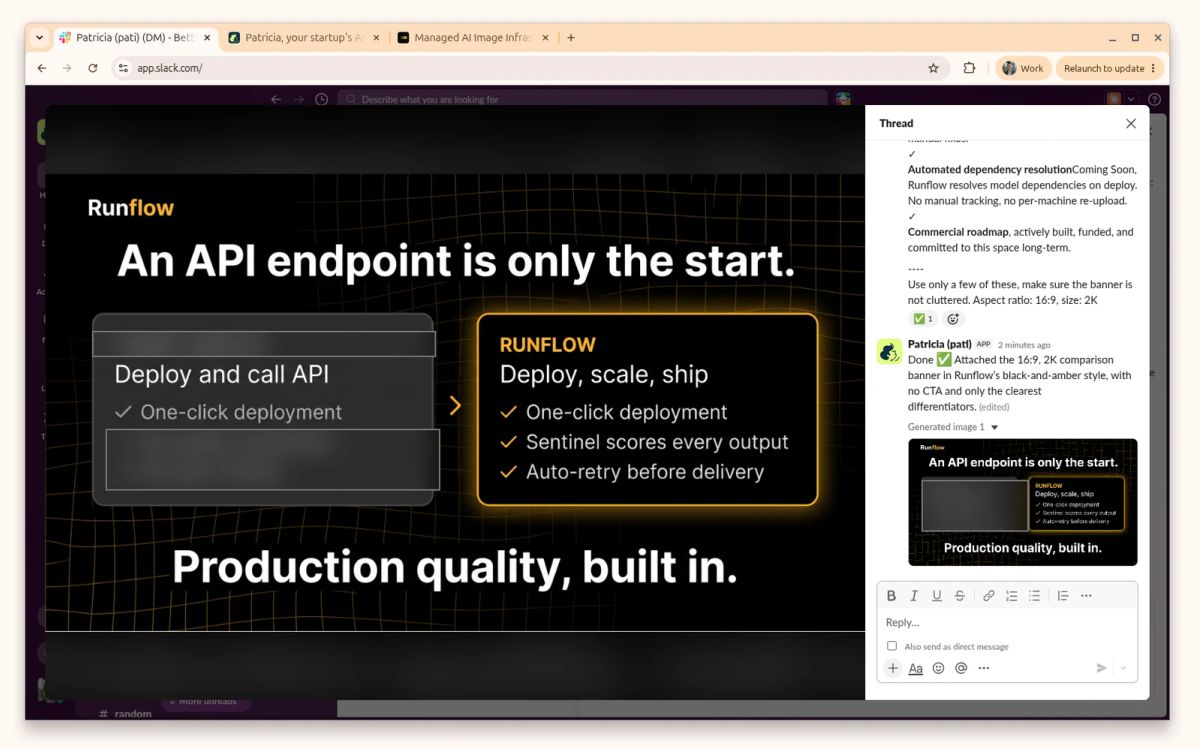
What I like: The work comes back where the team already talks, with a person approving the actions that publish, send or spend. The single workspace price also covers every seat, client and channel.
What could be better: Patricia has no public API, MCP server or programmatic access, and no SSO, SAML or SCIM. She is hired into Slack as a teammate rather than called as an endpoint. Video generation is not live yet.
Ideal for: Non-technical marketing, sales, ops and finance teams that want finished work handed back inside Slack rather than an API to build against.
Compared to CrewAI: CrewAI is a framework your engineers build on and call. Patricia is used from Slack with no code. Both publish a GitHub integration.
2. Cassidy AI
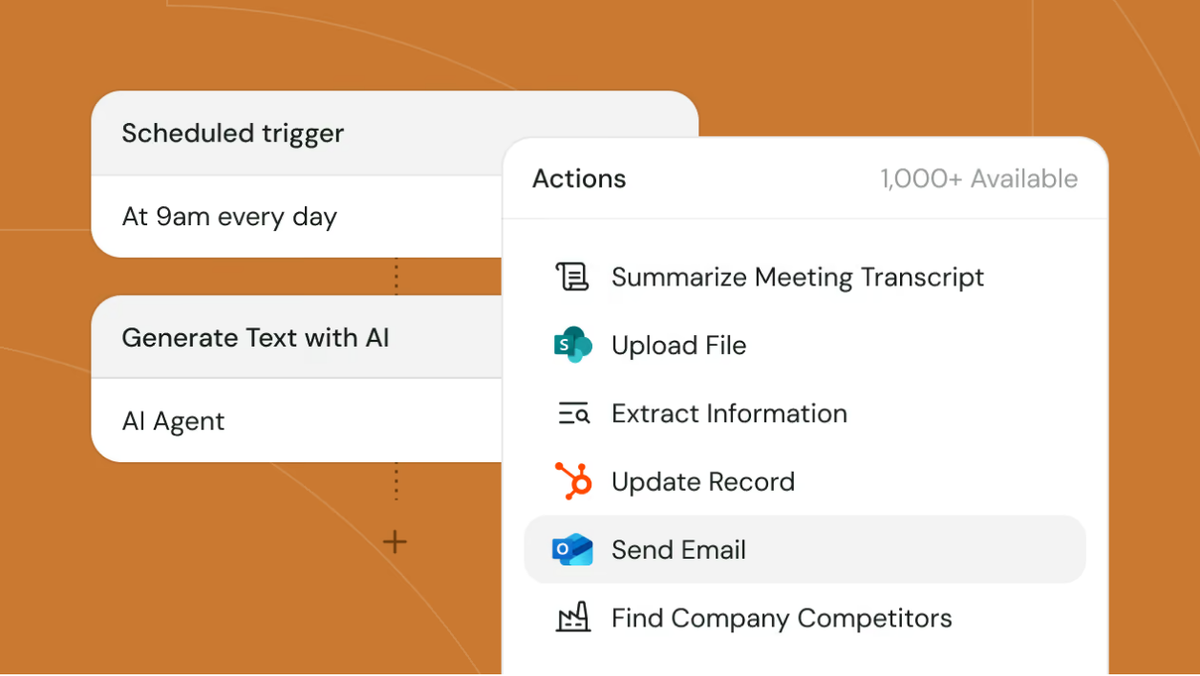
Cassidy AI calls its agents AI teammates anyone can build. The screenshot makes that pitch concrete: a scheduled 9am trigger flows into an AI agent step and then an action picker for email and transcript tasks.
It is an agent and workflow builder with a knowledge base and meeting tools.
Price: The Cassidy pricing page shows a free Starter plan with 3 seats, 1 workspace, 10,000 AI credits per month and 30,000 pages of storage. Business moves to custom seats, workspaces, credits and storage, with premium onboarding and support. Both plans say Start for free, and neither carries a dollar price.
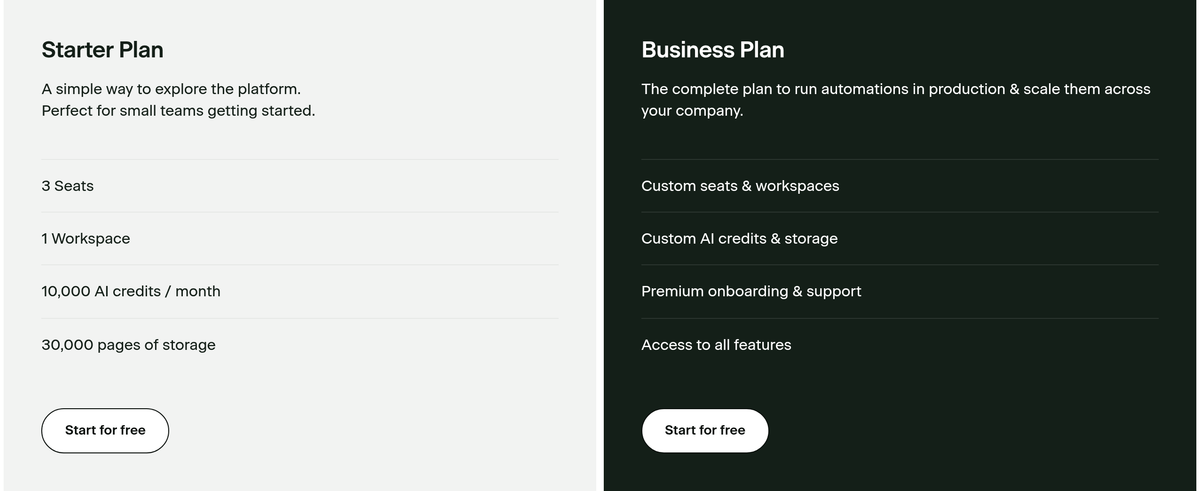
What I like: Starter gives a small team several agents and workflows inside one shared workspace, and the page publishes the 3-seat and 10,000-credit limits clearly.
What could be better: The free Starter plan caps a team at 3 seats and 10,000 credits per month (and person 4 sends you straight to sales). Cassidy publishes no Business price.
Ideal for: A small team that wants several agents and workflows inside one shared workspace before entering a sales process.
Compared to Zapier Agents: Zapier publishes a free 400-activity pool with web browsing, which Cassidy does not publish.
3. Zapier Agents
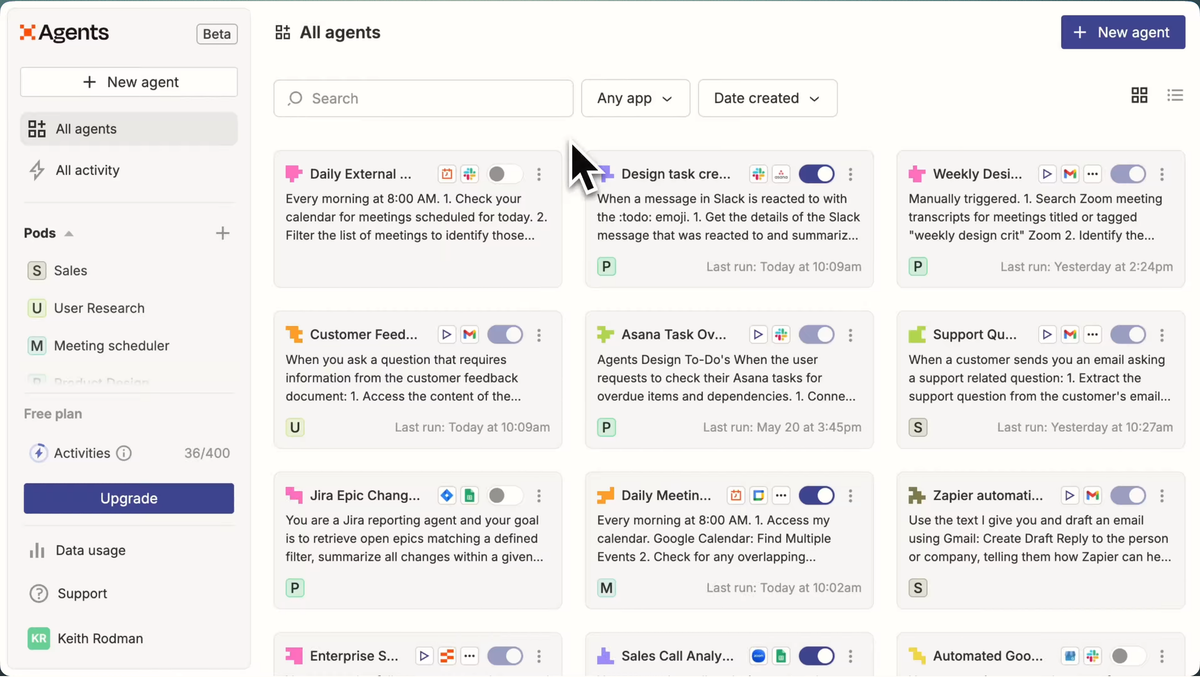
If your team already knows Zapier, Zapier Agents is the familiar option. It extends Zapier's app-connected automation model to agent behaviors, chat, web browsing and attached knowledge. The screenshot above shows configured agents, enable toggles, last-run times and the activity meter in one dashboard.
Price: The Zapier pricing page lists Agents Free as free forever with 400 activities per month. Agents Pro is $400 billed annually, shown as $33.33/month, with 1,500 activities per month. The pay-monthly rate was not selected in the captured page.
What I like: The free plan puts a real 400-activity number beside web browsing, so an existing Zapier team has something concrete to start from.
What could be better: Pro caps usage at 1,500 activities per month, and $33.33/month is available only as a $400 annual prepayment in the captured plan.
Ideal for: Teams that already understand Zapier and want agent actions close to their existing app connections.
Compared to Tasklet: Tasklet documents an isolated cloud terminal and agent browser, and its $25 Starter rate has no annual-prepay qualifier.
4. Tasklet
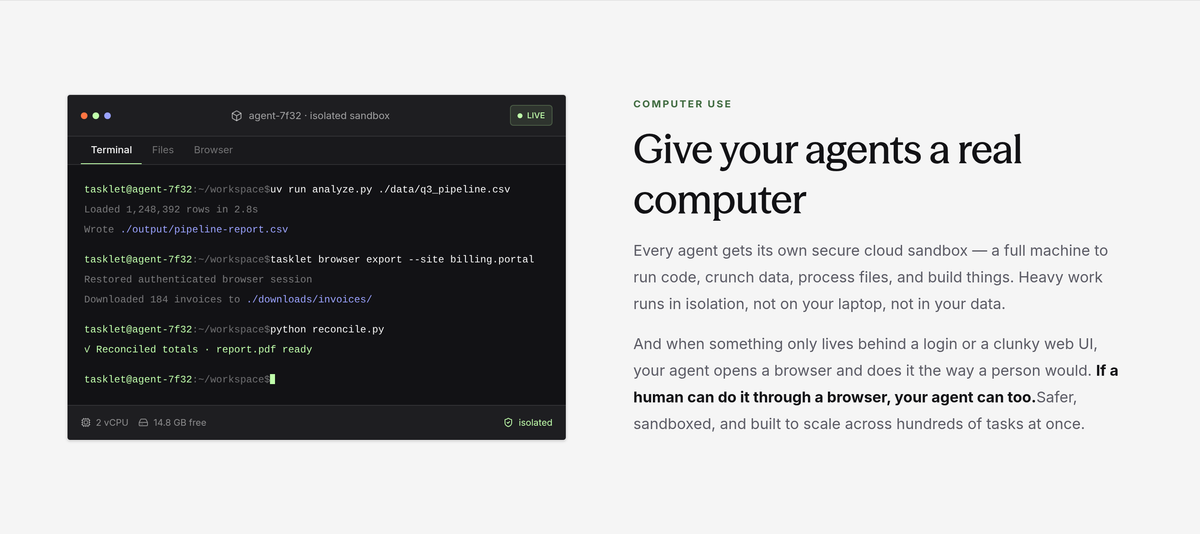
Tasklet is the one I would shortlist when the work needs a browser and a command line. It connects services to a sandboxed command-line environment and adds a dedicated web browser on paid plans. You can see analysis, browser export and reconciliation commands running in the isolated terminal above.
Price: The Tasklet pricing page lists Free at $0/month with 300 bonus credits per day, 10 executions per trigger and a limited file upload size. Starter costs $25/month for 10,000 monthly credits, Pro costs $100/month for 40,000, and Custom shows $250/month at the dropdown's default 100,000-credit option.
What I like: $25/month is a clean paid entry price, and the product shape is equally clear: web pages, connected services and command-line work under a credit budget.
What could be better: The move from Starter to Pro multiplies both the allowance and the price by four. Free also limits each trigger to 10 executions and restricts file upload size.
Ideal for: Teams that want agents to work across web pages, connected services and command-line tasks under a credit budget.
Compared to Lindy: Lindy documents email, calendar and meeting work, with inbox caps published on its plan cards.
5. Lindy
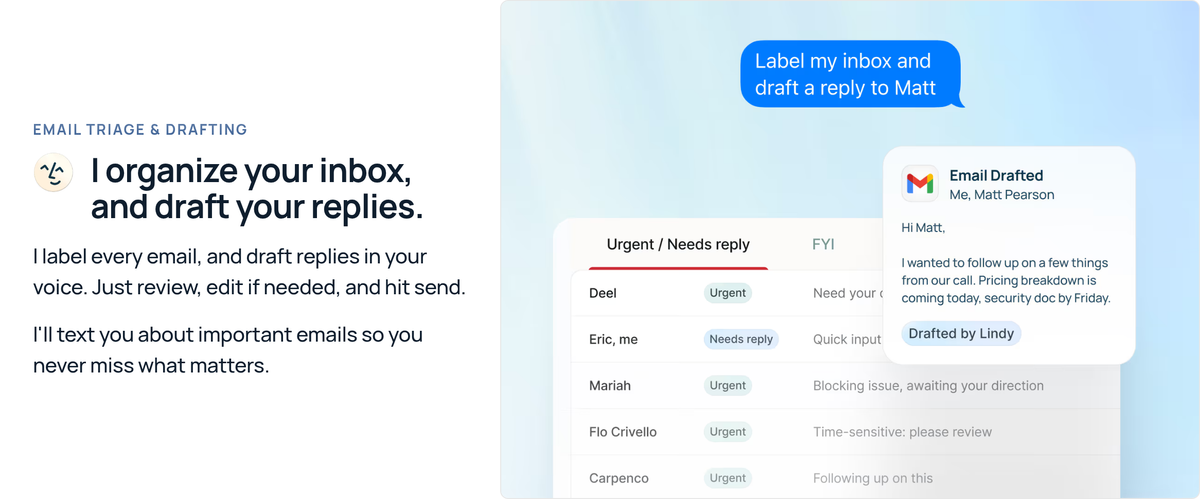
Lindy has the easiest job description in this list: inbox, meeting, calendar and follow-up work. The screenshot above shows urgent and needs-reply labels beside a Gmail response marked Drafted by Lindy. Its plans add inbox capacity and usage as the price rises, while Pro adds computer use and model choice.
Price: The Lindy pricing page lists Plus at $49.99/month with standard usage and up to 2 inboxes. Pro is $99.99/month with 3x more usage than Plus and up to 3 inboxes. Max is $199.99/month with 7x more usage than Plus and up to 5 inboxes. The page has no monthly or annual billing toggle.
What I like: The plan cards tie each price to an inbox cap, and the product stays focused on email, scheduling, meeting preparation, notes and follow-ups.
What could be better: The page states multiples against Plus without defining the base unit. Plus caps capacity at 2 inboxes, while SSO, SCIM and HIPAA sit behind the Enterprise Talk to sales path.
Ideal for: Individuals or compact teams that want one product centered on email, scheduling, meeting preparation, notes and follow-ups.
Compared to Gumloop: Gumloop publishes a shared multi-agent canvas, unlimited Pro seats and 5 concurrent workflow runs.
6. Gumloop
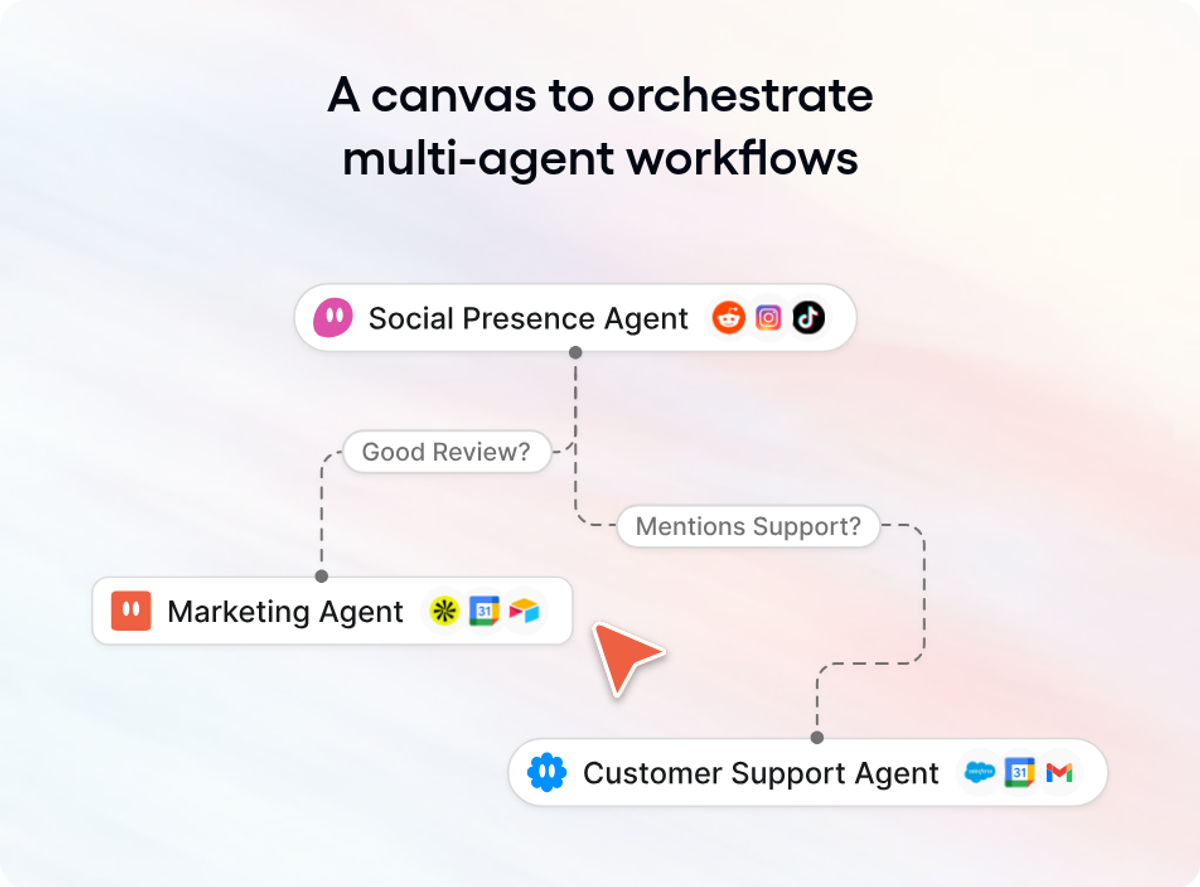
Gumloop is the first one I would look at for a team that wants shared workflow capacity without seat math. It combines credit-metered workflows, agent chats and team access, and its Pro plan includes unlimited seats and teams. The canvas above shows social, marketing and support agents moving through review and support branches.
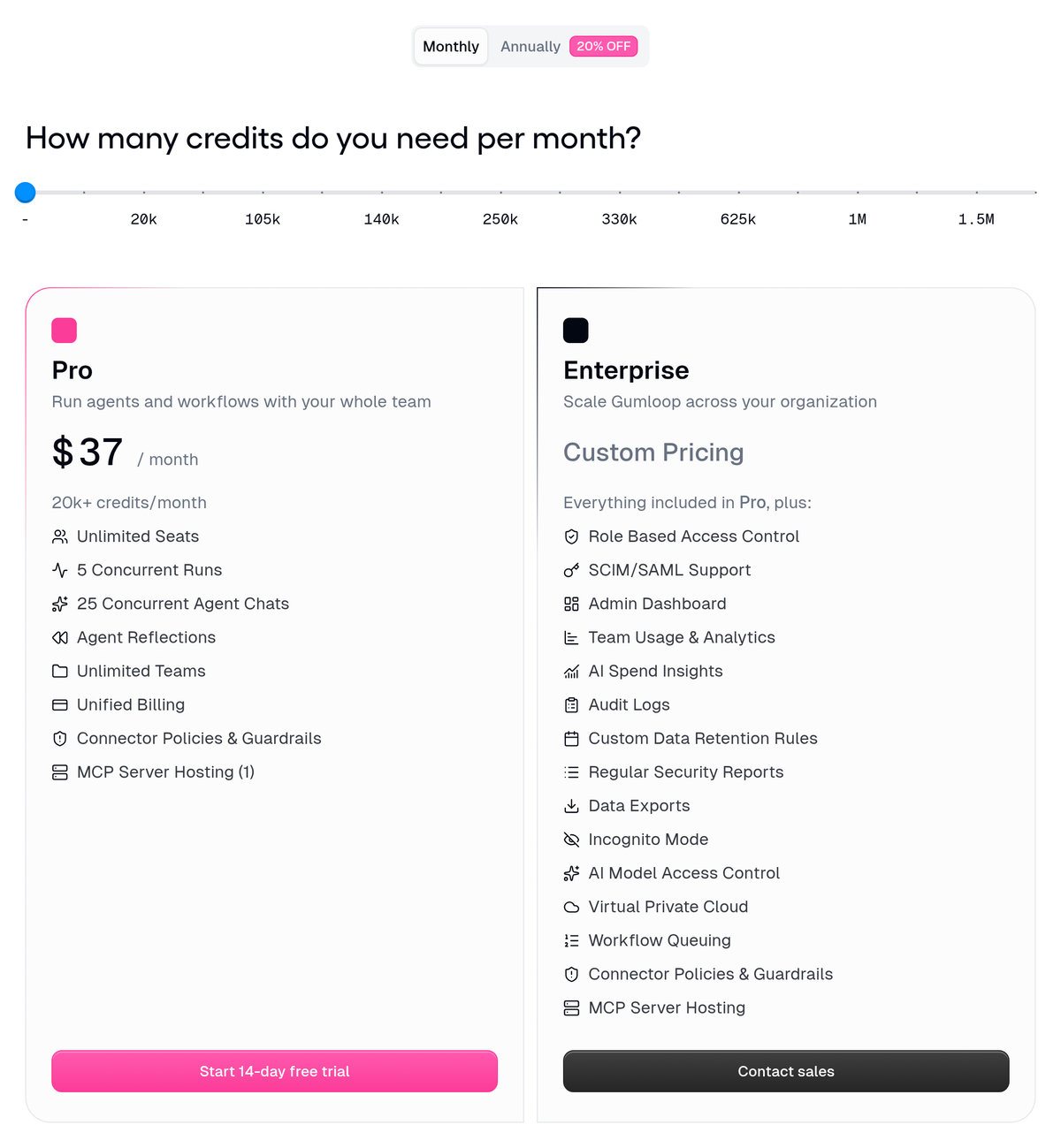
Price: From $37/month. The Gumloop pricing page is slider-driven, and $37/month is the slider at its lowest 20k-credit stop (the screenshot below has it parked there). The published stops run from 20k to 1.5M credits per month. At the entry setting, Pro includes unlimited seats, 5 concurrent workflow runs, 25 concurrent agent chats and one hosted MCP server.
What I like: Unlimited seats at the 20k-credit floor make the team economics easy to understand. The page also gives exact concurrency limits for workflows and agent chats.
What could be better: Only Pro and Enterprise are shown. Pro caps workflow concurrency at 5 runs. RBAC, SCIM/SAML and audit logs are Enterprise-only, and the public page does not publish that tier's price.
Ideal for: Operations teams that want shared agent and workflow capacity without buying a seat for each collaborator.
Compared to n8n: n8n publishes workflow-execution billing and a self-hosted Business option.
7. n8n
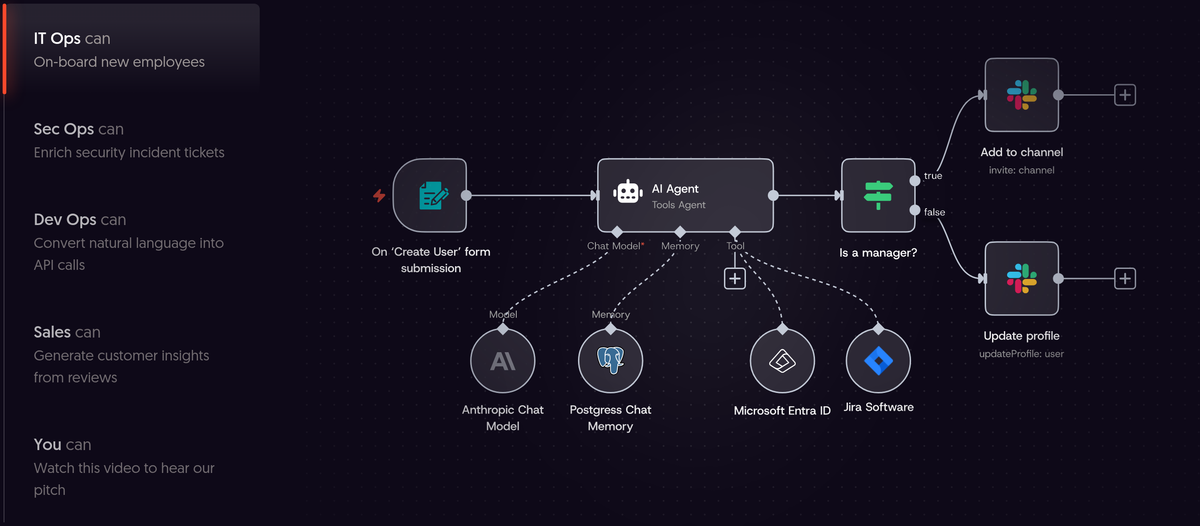
n8n gives technical teams the clearest billing unit in this group: one completed workflow execution, regardless of step count. All captured plans include unlimited users and workflows. The onboarding canvas above connects an AI agent to Anthropic, Postgres, Entra ID, Jira and Slack, which tells you exactly what kind of team n8n expects.
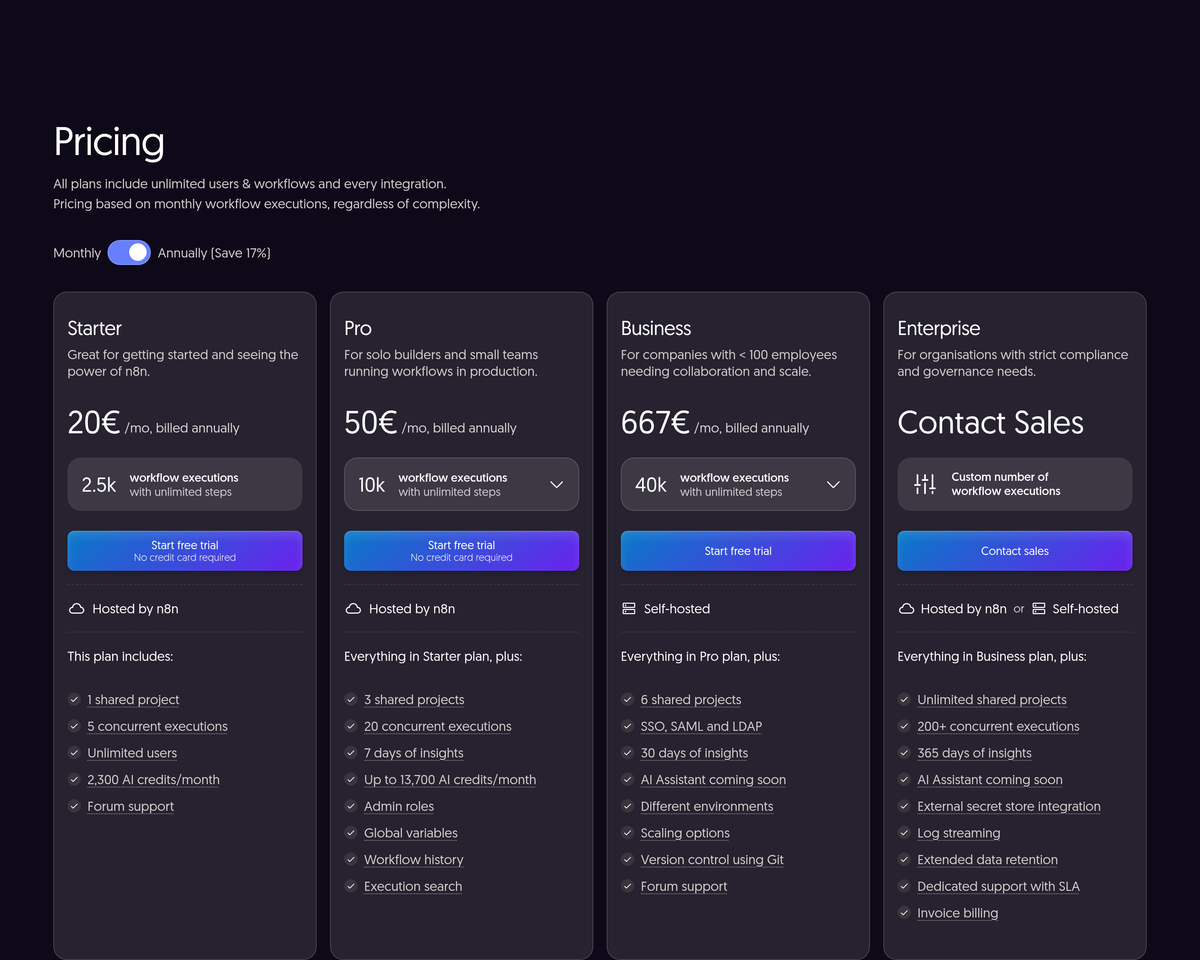
Price: The n8n pricing page had its Annually toggle selected with a stated 17% annual saving. Starter is 20€/mo, billed annually, for 2,500 workflow executions. Pro is 50€/mo, billed annually, for 10,000. Business is 667€/mo, billed annually, for 40,000 on a self-hosted plan. Enterprise pricing is custom. We did not capture the monthly-billing rate.
What I like: Completed-execution billing is easy to model, and step count does not change the unit. Unlimited users and workflows also make the team side of the bill easier to read.
What could be better: Starter is capped at 2,500 executions per month. SSO, SAML and LDAP first appear on Business at 667€/mo billed annually, more than 13 times Pro's 50€/mo annual-billing rate.
Ideal for: Technical teams that want workflow automation with hosted and self-hosted deployment options.
Compared to CrewAI: CrewAI documents GitHub integration and deployment to CrewAI cloud, a buyer's VPC or the buyer's own infrastructure.
8. CrewAI
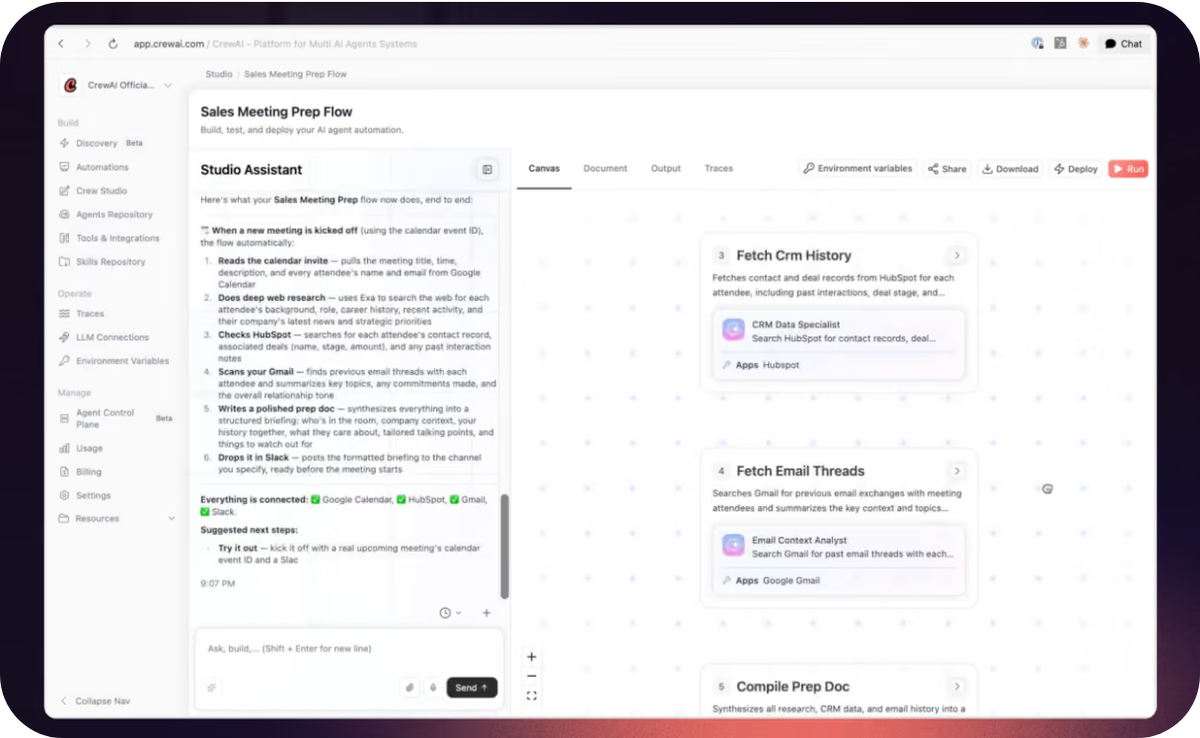
CrewAI is the engineering-led option here. It joins a visual editor and AI copilot with GitHub integration, then puts governance and deployment controls in Enterprise. Its own visual above maps sales meeting preparation across CRM, email and document steps assigned to specialist agents.
Price: The CrewAI pricing page lists Free with 50 workflow executions per month. Enterprise is Custom and adds governance, SSO, RBAC, and deployment on CrewAI cloud, a buyer's VPC or the buyer's own infrastructure.
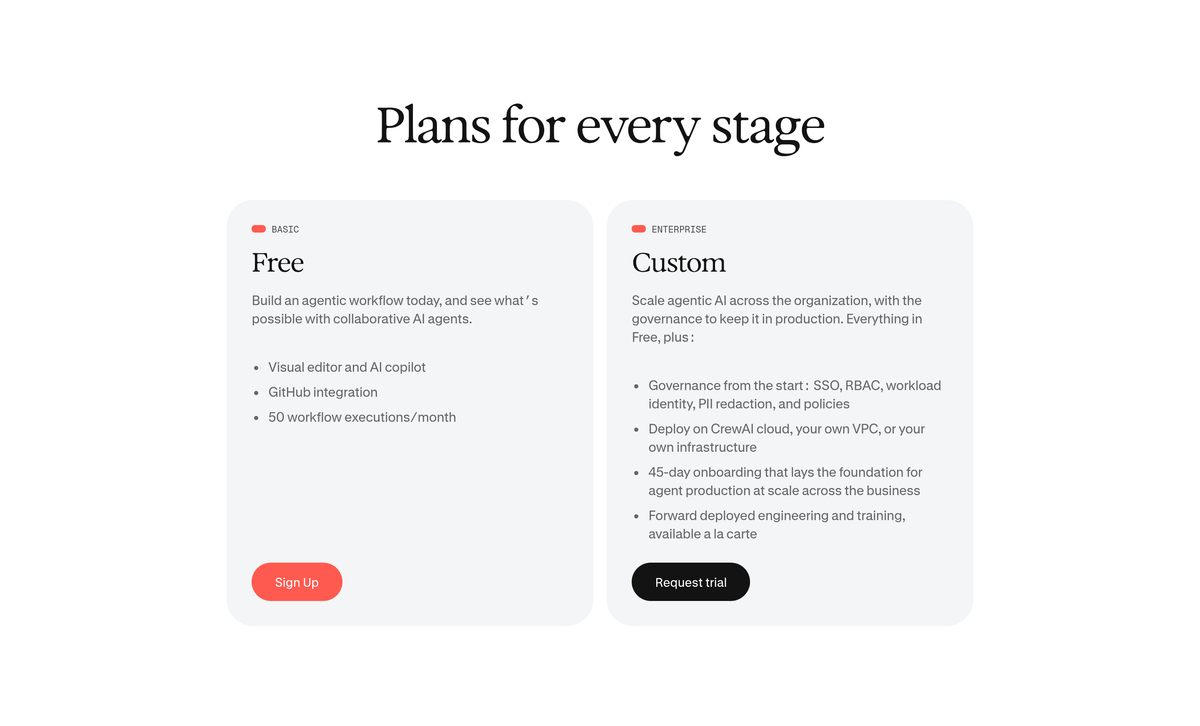
What I like: GitHub sits beside the visual builder, and Enterprise names three deployment paths: CrewAI cloud, a buyer's VPC and the buyer's own infrastructure.
What could be better: Free is capped at 50 workflow executions per month, and no dollar figure is published anywhere on the captured pricing page.
Ideal for: Engineering-led teams that need a path from agent workflow design to a centrally governed runtime across several deployment environments.
Compared to Microsoft Copilot Studio: Microsoft publishes a Microsoft 365 Copilot licence that includes Copilot Studio access for internal agents.
9. Microsoft Copilot Studio
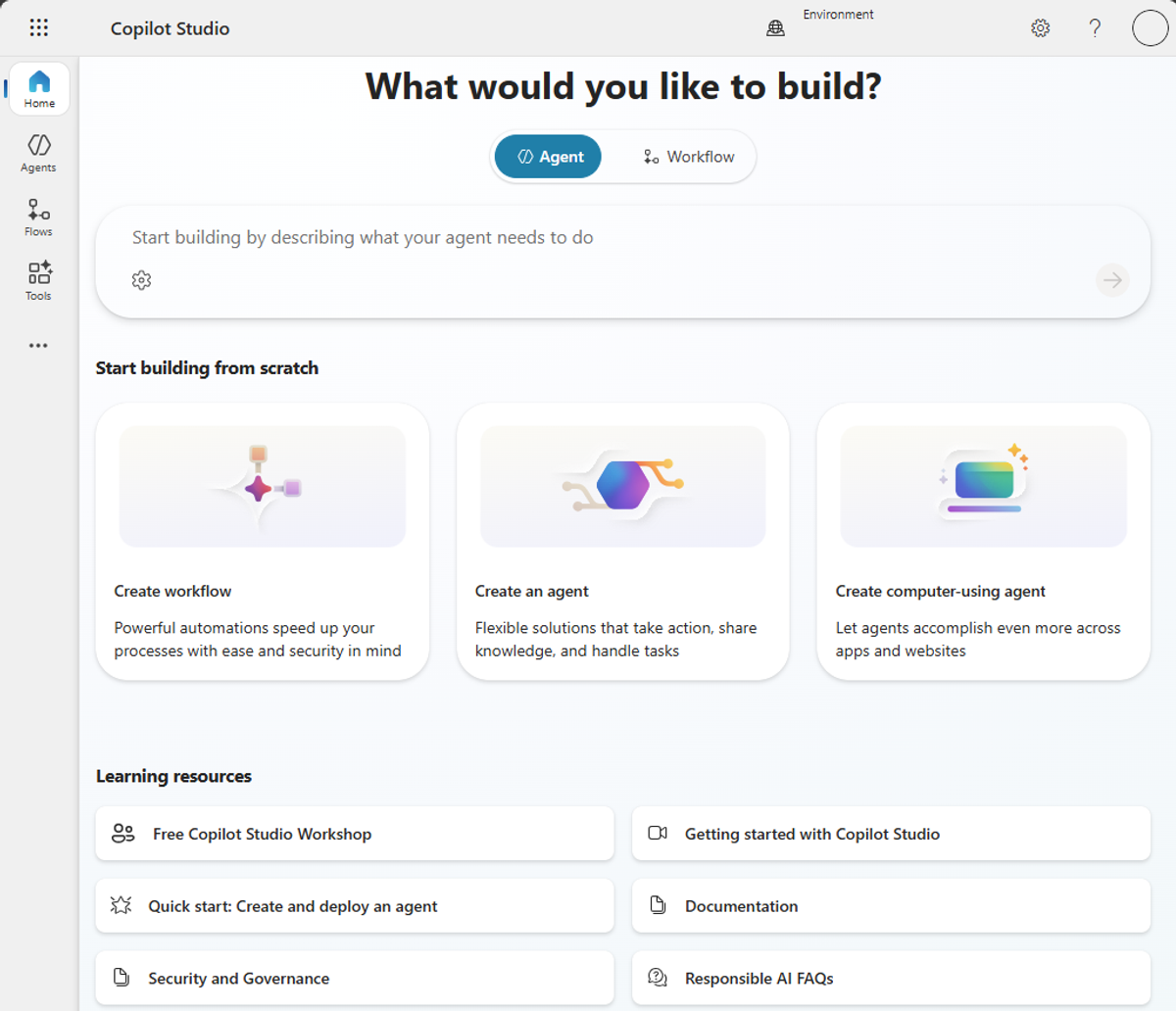
Microsoft Copilot Studio makes the most sense when Microsoft 365 and Azure already run the company. It is Microsoft's platform for building and managing agents, with buying paths tied to Microsoft 365 licensing or a separate credit commitment and Azure billing. The documentation screenshot above starts with cards for a workflow, an agent and a computer-using agent.
Price: $30.00 user/month, paid yearly, is Microsoft 365 Copilot, a different SKU that includes Copilot Studio access for internal agents. The standalone Copilot Studio rate is not published on the captured Microsoft Copilot Studio page. Standalone Copilot Studio has Pre-purchase and Pay-as-you-go options, and neither shows a price. Both require an Azure subscription.
Different SKU!
What I like: For a Microsoft shop, agent building stays beside the users, identity and daily work already sitting in Microsoft 365 and Azure.
What could be better: The captured page publishes no per-credit rate for standalone Copilot Studio, an Azure subscription is required, and the only list price belongs to a different SKU.
Ideal for: Organizations whose users, identity and daily work already sit in Microsoft 365 and Azure.
Compared to Salesforce Agentforce: Salesforce documents agent actions beside CRM objects and customer conversations.
10. Salesforce Agentforce
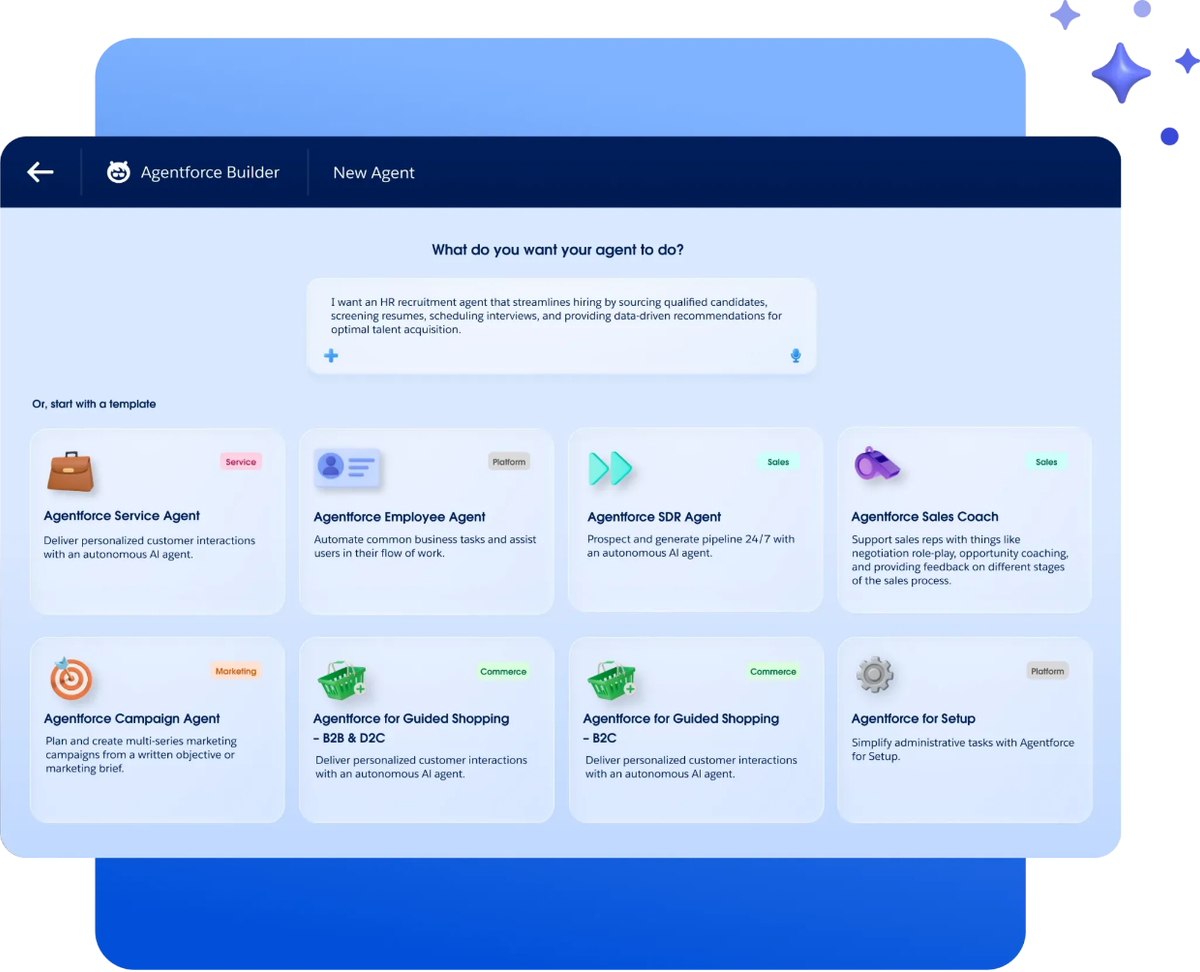
Salesforce Agentforce is the obvious suite-native choice for a Salesforce customer. It puts agents beside Salesforce users, CRM objects and customer conversations. The Builder screenshot above turns an HR recruitment brief into a new agent and offers templates for service, sales and commerce.
Price: The Salesforce Agentforce pricing page publishes seven price points across two tables. Salesforce Foundations is $0. Flex Credits are $500 USD per 100,000 credits. Conversations are $2 USD per conversation, pre-purchase only. Agentforce add-ons are $125 user/month for Sales, Service and Field Service. Agentforce Industries add-ons are $150 user/month. Agentforce 1 Editions: from $550 user/month with 2.5M Flex Credits per org per year. The Agentforce User License is $5 USD/user/month and requires Flex Credits.
Seven price points. Two buying models.
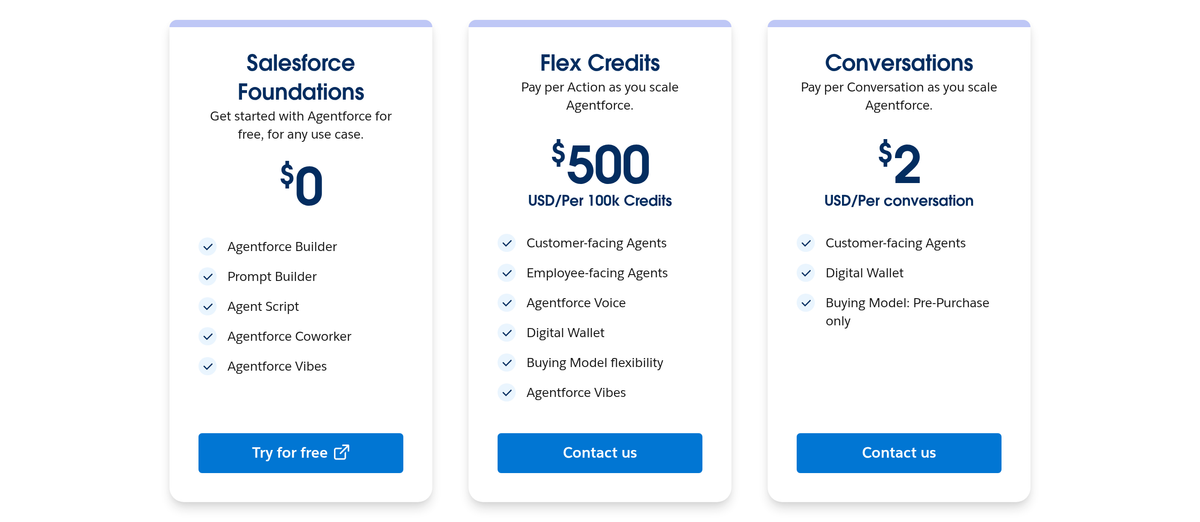
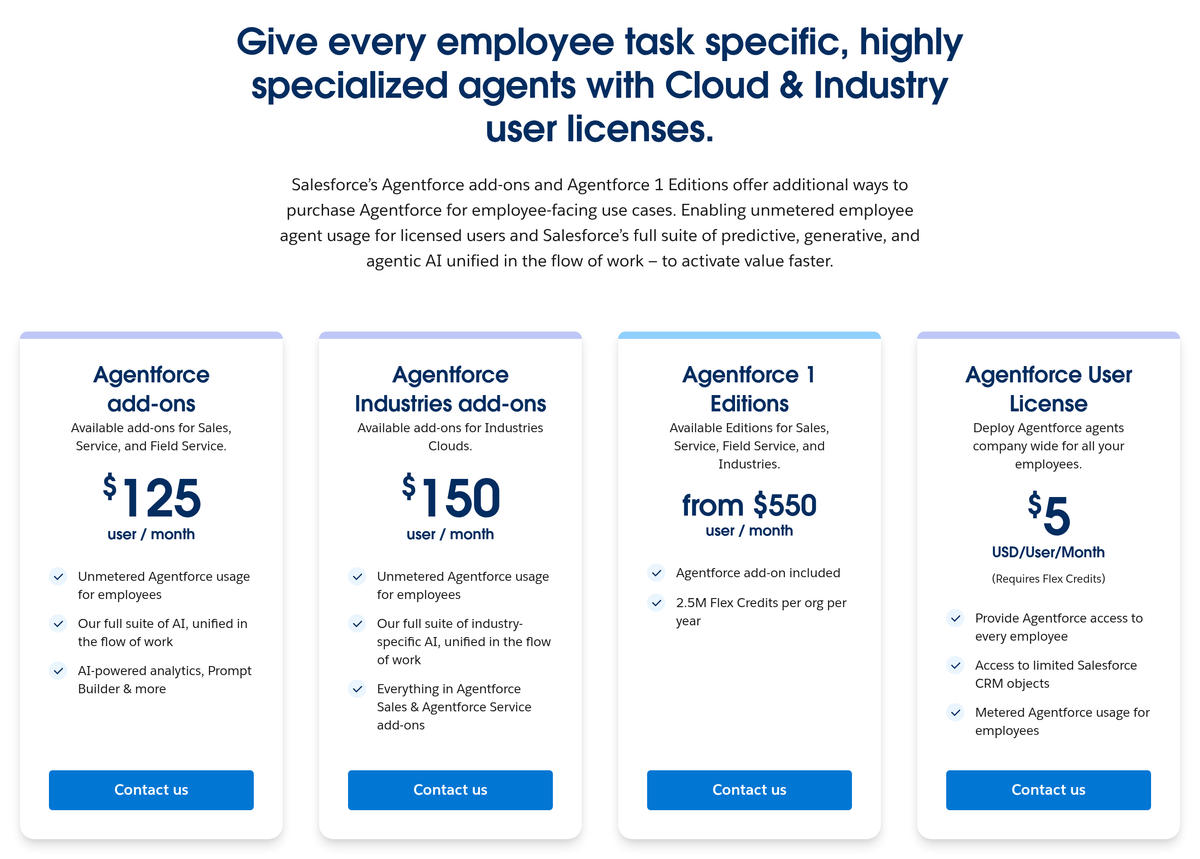
What I like: Salesforce binds every figure to a named SKU or unit, and the two screenshots make the split between consumption pricing and licences easy to see.
What could be better: The page has seven price points across two buying models. Every paid option says Contact us, and Salesforce says the page is provided for information purposes only and is subject to change.
Ideal for: Salesforce customers that want agent actions close to CRM records and can govern usage inside an existing Salesforce buying relationship.
Compared to Relevance AI: Relevance AI publishes unlimited agents, tools, users and projects plus calling and agent evaluations on Enterprise.
11. Relevance AI
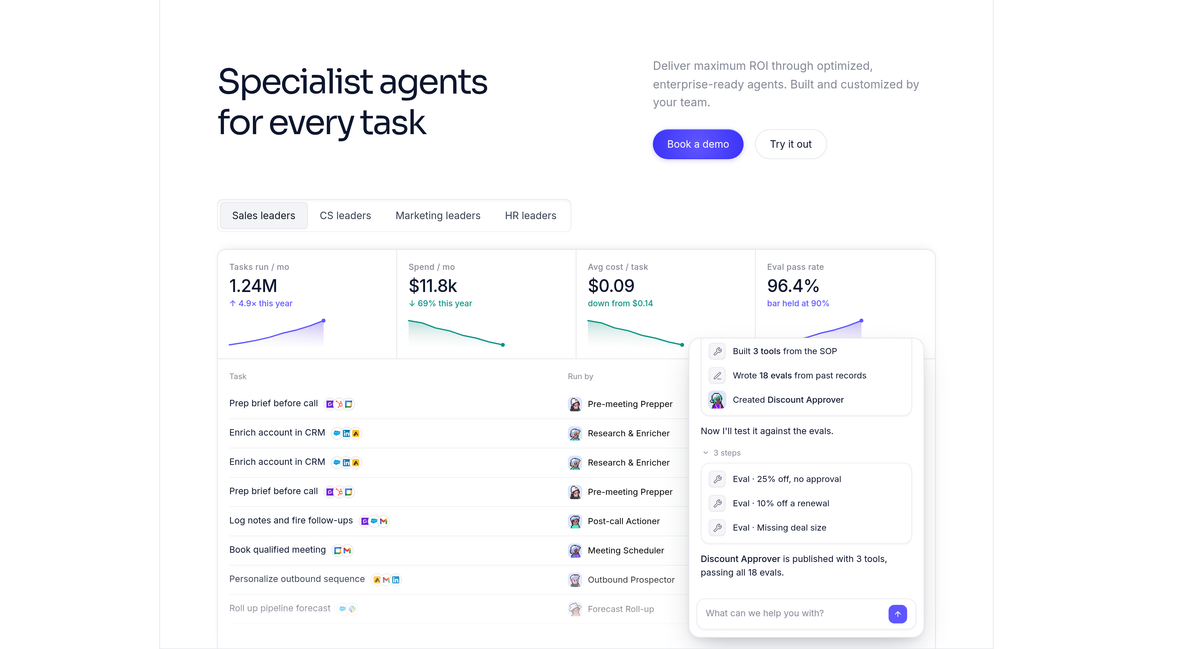
Relevance AI goes straight for the enterprise AI workforce pitch. It calls itself the home of the AI Workforce, and its Enterprise tier includes unlimited agents, tools, users, projects and workforces. The demo above puts task, spend, cost and evaluation tiles beside a discount-approver agent builder.
Price: The Relevance AI pricing page shows one Enterprise tier with a Talk to sales call to action and no published price.
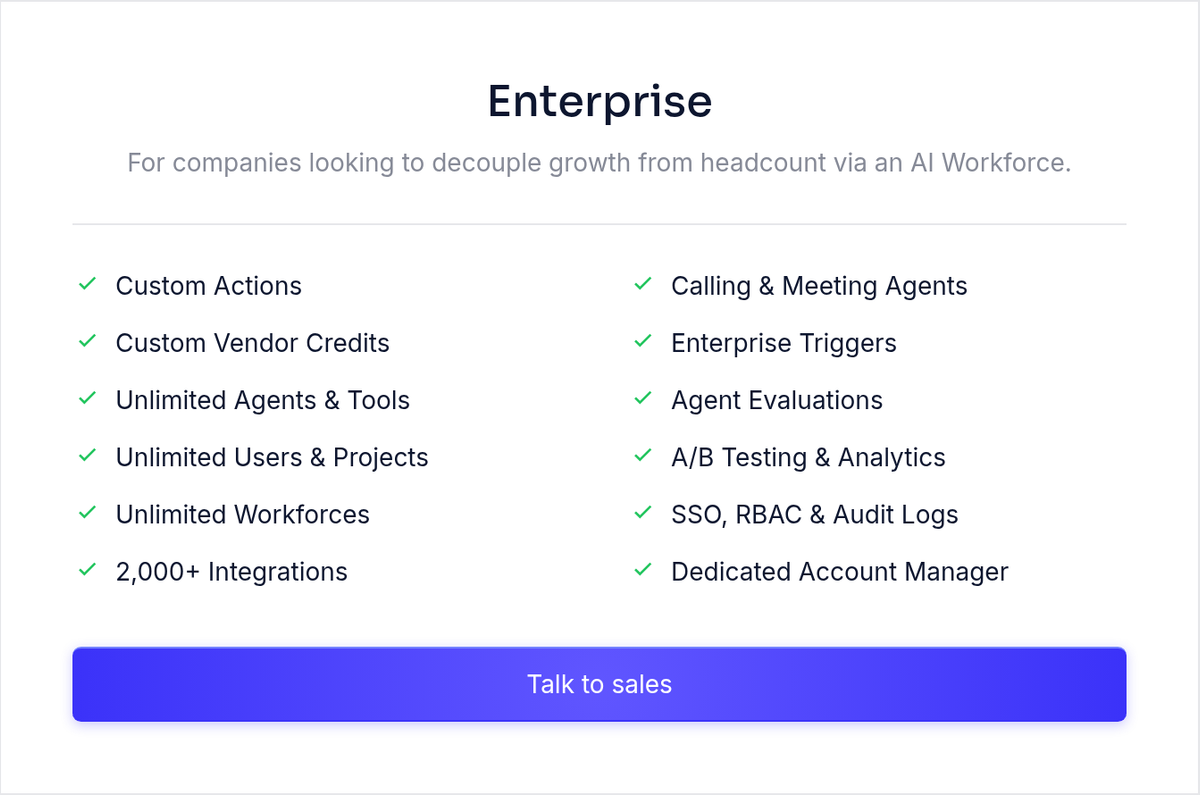
What I like: The page lists 2,000+ integrations, calling and meeting agents, enterprise triggers, agent evaluations, A/B testing, analytics, SSO, RBAC and audit logs. It is a wide feature and governance list in one sales-led package.
What could be better: Relevance AI publishes one Enterprise plan, no price and no self-serve tier, so a buyer cannot size or trial it before a sales process starts.
Ideal for: Companies seeking an enterprise agent platform with workforce management, calling, meetings and governance in one sales-led package.
Compared to CrewAI: CrewAI publishes a Free 50-execution allowance and cloud, VPC or own-infrastructure deployment paths.
Types of AI agent platforms for business
👀 Call them whatever you want. The useful split is product shape, because it tells me where the work happens and who has to build it. But you might think, where does each platform actually land? Here is my split, based on the product described in each linked entry.
- Packaged AI teammates: Cassidy AI puts agents, workflows and a knowledge base in a shared workspace. Lindy concentrates on inbox, calendar and meeting work.
- Computer-using task agents: Tasklet connects services to an isolated cloud terminal, then adds a dedicated browser on paid plans.
- App-connected no-code agents: Zapier Agents adds agent behaviors to Zapier's app connections. Gumloop combines a visual multi-agent canvas, agent chats and shared team access.
- Technical workflow and agent runtimes: n8n bills completed workflows and publishes hosted and self-hosted options. CrewAI combines visual agent design, GitHub and several deployment environments.
- Suite-native agent builders: Microsoft Copilot Studio sits inside Microsoft 365 and Azure buying paths. Salesforce Agentforce sits beside Salesforce users, CRM objects and customer conversations.
- Enterprise AI workforces: Relevance AI publishes one Enterprise plan with unlimited agents, tools, users, projects and workforces.
How billing shape and stack affect the budget
Once I have a pair from the 60-second shortlist, I do two bits of math: headcount and the suite the company already pays for (yes, the boring part). Guess what? The existing stack can settle the tie before the monthly figure does. Keep the shortlist as the source of truth for the candidate pairs and their disqualifiers.
- Seat economics at 25 users: The separate Microsoft 365 Copilot licence costs $30.00 per user each month, paid yearly. For 25 users, that is $9,000 a year. Gumloop's Pro slider starts at $37/month with unlimited seats at its 20k-credit floor. RBAC and SCIM/SAML remain in Gumloop's unpriced Enterprise tier.
- Incumbent-suite billing: Microsoft 365 Copilot is a separate paid-yearly SKU that includes Copilot Studio access. Standalone Copilot Studio publishes no rate and requires Azure. Salesforce's $5 User License requires Flex Credits, and every paid card routes through Contact us. I would use the existing suite as the implementation tie-breaker.
AI agents for sales
Sales demos get convincing very quickly. I start with who approves the outbound message and when the billable unit begins, then use the 60-second shortlist for candidate selection and pricing disqualifiers.
- Lindy documents inbox, scheduling and meeting work. Find Lindy under inbox or calling work in the shortlist.
- CrewAI shows a sales meeting preparation flow tied to CRM, email and documents. That puts CrewAI under technical deployment control, with no published paid dollar rate.
- Salesforce Agentforce documents CRM objects and customer conversations. Salesforce belongs to the existing enterprise suite pair.
- Relevance AI lists calling and meeting agents. I put Relevance beside Lindy under inbox or calling work, with no published price or self-serve tier.
Approval first. Define who approves outbound messages, and when a billable conversation or execution starts and ends.
AI agents for finance
Finance work makes vague permissions expensive. I would keep the candidate selection and pricing disqualifiers in the 60-second shortlist, then inspect the documented functions below.
- Tasklet shows analysis and reconciliation commands in an isolated terminal. For paid workflow work below $50/month, Tasklet is one of the two options.
- n8n bills completed workflows and publishes hosted or self-hosted paths. n8n appears under technical deployment control and shared access in the shortlist; SSO, SAML and LDAP first appear on Business at 667€/mo billed annually.
- Microsoft Copilot Studio connects to Microsoft 365 and Azure buying paths. Copilot Studio belongs to the existing enterprise suite pair; standalone Copilot Studio has no published rate on the captured page.
- Zapier Agents documents app-connected actions and metered activities. Zapier is one of the two options for a team of 3 starting free.
For ledger changes, payment messages or reports, require separate read and write permissions, a preview, named approvers, an audit trail and a retry policy. Ask to see the pause and the completed output.
What we could not verify
Here is the part of my notes where the pages stopped giving useful answers (I wish this section were shorter):
- I did not verify the security or compliance posture of any product here. Establish every governance claim during procurement.
- Cassidy AI's Business tier has no published price in the source material. The same goes for the Enterprise tiers from Zapier Agents, Lindy, Gumloop, n8n, CrewAI and Relevance AI. Standalone Microsoft Copilot Studio also has no rate on the captured product page.
- Zapier's pay-monthly Agents Pro rate and n8n's monthly-billing rates were not selected in our captures.
- Microsoft's Power Platform pricing page at https://www.microsoft.com/en-us/power-platform/pricing/ returned HTTP 403 to our automated capture on 2026-07-30, so I could read no per-Copilot-Credit rate from it. Microsoft's reachable billing and licensing guide describes the credit mechanics without a rate.
- Our automated captures could not read prices from Sintra, agent.ai, Manus or Bardeen, so I publish no figure from those pages.
FAQ
What belongs on a list of AI agents for business?
The category name is doing a lot of work here. I count these ten third-party platforms: Cassidy AI, Zapier Agents, Tasklet, Lindy, Gumloop, n8n, CrewAI, Microsoft Copilot Studio, Salesforce Agentforce and Relevance AI. Start with the billing shape, then read every limitation.
Best AI agents for business
Go to the 60-second shortlist. I kept every pricing disqualifier attached to its candidate on purpose. Match your situation there, then use the six buying questions.
Looking for AI agents examples?
The screenshots give the clearest answer. Tasklet is running terminal work, Lindy is triaging email, n8n is routing employee onboarding and CrewAI is laying out meeting preparation. Those images put the interfaces and demo flows right there on the page.
Custom AI agents for business
Start from the finished artifact. A custom agent makes sense when company-specific systems, permissions or output formats exceed a standard template. CrewAI documents several deployment paths. Microsoft Copilot Studio and Salesforce Agentforce keep the build close to their respective suites. Before you build, define the allowed actions, review step, failure behavior and credential owner too.
What does Agent AI mean?
The names get fuzzy fast. "Agent AI" is a search phrase for the product category covered here, while AI coworker, AI teammate and AI workforce are category labels. The useful part lives in the permission and billing detail for Cassidy AI, Gumloop and the other entries.
What can this guide answer for an AI agents McKinsey search?
If you searched that phrase, you probably want a category map and a way to turn adoption interest into a buying process. Use the platform types to separate product shapes, then put the six buying questions and shortlist to work on billing units, controls, failure handling and workflow fit. This guide cites no McKinsey finding, statistic or report. McKinsey's own publications are the source for its research.
Which AI agent is best for a small team?
For a shared team of up to 3, I would use the free-start row in the 60-second shortlist. Cassidy AI's fourth-seat sales path stays attached there. Price one weekly workflow because each product meters a different unit.
What is the best free AI agent for business?
Start with the free-start row in the 60-second shortlist. I put the team limit and next paid step beside both candidates because free gets expensive when the wrong cap arrives first. Price your real task against those caps before building around either product.
Are AI agents safe with sensitive company data?
Treat every safety claim as a procurement question. Take the six buying questions and the governance criterion into the room, then ask for role controls, audit logs, SSO, retention, credential ownership and an approval record. The Lindy, Gumloop and n8n entries show where some controls first appear in published plans. Verify every control you need in your own procurement process.
Where to start
So which one should you pick?
💸 My verdict:
- Non-technical team already working in Slack: I would pick Patricia because finished work comes back in Slack and a person approves the actions that publish, send or spend.
- Technical team that wants to self-host: n8n is my pick because its completed-execution billing is easy to model and it publishes a self-hosted Business plan.
- Company already living in Microsoft 365 or Salesforce: I would pick Copilot Studio or Agentforce respectively. The existing suite should break the tie.
- Someone who just wants to start free today: I would start with Zapier Agents for its published 400-activity monthly pool and web browsing.
Pick a real workflow you know well, then do this:
- Pick two candidates from the 60-second shortlist.
- Run both through the same real workflow with the same inputs, permissions and approval requirement.
- Record every billable event, the approval step, failure behavior and which required controls cost extra. Compare those records before choosing.
That is it. Same work, same permissions, receipts open.
Sources
- Cassidy AI, homepage: https://www.cassidyai.com/.
- Cassidy AI, pricing: https://www.cassidyai.com/pricing.
- Zapier, Agents product page: https://zapier.com/agents.
- Zapier, Agents pricing tab: https://zapier.com/pricing.
- Tasklet, homepage: https://tasklet.ai/.
- Tasklet, pricing: https://tasklet.ai/pricing.
- Lindy, homepage: https://www.lindy.ai/.
- Lindy, pricing: https://www.lindy.ai/pricing.
- Gumloop, homepage: https://www.gumloop.com/.
- Gumloop, pricing: https://www.gumloop.com/pricing.
- n8n, homepage: https://n8n.io/.
- n8n, pricing: https://n8n.io/pricing/.
- CrewAI, homepage: https://www.crewai.com/.
- CrewAI, pricing: https://www.crewai.com/pricing.
- Microsoft Learn, What is Microsoft Copilot Studio: https://learn.microsoft.com/en-us/microsoft-copilot-studio/fundamentals-what-is-copilot-studio.
- Microsoft, Copilot Studio product and pricing page: https://www.microsoft.com/en-us/microsoft-copilot/microsoft-copilot-studio.
- Microsoft Learn, Copilot Studio billing and licensing: https://learn.microsoft.com/en-us/microsoft-copilot-studio/billing-licensing.
- Microsoft, Power Platform pricing: https://www.microsoft.com/en-us/power-platform/pricing/, returned HTTP 403 to our automated capture on 2026-07-30.
- Salesforce, Agentforce Builder: https://www.salesforce.com/agentforce/agent-builder/.
- Salesforce, Agentforce pricing: https://www.salesforce.com/agentforce/pricing/.
- Relevance AI, homepage: https://relevanceai.com/.
- Relevance AI, pricing: https://relevanceai.com/pricing.
- Patricia, homepage: https://www.patricia.app/.
- Patricia, pricing file: https://www.patricia.app/pricing.md.
- Patricia, published agent skill: https://www.patricia.app/.well-known/agent-skills/patricia/SKILL.md.
- Patricia, security: https://www.patricia.app/security.
- Patricia, GitHub integration: https://www.patricia.app/integrations/github.
- Patricia, Patricia vs Claude Tag comparison: https://www.patricia.app/vs/claude-tag.
Want custom benchmarks for your workload?
We'll run our evaluation pipeline against your production data, for free.
Talk to Founders